


Creating a more advanced property editor
Note: There is an updated version of this blog post for EPiServer 7.5 here.
In this fourth and last blog post in my series on how to extend the user interface in EPiServer 7 we will take a look how we can build a more advanced editorial widget. We will use two of the built in widgets in Dijit that creates a select-like ui component that will present possible alternatives to the editor as they type which will give us the following editor widget:
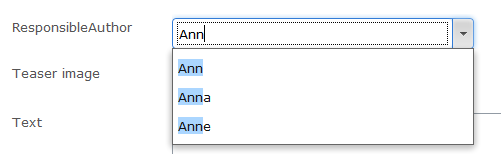
There are two widgets in Dijit that are very similar to each other:
- FilteringSelect forces the user to use one of the suggested values.
- ComboBox lets the user type what she want’s and merely gives suggestions. Perfect for tags for instance.
It’s possible to bind the widgets to either a list of values or to connect it to a store that will search for alternatives as the editor types. We’ll go for the later in this sample.
Implementing the server parts
First, we add a property to our page type and mark it with an UIHint attribute that points to a custom editor identifier.
[ContentType(GUID = "F8D47655-7B50-4319-8646-3369BA9AF05E")]
public class MyPage : SitePageData
{
[UIHint("author")]
public virtual string ResponsibleAuthor { get; set; }
}
Then we add the editor descriptor that is responsible assigning the widget responsible for editing. Since we add the EditorDescriptiorRegistration attribute this means that all strings that are marked with an UIHint of “author” will use this configuration.
using EPiServer.Shell.ObjectEditing.EditorDescriptors;
namespace EPiServer.Templates.Alloy.Business.EditorDescriptors
{
[EditorDescriptorRegistration(TargetType = typeof(string), UIHint = "author")]
public class EditorSelectionEditorDescriptor : EditorDescriptor
{
public EditorSelectionEditorDescriptor()
{
ClientEditingClass = "alloy/editors/AuthorSelection";
}
}
}
Before we head over to the client parts let’s add the store that is responsible for giving the results to the client:
using System;
using System.Collections.Generic;
using System.Linq;
using EPiServer.Shell.Services.Rest;
namespace EPiServer.Templates.Alloy.Rest
{
[RestStore("author")]
public class AuthorStore : RestControllerBase
{
private List<string> _editors = new List<string>{
"Adrian", "Ann", "Anna", "Anne", "Linus", "Per",
"Joel", "Shahram", "Ted", "Patrick", "Erica", "Konstantin", "Abraham", "Tiger"
};
public RestResult Get(string name)
{
IEnumerable<string> matches;
if (String.IsNullOrEmpty(name) || String.Equals(name, "*", StringComparison.OrdinalIgnoreCase))
{
matches = _editors;
}
else
{
//Remove * in the end of name
name = name.Substring(0, name.Length - 1);
matches = _editors.Where(e => e.StartsWith(name, StringComparison.OrdinalIgnoreCase));
}
return Rest(matches
.OrderBy(m => m)
.Take(10)
.Select(m => new {Name = m, Id = m}));
}
}
}
We inherit from the class EPiServer.Shell.Services.Rest.RestControllerBase. Now we can implement the REST-methods that we want. In this case we only implement GET which is used for fetching data but we can also implement POST, PUT and DELETE. EPiServer has also added SORT and MOVE to the list of accepted methods (these are not part of the REST-specification but rather the WebDav specification). To register a service end point for our store we add the attribute RestStore(“author”). We will add some client side logic to resolve the URL for this store.
Implementing the client
Setting up the client side store that works against the server side REST store feels logical to do in a module initializer so let’s make sure that we have a client module initializer registered in our module.config file:
<?xml version="1.0" encoding="utf-8"?>
<module>
<assemblies>
<!-- This adds the Alloy template assembly to the "default module" -->
<add assembly="EPiServer.Templates.Alloy" />
</assemblies>
<dojoModules>
<!-- Add a mapping from alloy to ~/ClientResources/Scripts to the dojo loader configuration -->
<add name="alloy" path="Scripts" />
</dojoModules>
<clientModule initializer="alloy.ModuleInitializer"></clientModule>
</module>
And we add a file named “ModuleInitializer” in the ClientResources/Scripts folder:
define([
// Dojo
"dojo",
"dojo/_base/declare",
//CMS
"epi/_Module",
"epi/dependency",
"epi/routes"
], function (
// Dojo
dojo,
declare,
//CMS
_Module,
dependency,
routes
) {
return declare("alloy.ModuleInitializer", [_Module], {
// summary: Module initializer for the default module.
initialize: function () {
this.inherited(arguments);
var registry = this.resolveDependency("epi.storeregistry");
//Register the store
registry.create("alloy.customquery", this._getRestPath("author"));
},
_getRestPath: function (name) {
return routes.getRestPath({ moduleArea: "app", storeName: name });
}
});
});
In the initializer we call resolveDependency to get the store registry from the client side IOC-container. The store registry has a method to create and register a store that takes an identifier for the store as a string as well as an URL to the store. In our case we resolve the URL to the store with the name of the shell module and the registered name of the store “author”.
Note: In this case we are using the “built in” shell module in the site root which is simply named “App”.
So, lets go ahead and create the actual editor widget:
define([
"dojo/_base/connect",
"dojo/_base/declare",
"dijit/_CssStateMixin",
"dijit/_Widget",
"dijit/_TemplatedMixin",
"dijit/_WidgetsInTemplateMixin",
"dijit/form/FilteringSelect",
"epi/dependency",
"epi/epi",
"epi/shell/widget/_ValueRequiredMixin",
//We are calling the require module class to ensure that the App module has been set up
"epi/RequireModule!App"
],
function (
connect,
declare,
_CssStateMixin,
_Widget,
_TemplatedMixin,
_WidgetsInTemplateMixin,
FilteringSelect,
dependency,
epi,
_ValueRequiredMixin,
appModule
) {
return declare("alloy.editors.AuthorSelection", [_Widget, _TemplatedMixin, _WidgetsInTemplateMixin, _CssStateMixin, _ValueRequiredMixin], {
templateString: "<div class=\"dijitInline\">\
<div data-dojo-attach-point=\"stateNode, tooltipNode\">\
<div data-dojo-attach-point=\"inputWidget\" data-dojo-type=\"dijit.form.FilteringSelect\" style=\"width: 300px\"></div>\
</div>\
</div>",
intermediateChanges: false,
value: null,
store: null,
onChange: function (value) {
// Event that tells EPiServer when the widget's value has changed.
},
postCreate: function () {
// call base implementation
this.inherited(arguments);
// Init textarea and bind event
this.inputWidget.set("intermediateChanges", this.intermediateChanges);
var registry = dependency.resolve("epi.storeregistry");
this.store = this.store || registry.get("alloy.customquery");
this.inputWidget.set("store", this.store);
this.connect(this.inputWidget, "onChange", this._onInputWidgetChanged);
},
isValid: function () {
// summary:
// Check if widget's value is valid.
// tags:
// protected, override
return this.inputWidget.isValid();
},
// Setter for value property
_setValueAttr: function (value) {
this.inputWidget.set("value", value);
this._set("value", value);
},
_setReadOnlyAttr: function (value) {
this._set("readOnly", value);
this.inputWidget.set("readOnly", value);
},
// Event handler for the changed event of the input widget
_onInputWidgetChanged: function (value) {
this._updateValue(value);
},
_updateValue: function (value) {
if (this._started && epi.areEqual(this.value, value)) {
return;
}
this._set("value", value);
this.onChange(value);
}
});
});
In short terms, what the widget does it to set up an dijit.form.FilteringSelect as an inner widget, feed this with a store from the store registry and listen to it’s change event. If we take a closer look to some of the parts of the widget we can see the code needed to connect the store defined in our initialization module to the inner widget:
var registry = dependency.resolve("epi.storeregistry");
this.store = this.store || registry.get("alloy.customquery");
this.inputWidget.set("store", this.store);
Requiring a module
When EPiServer starts a view not all modules and components are loaded. When the view is loaded, before we add a component (or gadget) we make sure that we have started the shell module that it is located in. In EPiServer 7.1 this can be done by calling the "epi/RequireModule" class with your module name, in this example:
"epi/RequireModule!App"
And we are done! When editing a page of the given type we can see how the editor changes suggestions as we type and entering an invalid value gives us an validation error:

Doing a simple search and replace in Author.js from FilteringSelect to ComboBox enables the editor to enter any value she likes:

Summary
This ends the series of how to extend the user interface of EPiServer 7. We have looked how to create components for the UI that can either be plugged in automatically or added by the user. We have created a component using either web forms or dojo/dijit. Using jQuery-style gadgets ala EPiServer 6 still works pretty much the same way with the difference that these also works in the EPiServer 7 CMS edit view.
We have also looked how you can add attributes to your models to control both presentation and editing. We have looked into creating an editor using Dojo/Dijit. There are a few examples of the in the new Alloy template package and there is more information about how to extend the user interface in the User Interface section of the EPiServer Framework SDK: http://sdkbeta.episerver.com/Developers-guide/Framework/?id=3511&epslanguage=en.
Extending the User Interface of EPiServer 7
Plugging in a Dojo based component
Creating a content search component
Creating a more advanced property editor

Comments