


Auto suggest editor in EPiServer 7.5
Update: This functionality is now built in. Read more about it here.
This is an updated version of the editor that was done in a blog post around the release of EPiServer 7 about a year ago that has been simplified quite a lot (the original blog post can be found here). The goal of this blog post is to add an editor that can be used to select values for a property that is feed from a store using Web API 2.0. The result looks something like this:
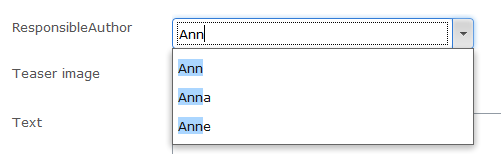
As with the previos blog post the usage is to add a UI hint to a property:
public class MyPage : SitePageData
{
[UIHint("author")]
public virtual string ResponsibleAuthor { get; set; }
}
Then we add an editor descriptor that is responsible for defining the widget used for editing as well as sending the store URL to the widget:
using System;
using System.Collections.Generic;
using System.Web;
using EPiServer.Shell.ObjectEditing.EditorDescriptors;
namespace EPiServer.Templates.Alloy.Business.EditorDescriptors
{
[EditorDescriptorRegistration(TargetType = typeof(string), UIHint = "author")]
public class EditorSelectionEditorDescriptor : EditorDescriptor
{
public EditorSelectionEditorDescriptor()
{
ClientEditingClass = "alloy/editors/AutoSuggestEditor";
}
public override void ModifyMetadata(Shell.ObjectEditing.ExtendedMetadata metadata, IEnumerable<Attribute> attributes)
{
base.ModifyMetadata(metadata, attributes);
metadata.EditorConfiguration["storeurl"] = VirtualPathUtility.ToAbsolute("~/api/authors/");
}
}
}
Creating the service
I base the server side logic that is responsible to feed the widget suggestions on Web API 2.0 and attribute routing. I followed the following guide to set up the attribute routing (http://www.asp.net/web-api/overview/web-api-routing-and-actions/attribute-routing-in-web-api-2). Please note that if you are running an existing project you need to add a call the config.MapHttpAttributeRoutes() method in the application start up as suggested in the guide to get attribute mappings to work.
using System;
using System.Collections.Generic;
using System.Linq;
using System.Web.Http;
namespace EPiServer.Templates.Alloy.UIExtensions.Rest
{
[RoutePrefix("api/authors")]
public class AuthorWebStoreController : ApiController
{
private List<string> _editors = new List<string>{
"Adrian", "Ann", "Anna", "Anne", "Linus", "Per",
"Joel", "Shahram", "Ted", "Patrick", "Erica", "Konstantin", "Abraham", "Tiger"
};
[Route]
public IEnumerable<AuthorSearchResult> GetAuthors(string name)
{
//Remove * in the end of name
if (name.EndsWith("*"))
{
name = name.Substring(0, name.Length - 1);
}
return QueryNames(name);
}
[Route("{name}")]
public AuthorSearchResult GetAuthorByName(string name)
{
string author = _editors.FirstOrDefault(e => e.StartsWith(name, StringComparison.OrdinalIgnoreCase));
return String.IsNullOrEmpty(author) ? null : new AuthorSearchResult { name = author, id = author };
}
private IEnumerable<AuthorSearchResult> QueryNames(string name)
{
IEnumerable<string> matches;
if (String.IsNullOrEmpty(name) || String.Equals(name, "*", StringComparison.OrdinalIgnoreCase))
{
matches = _editors;
}
else
{
matches = _editors.Where(e => e.StartsWith(name, StringComparison.OrdinalIgnoreCase));
}
return matches
.OrderBy(m => m)
.Take(10)
.Select(m => new AuthorSearchResult { name = m, id = m });
}
}
public class AuthorSearchResult
{
public string name { get; set; }
public string id { get; set; }
}
}
Note(1) that the route prefix matches the URL sent to the editing widget.
Note(2) that the casing for the properties of the result class is using lower case. This is since the default json contract resolver in .NET web API uses a standard contract resolver instead of the camel case contract resolver that was used in the EPiServer Rest stores. This can of course be changed for the entire application but that’s not part of this blog post.
The editing widget
The editing widget has been greatly simplified, using inherritance instead of composition which in this case reduces complixity. (given that you have set up a script module, you can add the content below in a file placed under “ClientResources/Scripts/Editors/AutoSuggestEditor.js”)
define([
"dojo/_base/declare",
"dojo/store/JsonRest",
"dijit/form/FilteringSelect"
],
function (
declare,
JsonRest,
FilteringSelect
) {
return declare([FilteringSelect], {
postMixInProperties: function () {
var store = new JsonRest(dojo.mixin({
target: this.storeurl
}));
this.set("store", store);
// call base implementation
this.inherited(arguments);
}
});
});
Note that since the store is feed to the widget, the same widget can be used against different service APIs.
Required field and validation bug
When testing this i noticed that there seems to be a bug in the filteringselect widget when the widget has focus and is cleared. If the value is required then the validation will not be shown to the user if the search result is open. The second time the field is left (with an empty valur) the validation appears.

Comments