
EPiImage 2.0 Released
EPiImage has almost been rewritten from scratch and is released today as 2.0. It now uses EPiServer.ImageLibrary for better performance, supports multiple galleries on a page, plays nice with CMS 6 R2, has language file support and much more.
What is EPiImage?
EPiImage is an award winning, free module that provides image scaling functionality, as well as two new property types: EPiImage Property that extends “URL to image” with a preview, and EPiImageGallery Property that provides a editor friendly way to add pictures to a gallery including drag and drop sorting, drag and drop adding of images from the file action menu (including whole folders), description texts, links etc.
What is new in EPiImage 2.0?
One of the killer features of EPiImage is the ability to drag and drop image files from the file management action window and straight into the gallery. You can even drag whole folders of images! In version 2.0 the loading of dragged and dropped images is much better and it now shows a loading indicator.
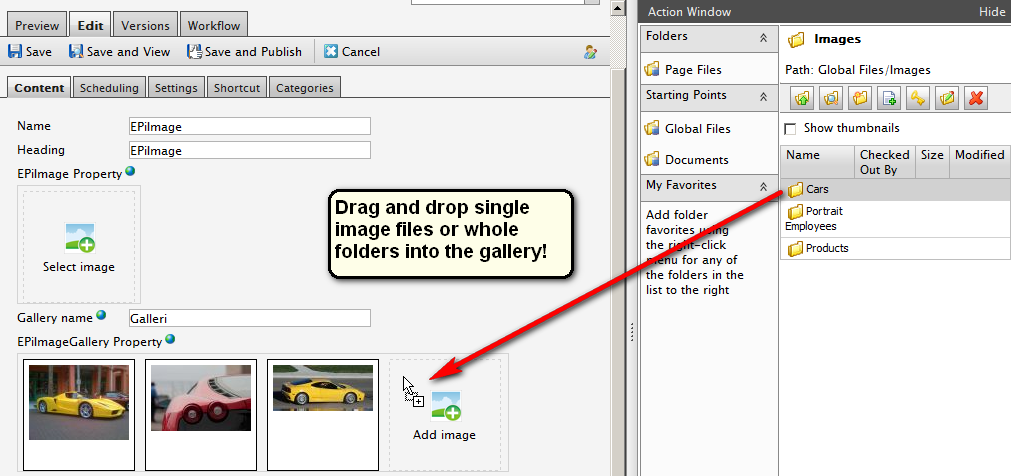
You can of course also use drag and drop sort the images into the order you want after loading.

Each image in a gallery can now have a link in addition to a text description. This means that the property can be used for much more than a simple image gallery. One thing we have used it for is to add internal campaign banners to a site and add image menu buttons to a front page.

We have also added prev/next links to the preview to quickly add image descriptions and links to a series of images.
New User Control: EPiImageGallery Grid
EPiImageGallery Grid is another sample user control that shows you how you can render an EPiImagegallery Property. It simply displays all the images in a grid on a single page. Descriptions and download links are optional. Clicking on a thumbnail either takes you to the original image or to the link specified for each image in edit mode.

What’s new in EPiImage 2.0: the complete list:
- Faster scaling of images by using EPiServer.ImageLibrary
- Images in a gallery can now contain both a description and a link
- Multiple EPiImageGalleryProperties is now allowed on the same page
- New user control: EPiImageGalleryGrid
- You get a warning if you try to delete an image that is in use
- Lang file support (EN/NO/SV included)
- Moved optional configuration to web.config
- Scales PNG to PNG, GIF to GIF and the rest to JPEG
- Prev/Next buttons when previewing images in a gallery
- 60% of the codebase rewritten from scratch for better performance and cleaner code
- Smoother loading when dragging and dropping a folder
- Multiple bug fixes
- No longer supports CMS 5 R2, 2.0 is CMS 6 and CMS 6 R2 only.
- Demo templates only for CMS 6 R2 Alloy
- New storage format, but is backwards compatible with EPiImage 1.5.
More information and download
Visit the EPiCode page for EPiImage for more information and to download the module.
Share your feedback in the comments or on Twitter: @ahaneng

Comments