
EPiFastUpload: Cross browser drag and drop file upload in EPiServer CMS 6
A cross browser solution to uploading multiple files has been high on my wish list for many years now. And now I can finally present the solution (although as an early beta).
The problem
The problem with the built in multiple file upload in EPiServer is that in only works in Internet Explorer. Oh and it has to be 32-bit… and you need to install an Active X control… Argh…
Plupload to the rescue!
The people who made TinyMCE (the WYSWIG editor in EPiServer CMS) has also made a great open source tool called Plupload. It uses all kinds of fancy tricks (HTML5, Flash, Google Gears etc.) to provide multiple file upload in all kinds of browsers.
A long story short
To make a long story short it all started with Ruwen Jin who created Aurumio.EPiServer.Integration.PlupLoad, an EPiServer module that integrated Plupload. Sadly it was poorly documented and had a few problems (especially with chunked uploads). Sveinung Myrlid at EPiServer Norway took the best parts of the module and made Plupload work with EPiServer Relate. We happened to meet at lunch one day and we started discussing how cool it would be to get this working 100% in EPiServer CMS. My colleague Sigve Fast and I got some code and some important pointers from Sveinung, and soon we had a PoC. After a bit of clean up and refactoring we ended up with EPiFastUpload!
What does it do?
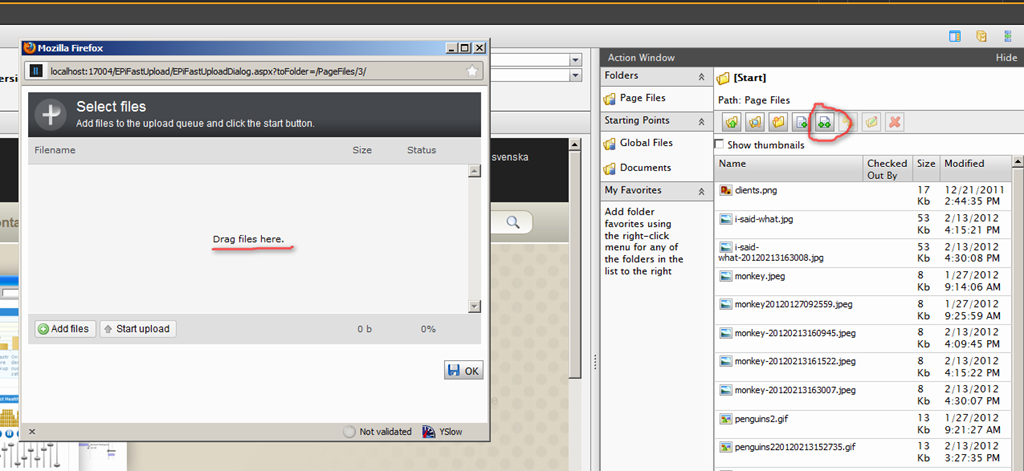
When you install the module you will get an extra button next to the normal “file upload” button:

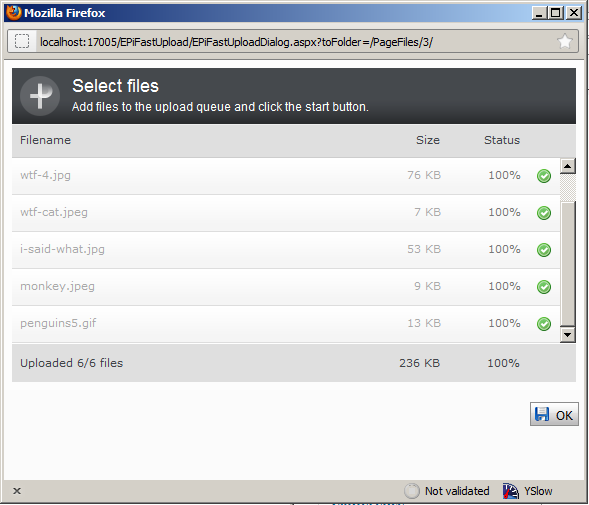
When you click the new upload button a dialog box opens. Here you can drag and drop files from your computer and click the “Start Upload” button. After the upload has finished click the OK button and the File Manager file list is refreshed showing you the new files.
Update:
EPiFastUpload is now stable and in version 1.0.
Download
You can download the latest version from the EPiCode page or from EPiServer Nuget
Posted by Alexander Haneng

Comments