
Limiting a Page Property to a specific Page Type in EPiServer 7
In EPiServer 7 you can limit what page types can be selected in a page or link collection property using validation attributes.
Intro
One of the big problems with EPiServer sites that have lived a while is when some clever editor decides to change a page property. It just so happens that this specific page property is used to get a page of a specific page type that contains some important properties that are used for settings/header/footer/search page etc. For example a page property on the start page that links to a settings page gets changed to an article page. This might result in the whole site crashing. Arghhh…
Limiting page types for a page property
In EPiServer 7 we get to create our own validation attributes, so why not create a validation attribute that prevents the user from selecting the wrong page type?
I have created such an validation attribute. Simply add this class to your project and you can start using it. You can find the source code at the end of this article
Using the [LimitPageType] attribute to limit a page property to a specific page type
Lets say we have a settings page in our solution and we have a page property that points to the search page for our site. We want to ensure that only a page of the page type “SearchPage” can be selected.
[LimitPageType(typeof(SearchPage),
ErrorMessage = "Page '{2}' is not of page type '{1}'! " +
"(It is of the type '{3}')")]
[Display(
Name = "Search page",
Description = "",
GroupName = SystemTabNames.Content,
Order = 1)]
public virtual PageReference SearchPage { get; set; }
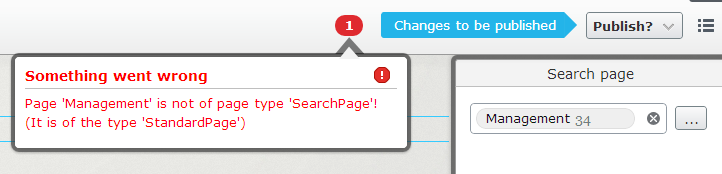
If we try to select the page “Management” of type “StandardPage” we will get the following error:
Using inheritance
You can also use inheritance, so if you limit the page property to “StandardPage” you can select a page of the type of “StandardPage” or any page inherited from “StandardPage” like “NewsPage” and “ProductPage”.
[LimitPageType(typeof(StandardPage),
ErrorMessage = "Page '{2}' is not of page type '{1}'! " +
"(It is of the type '{3}')")]
[Display(
Name = "About us page",
Description = "",
GroupName = SystemTabNames.Content,
Order = 2)]
public virtual PageReference AboutUsPage { get; set; }
Using the [LimitPageType] attribute to limit a page property to an interface
You are not limited to page types, you can also specify an interface to only allow page types that implements a specific interface to be selectable. This ensures that the properties defined in the interface will be included in the selected page.
[LimitPageType(typeof(ISearchable),
ErrorMessage = "Page '{2}' is not of type '{1}'!")]
[Display(
Name = "Searchable page page",
Description = "",
GroupName = SystemTabNames.Content,
Order = 3)]
public virtual PageReference SearchablePage { get; set; }
Using the [LimitPageType] attribute to limit a Link Item Collection property to only contain pages of a specific page type
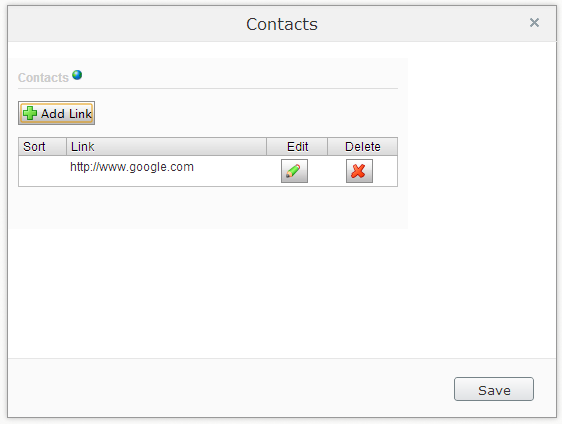
The validation attribute also works on the LinkItemCollection property and it checks that all the items are EPiServer pages of the correct page type. In this example we only want to have a list of contact pages of the type “Contactpage”.
[LimitPageType(typeof(ContactPage),
ErrorMessage = "Link '{2}' is not a page of type '{1}'!")]
[Display(
Name = "Contacts",
Description = "",
GroupName = SystemTabNames.Content,
Order = 4)]
public virtual LinkItemCollection Contacts { get; set; }

Summing up
The built in validation attributes like StringLength, Range and RegularExpression are really powerful in validating the input from editors, especially when you need to use it for something more than just displaying the value. This power can be further extended with custom validation attributes like the one in this blog post. I am sure more validators will be released by the community as EPiServer 7 matures.
Source code: LimitPageType.cs
For the examples in the blog post to work you need to create an empty class in your project and copy and paste the code below inside.
using System;
using System.Collections.Generic;
using System.Globalization;
using System.ComponentModel.DataAnnotations;
using EPiServer.Core;
using EPiServer.SpecializedProperties;
using EPiServer.Web;
namespace EPiServer.Templates.Alloy.Validation
{
/// <summary>
/// LimitPageType Validation Attribute
/// Add the attribute [LimitPageType(typeof(StandardPage))] to a EPiServer
/// PageReference property to limit what pages can be selected to the
/// chosen page type. Can also be used for inherited page types and
/// interfaces.
/// </summary>
[AttributeUsage(AttributeTargets.Property | AttributeTargets.Field,
AllowMultiple = false)]
public sealed class LimitPageType : ValidationAttribute
{
private readonly Type _pageType;
private string _errorMsg = string.Empty;
public Type PageType { get { return _pageType; } }
public LimitPageType(Type PageType)
{
_pageType = PageType;
}
public override bool IsValid(object value)
{
// Check if page reference is a reference to a page of
// the right page type
PageReference pageRef = value as PageReference;
if (pageRef != null)
{
PageData page = DataFactory.Instance.GetPage(pageRef);
_errorMsg = page.PageTypeName;
if (!this.PageType.IsInstanceOfType(page))
return false;
}
else if (value as LinkItemCollection != null)
{
//Loop through and check if it is a link to an EPiServer page.
//If it is add it to pages.
LinkItemCollection linkItems = value as LinkItemCollection;
List<PageData> pages = new List<PageData>();
foreach (LinkItem linkItem in linkItems)
{
string linkUrl;
if (!PermanentLinkMapStore.TryToMapped(linkItem.Href,
out linkUrl))
{
_errorMsg = linkItem.Text;
return false;
}
if (string.IsNullOrEmpty(linkUrl))
{
_errorMsg = linkItem.Text;
return false;
}
PageReference pageReference = PageReference.ParseUrl(linkUrl);
if (PageReference.IsNullOrEmpty(pageReference))
{
_errorMsg = linkItem.Text;
return false;
}
pages.Add(DataFactory.Instance.GetPage((pageReference)));
}
if (pages.Count > 0)
{
foreach (PageData page in pages)
{
if (!this.PageType.IsInstanceOfType(page))
{
_errorMsg = page.PageName;
return false;
}
}
}
return true;
}
return true;
}
public override string FormatErrorMessage(string name)
{
return String.Format(CultureInfo.CurrentCulture,
ErrorMessageString, name, this.PageType.Name, _errorMsg);
}
}
}

Comments