
A critical vulnerability was discovered in React Server Components (Next.js). Our systems remain protected but we advise to update packages to newest version. Learn More

Allan Thraen
May 18, 2011
  3989
(0 votes)

NHunSpellchecker for EPiServer CMS - Now on NuGet

Back in August of 2010 Ruwen Jin did a pretty cool implementation of NHunSpellchecker for TinyMCE in EPiServer CMS. Because he needed some framework changes in the CMS to finish it, it never made it online. However with EPiServer CMS 6 R2 those changes are in place and I took the liberty of finishing his project and wrap it in a NuGet package for our EPiServer NuGet feed. If you are new to NuGet, you can learn more here.

You can install it directly from the EPiServer NuGet Feed or download the source here if you are interested. Note that NHunSpellChecker, HunSpellChecker and the individual language packs which this project is dependent on each come with their own  open source licenses.

After you install it from the EPiServer NuGet feed into your web project, you need to create a custom setting for the spell-checker to be enabled on your XHTML fields. You do this by:

  1. Go to Admin mode
  2. Select the “Page Type” tab
  3. Click on “Edit Custom Property Types”
  4. Select XHTML String (in the bottom)
  5. Add a new setting. Give the setting a name and move the Spellcheck button from the “Miscellaneous” area to the place in the toolbar where you want it. Save the setting.
  6. Set it as Default.

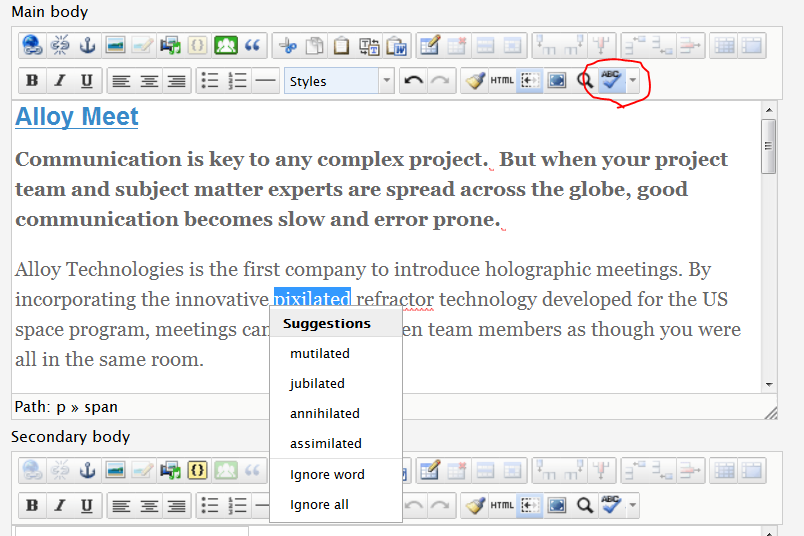
You should now be ready to go! If you click the spellcheck button on any of the text fields in the editor it will highlight spelling mistakes and you can then select them to list suggestions.
image


The spell checker uses open source dictionaries from Open Office. Find more here. To install them, make sure that the language is enabled in EPiServer CMS, copy the .aff and .dic files to a folder with the language ID under modules\NHunSpellChecker.

Enjoy!

May 18, 2011

Comments

Please login to comment.
Latest blogs
A day in the life of an Optimizely OMVP: Learning Optimizely Just Got Easier: Introducing the Optimizely Learning Centre

On the back of my last post about the Opti Graph Learning Centre, I am now happy to announce a revamped interactive learning platform that makes...

Graham Carr | Jan 31, 2026

Scheduled job for deleting content types and all related content

In my previous blog post which was about getting an overview of your sites content https://world.optimizely.com/blogs/Per-Nergard/Dates/2026/1/sche...

Per Nergård (MVP) | Jan 30, 2026

Working With Applications in Optimizely CMS 13

💡 Note:  The following content has been written based on Optimizely CMS 13 Preview 2 and may not accurately reflect the final release version. As...

Mark Stott | Jan 30, 2026

Experimentation at Speed Using Optimizely Opal and Web Experimentation

If you are working in experimentation, you will know that speed matters. The quicker you can go from idea to implementation, the faster you can...

Minesh Shah (Netcel) | Jan 30, 2026

How to run Optimizely CMS on VS Code Dev Containers

VS Code Dev Containers is an extension that allows you to use a Docker container as a full-featured development environment. Instead of installing...

Daniel Halse | Jan 30, 2026

A day in the life of an Optimizely OMVP: Introducing Optimizely Graph Learning Centre Beta: Master GraphQL for Content Delivery

GraphQL is transforming how developers query and deliver content from Optimizely CMS. But let's be honest—there's a learning curve. Between...

Graham Carr | Jan 30, 2026