


Summer of Code: CategoryProvider – Alternate navigation
Here’s a little Friday goodie, in the end of the summer (although the weather outside leads me to believe that summer is already over). It’s not uncommon to want to use an alternate navigation method to access your content – like for instance using the built-in categories and list pages on your web site based on a taxonomy, rather than the usual tree-structure. Or what about quickly inserting a page-listing on your front page that shows everything tagged with a certain tag? As with everything else with EPiServer CMS it’s easy to do – and there are a couple of different approaches to do it. Being geeky as usual I decided to try to accomplish a rather elegant approach to this – that’s easily installable and will work anywhere. I’ve made an automatically attaching page-provider that will turn your categories (and pages tagged with them) into an alternate navigation tree living parallel to your regular tree.
Inspired by a few of my own old posts (mostly http://labs.episerver.com/en/Blogs/Allan/Dates/2010/1/Attaching-a-Page-Provider-programmatically/), I put this together in a few hours today.
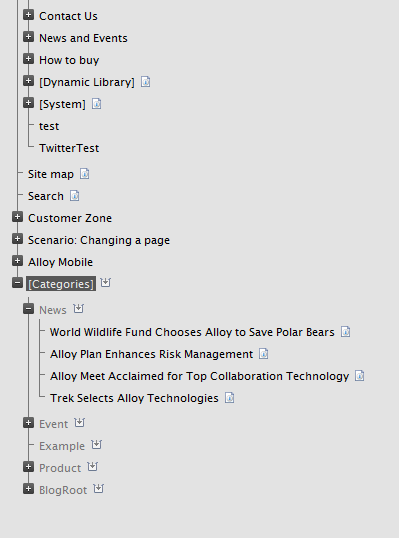
This plugin requires EPiServer CMS 6 R2 Enterprise. All you need to do is download the assembly and put it in your ‘bin’ folder (unblocked, of course). Then you’ll notice a new structure under your root page, identical to your categories. By default it uses a pagetype that does not have a rendering, but it’s easy to set it to use another page type in the plugin-settings of this plugin. Beneath each category you’ll see the pages/content-items that are tagged in that category. Notice that it is the actual pages you are seeing – and if you select them it’s the same page as exist somewhere else in your structure!
If you change the category assignment on any page, it’ll instantly update the tree. I find this to be particularly useful as a source of listings – like putting a listing on your front page that lists all “News” items – wherever they reside on your site.
Download the binary here and the full source here. If you find this useful, drop a comment and I’ll be happy to put it on NuGet and Codeplex.

Comments