
A critical vulnerability was discovered in React Server Components (Next.js). Our systems remain protected but we advise to update packages to newest version. Learn More

Allan Thraen
Mar 8, 2012
  5464
(0 votes)

QRCodes for your EPiServer CMS pages

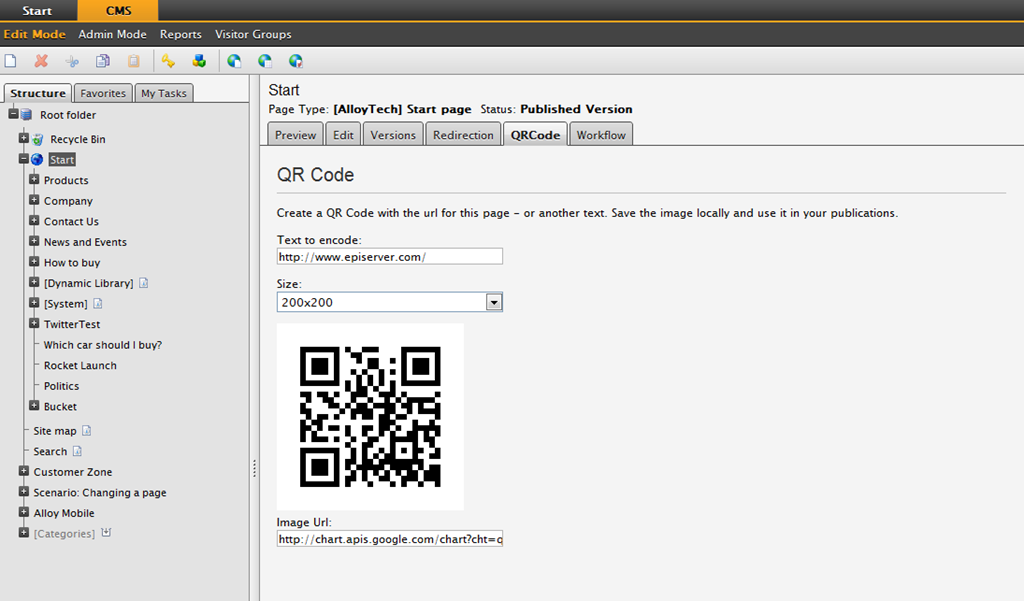
After a month of parental leave (following the release of AllansSon R2 in january) I’m finally getting to the bottom of the huge pile of emails that was waiting for me when I came back – and thought I’d celebrate it with this quick blog-post. While on parental leave I found a few moments in between diaper-changing to put together this little edit-mode plugin that will produce QR Codes.
image

As I’m sure all of you know, QR Codes are 2D bar-codes that can hold up to 4,296 alphanumeric characters and can be read with many different devices. A popular use is to store URL’s in them, put them on printed material, so people can just scan them with their cell-phone and then open a URL in the mobile browser.

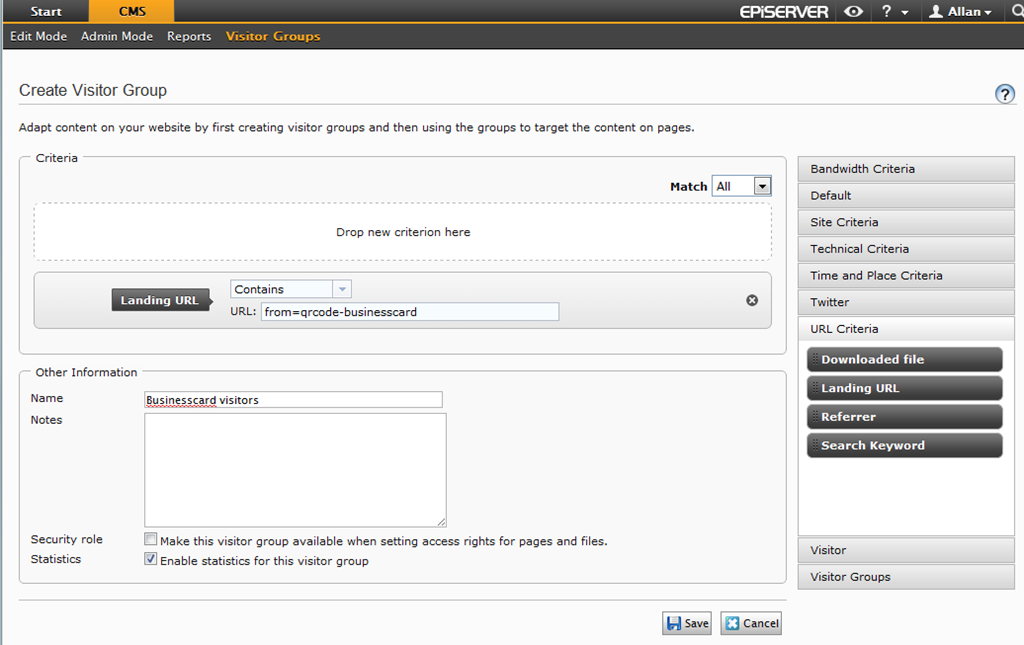
To make it easier to do this, I used the free Google Chart API that supports QR codes and plugged it in. By default, when you open the QRCode tab, it will suggest the public url to the current page as the text to encode. But you are free to change this of course. It can be any URL or textual message. A typical usage might be to include a query-parameter in the URL like “?from=qrcode-businesscard” so you can later personalize content to the visitors that arrive at your site from the QRCode like this:
image

Once you have generated the QRCode, you can just copy the image and use it wherever you want.


The project is still pretty rough – hardcoded texts, and so on. If there’s interest I can put it on codeplex and we can turn it completely opensource.

Until then, I’ll include full source here for download – and I’ll put a package on our nuget feed soon.

Mar 08, 2012

Comments

Please login to comment.
Latest blogs
A day in the life of an Optimizely OMVP: Learning Optimizely Just Got Easier: Introducing the Optimizely Learning Centre

On the back of my last post about the Opti Graph Learning Centre, I am now happy to announce a revamped interactive learning platform that makes...

Graham Carr | Jan 31, 2026

Scheduled job for deleting content types and all related content

In my previous blog post which was about getting an overview of your sites content https://world.optimizely.com/blogs/Per-Nergard/Dates/2026/1/sche...

Per Nergård (MVP) | Jan 30, 2026

Working With Applications in Optimizely CMS 13

💡 Note:  The following content has been written based on Optimizely CMS 13 Preview 2 and may not accurately reflect the final release version. As...

Mark Stott | Jan 30, 2026

Experimentation at Speed Using Optimizely Opal and Web Experimentation

If you are working in experimentation, you will know that speed matters. The quicker you can go from idea to implementation, the faster you can...

Minesh Shah (Netcel) | Jan 30, 2026

How to run Optimizely CMS on VS Code Dev Containers

VS Code Dev Containers is an extension that allows you to use a Docker container as a full-featured development environment. Instead of installing...

Daniel Halse | Jan 30, 2026

A day in the life of an Optimizely OMVP: Introducing Optimizely Graph Learning Centre Beta: Master GraphQL for Content Delivery

GraphQL is transforming how developers query and deliver content from Optimizely CMS. But let's be honest—there's a learning curve. Between...

Graham Carr | Jan 30, 2026