
How to create virtual page types
Often I come over some sites where there are many page types. Personally I don’t like it, but one of the reason all these types exists is that one want to set some default values on them. Sometime they also want to change the sequence the properties are listed in edit mode. All of this is fair game.
But one problem I have is that my editors want to create these page types and set the default values. If you use page type builder (as I do thank you Joel) that can be problematic.
The solution to this is to create virtual page types. These page types is not real ones, but only a set of default values for the type.
I first created myself a admin tool that looks something like this
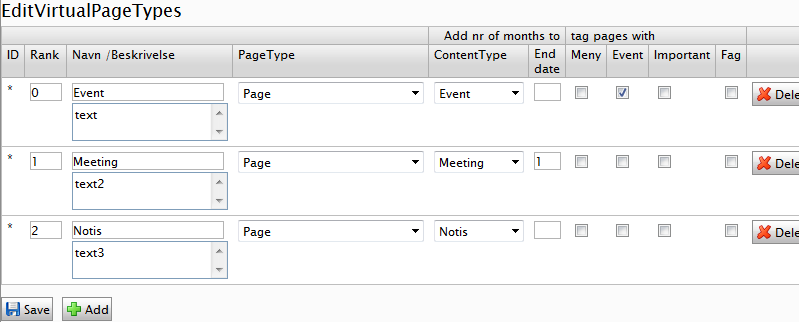
where ContentType and other stuff is default values I have one some page types. What these elements can be will change from project to project. But have hardcoded them in since I don’t want to give my administrators to much options to work with  .
.
I save those row data inside a DSS
- [EPiServerDataStore(AutomaticallyRemapStore = true, AutomaticallyCreateStore = true)]
- public class VirtuelPageTypeData : IDynamicData
- {
- public EPiServer.Data.Identity Id { get; set; }
- public int Rank { get; set; }
- public string Name { get; set; }
- public string Description { get; set; }
- public string PageTypeID { get; set; }
- /*Hardcoded properties*/
- public string ContentType { get; set; }
- public string PageStopPublishAddMonth { get; set; }
- public string IsTypeEvent { get; set; }
- public string ImportantPage { get; set; }
- public string IsSelectebleAsFag { get; set; }
- public string PageVisibleInMenu { get; set; }
Then I need to change where the page type is selected.
I made myself a PageAdapter that I register in the App_Browser catalog like this.
- <adaptercontrolType="EPiServer.UI.Edit.NewPage"
- adapterType="Itera.VirtualPageTypes.NewPageAdapter" />
The code that is executed is a copy of the original page load code but I have added my virtual page types and removing the original page type from the collection. I also needed to change the return type of ID from int to string since I’m returning another parameter along with the pagetypeID.
- foreach (var item in (VirtuelPageTypeData.Items.OrderBy(p=>p.Rank)) )
- {
- var orgType = dataSource2.Find(p => p.ID == item.PageTypeID);
- if ( orgType!= null)
- {
- var v = new {
- ID = item.PageTypeID + "&defaultValues=" + item.Id.ToString(),
- Name = item.Name,
- Description = item.Description };
- dataSource2.Insert(teller, v);
- teller++;
- if (!remove.Contains(item.PageTypeID))
- remove.Add(item.PageTypeID);
- }
- }
- foreach (var i in remove)
- {
- var orgType = dataSource2.Find(p => p.ID == i);
- dataSource2.Remove(orgType);
- }
After I have done this the new page dialog looks like this:
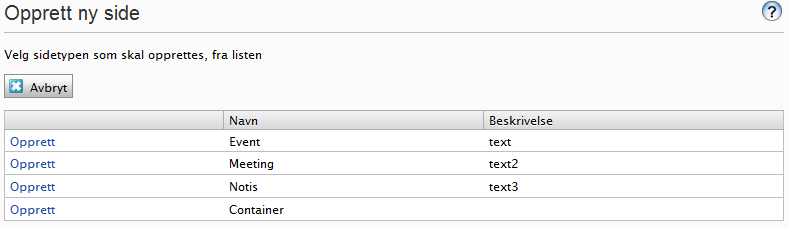
So far so good , but then I need to actually populate the default values to the page.
I found out that the easiest way was to attach myself to the LoadedDefaultPageData event like this.
- [EPiServer.Framework.ModuleDependency(typeof(PageTypeBuilder.Initializer))]
- public class AttachEvent : IInitializableModule
- {
- #region IInitializableModule Members
- static EPiServer.PageEventHandler DefaultHandler = new EPiServer.PageEventHandler(Instance_LoadedDefaultPageData);
- public void Initialize(EPiServer.Framework.Initialization.InitializationEngine context)
- {
- EPiServer.DataFactory.Instance.LoadedDefaultPageData += DefaultHandler;
- }
- static void Instance_LoadedDefaultPageData(object sender, EPiServer.PageEventArgs e)
- {
- if (HttpContext.Current!=null && !string.IsNullOrEmpty(HttpContext.Current.Request["defaultValues"]))
- {
- try
- {
- var row = VirtuelPageTypeData.Store.Load<VirtuelPageTypeData>(EPiServer.Data.Identity.Parse(HttpContext.Current.Request["defaultValues"]));
- UpdatePage(e.Page, "ContentType", row.ContentType);
- UpdatePage(e.Page, "IsTypeEvent", row.IsTypeEvent);
- UpdatePage(e.Page, "ImportantPage", row.ImportantPage);
- UpdatePage(e.Page, "IsSelectebleAsFag", row.IsSelectebleAsFag);
- if (!string.IsNullOrEmpty(row.PageStopPublishAddMonth)) {
- try {
- int mnd=int.Parse(row.PageStopPublishAddMonth);
- (e.Page.Property["PageStopPublish"] as PropertyDate).Date=DateTime.Now.AddMonths(mnd);
- }
- catch{}
- }
- }
- catch (System.Exception error)
- {
- var a = error.Message;
- }
- }
- }
- static void UpdatePage(PageData page, string key, string val)
- {
- if (page.Property[key] != null)
- page.Property[key].ParseToSelf(val);
- }
Then a new page Event will have the default properties set like this.


Then the only problem that is left is to change the edit mode accordingly to one or more properties set on the page.
I have blogged before about Change the edit page for the editors. This one of many the blog post from labs that is not searchable using world since they purge a lot of post  .
.
That blog post describe a technic that can be used to change the editor mode. With little effort that code can be modified to take in account an other page property
- string fil = HttpContext.Current.Server.MapPath("/EditLayout/" + this.Name + ".html");
- if (this.Parent["ContentType"] != null && !this.Parent["ContentType"].IsNull)
- {
- if (File.Exists(HttpContext.Current.Server.MapPath("/EditLayout/" + this.Name + "_" + this.Parent["ContentType"].ToString() + ".html")))
- {
- fil = HttpContext.Current.Server.MapPath("/EditLayout/" + this.Name + "_" + this.Parent["ContentType"].ToString() + ".html");
- }
- }
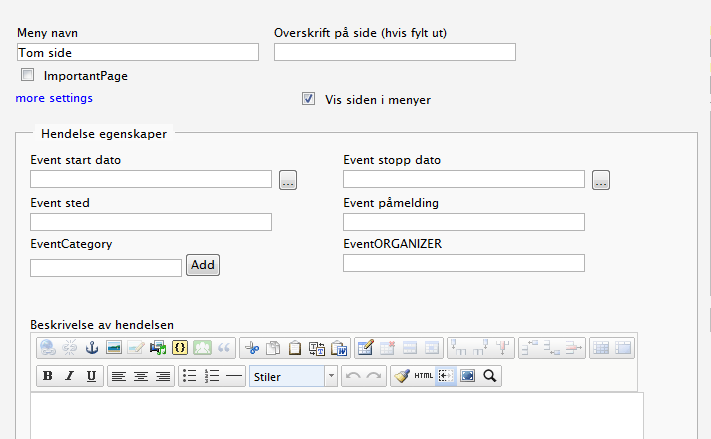
So if a page is tagged with Event I can display the edit mode like this:
and if its not I can show another edit mode like this
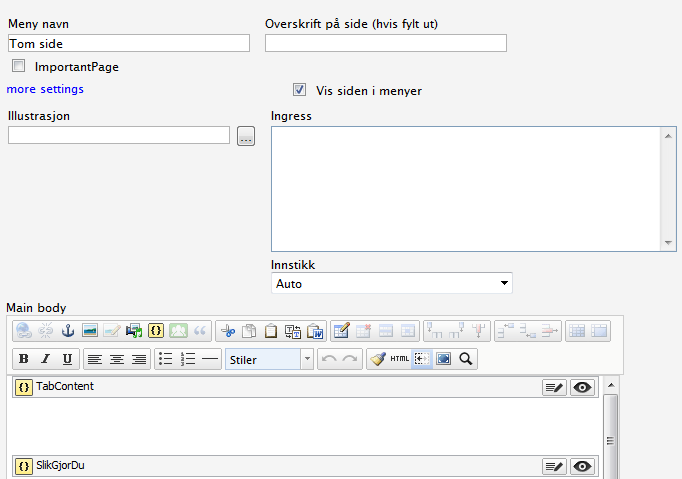
even thou it’s the same page type.

Comments