
Itera.Translate a Web Control/BaseUserControl that translate key phrases
I like EPiServer a lot, but one of the areas I think need some work is the handling of translation of key strings. Or more précises how too easy add text that can be translated or changed by editors. I have started on a module that can handle some of these issues.
The concept is simple. All text within {{text}} will be added to a dynamic data store table, where it’s possible to specify new text. Either change the text, or make a translation. The original text is uses as the key, so different areas that use the same key will share the translations. The data store class looks like this:
- public class TranslateStore : IDynamicData
- {
- public EPiServer.Data.Identity Id { get; set; }
- [EPiServerDataIndex]
- public string Key { get; set; }
- public string EN { get; set; }
- public string NO { get; set; }
- public string GetText()
- {
- var lang = Thread.CurrentThread.CurrentUICulture.IetfLanguageTag;
- if (lang == "no" && !string.IsNullOrEmpty(NO))
- return NO;
- if (lang == "en" && !string.IsNullOrEmpty(EN))
- return EN;
- return Key;
- }
- public static TranslateStore Find(string key)
- {
- var q = (from item in Items where item.Key == key select item).ToList();
- if (q != null && q.Count > 0)
- return q[0];
- var newItem = new TranslateStore();
- newItem.Key = key;
- Store.Save(newItem);
- return newItem;
- }
- public static IOrderedQueryable<TranslateStore> Items
- {
- get
- {
- return Store.Items<TranslateStore>();
- }
- }
- public static TranslateStore Load(EPiServer.Data.Identity id)
- {
- return Store.Load<TranslateStore>(id);
- }
- public static DynamicDataStore Store
- {
- get
- {
- return DynamicDataStoreFactory.Instance.GetStore(typeof(TranslateStore));
- }
- }
- }
Inside the Render method I do
- protected override void Render(HtmlTextWriter writer)
- {
- var page = this.Page as PageBase;
- StringBuilder sb = new StringBuilder();
- StringWriter sw = new StringWriter(sb);
- HtmlTextWriter htw = new HtmlTextWriter(sw);
- base.Render(htw);
- try
- {
- writer.Write(inner.TranslateText(sb, page, this.ClientID, DisplayName));
- }
- catch (System.Exception error)
- {
- base.Render(writer);
- writer.Write(error.Message);
- }
- }
and the replacement is done by
- publicStringBuilder TranslateText(StringBuilder sb, PageBase page, string id, string displayName)
- {
- var result = new StringBuilder();
- try
- {
- var start = DateTime.Now;
- string content = sb.ToString();
- var matches = FindMatches(content);
- var start2 = DateTime.Now;
- TranslateStore data = null;
- int startIndex = 0;
- foreach (var match in matches)
- {
- result.Append(content.Substring(startIndex, match.Index - startIndex));
- string key = match.Value.Substring(2, match.Value.Length - 4);
- if (!keys.ContainsKey(key.ToLower()))
- {
- data = TranslateStore.Find(key);
- keys.Add(key.ToLower(), data);
- }
- else
- data = keys[key.ToLower()];
- result.Append(data.GetText());
- startIndex = match.Index + match.Length;
- }
- result.Append(content.Substring(startIndex));
- if (HttpContext.Current.Items["TranslateMenu"] != null && HttpContext.Current.Request["translate"] != null && HttpContext.Current.Request["translate"]=="true")
- {
- var debug = new StringBuilder();
- debug.AppendLine("Found matches:" + ((TimeSpan)(start2 - start)).TotalMilliseconds + "ms<br />");
- debug.AppendLine("replaced matches:" + ((TimeSpan)(DateTime.Now - start2)).TotalMilliseconds + "ms<br />");
- result.Append(EditMode(page, debug, displayName + " Tot time:" + ((TimeSpan)(DateTime.Now - start)).TotalMilliseconds + "ms", id));
- }
- if (HttpContext.Current.Items["TranslateMenu"] != null && HttpContext.Current.Request["translate"] != null && HttpContext.Current.Request["translate"] == "all" && first)
- {
- var debug = new StringBuilder();
- var query = from item in TranslateStore.Items select item;
- var allKeys =new Dictionary<string, TranslateStore>();
- foreach (var item in query)
- allKeys.Add(item.Key, item);
- result.Append(EditMode(page, debug, "ALL Tot time:" + ((TimeSpan)(DateTime.Now - start)).TotalMilliseconds + "ms", id, allKeys,true));
- }
- }
- catch (System.Exception error)
- {
- result.Append(error.Message + error.StackTrace);
- }
- return result;
- }
I’m also adding a context menu so this html code:
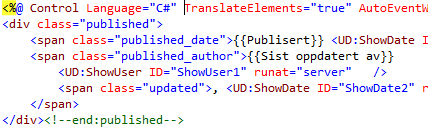
will appear like this:
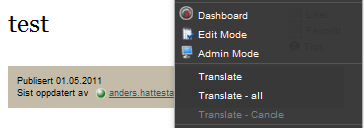
and if I select Translate
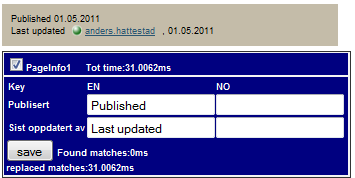
this blue dragable div will lay it self over the text.
If you select Translate – all one blue box will appear with all the elements in the dynamic data store table displayed.
Use
Web Control
just add this line in the web.config pages/controls section
- <add tagPrefix="Itera" namespace="Itera.WebControls" assembly="Itera.Translate" />
Then you can easy translate text like this
- <Itera:Translate ID="Translate1" runat="server" DisplayName="MasterPage" >
- <a href="#nonav1" class="hiddenTxt">{{Gå direkte til navigasjon}}</a>
- <a href="#nonav2" class="hiddenTxt">{{Gå direkte til hovedinnhold}}</a>
- <a href="#nonav3" class="hiddenTxt">{{Gå direkte til kontaktinfo}}</a>
- </Itera:Translate>
User Control
Just inherit from TranslateUserControl instead of UserControlBase and add the following element in the page directives
- <%@ Control Language="C#" TranslateElements="true"
then you can either change text using {{}} like this

or from the code behind
- var format = TranslateText("Denne saken har {0} kommentar(er)");
Code is in the code section here it’s compiled with CMS 6 R2, but it will work if you recompile it and remove the new the Data Store attributes.

Comments