
How to change context menu in the edit mode tree view
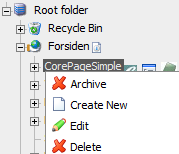 If one would like to change the right right click context menu, to add one or more options there are several different approaches one could take. One that I like is to attach myself to the PageSetup event. This event will trigger on all pages that inherit from PageBase. That includes most of the admin and edit mode pages. (if not all)
- public static void Initialize(int bitflags)
- {
- EPiServer.PageBase.PageSetup += new EPiServer.PageSetupEventHandler(PageBase_PageSetup);
- }
if the page is EditTree we can then try to attach to the Menu object that will provide the right context menu. That property is protected, so we have to use reflection:
- PropertyInfo info = type.GetProperty("Menu",BindingFlags.Instance|BindingFlags.NonPublic);
- RightClickMenu menu = info.GetValue(sender, null) as RightClickMenu;
The whole code will look like this
- static void sender_PreRender(object sender, EventArgs e)
- {
- if (sender is EditTree)
- {
- //I'm in right context menu in edit mode
- Type type = typeof(EditTree);
- string str = (sender as EditTree).ResolveUrlFromUI("edit/");
- string imageThemeUrl = (sender as EditTree).GetImageThemeUrl("Tools/");
- PropertyInfo info = type.GetProperty("Menu",BindingFlags.Instance|BindingFlags.NonPublic);
- RightClickMenu menu = info.GetValue(sender, null) as RightClickMenu;
- RightClickMenuItem item = new RightClickMenuItem("Archive",
- null,
- CreateMenuAction("deletepage", "/custom/AdminPages/Delete2Archive.aspx", ""), "AllowDelete()",
- imageThemeUrl + "Delete.gif",
- RightClickMode.All);
- menu.Add("MyItem",item);
- }
- else
- {
- //I'm in view mode
- if ((sender as EPiServer.PageBase).ContextMenu != null && (sender as EPiServer.PageBase).ContextMenu.Menu != null)
- {
- //(sender as EPiServer.PageBase).ContextMenu.Menu.Add("MyItem", EPiServer.Security.AccessLevel.Edit, new EPiServer.RightClickMenuItem("My Script", "MyScript()", "MyScriptSubMenu"));
- }
- }
- }
- private static string CreateMenuAction(string action, string url, string data)
- {
- return string.Format("OnContextMenuAction(\"{0}\", \"{1}\", \"{2}\")", action, url, data);
- }
In my code, I want the Archive option enabled just as the Delete option. If you want more logic when its enabled just create yourself a java script function and provide the java script name in the constructor of the RightClickMenuItem.

Comments