
Find pages a lot faster without using FindPagesWithCriteria
I have in some projects had the need to get different pages from all over my site with some criteria’s. This could have been a job for FindPagesWithCriteria, but I was a bit concerned about the performance. I therefore made myself a Dynamic DataStore table that have those page data properties I want to query against with queries like this
- var q = from item in Items where
- item.BoolProperties.Contains("PageVisibleInMenu")
- orderby item.StartPublish
- select item;
Every time a page is published, moved or deleted I update the store. If the page is the master language I also update the other languages. This was actually the tricky part. With replacement languages on like this
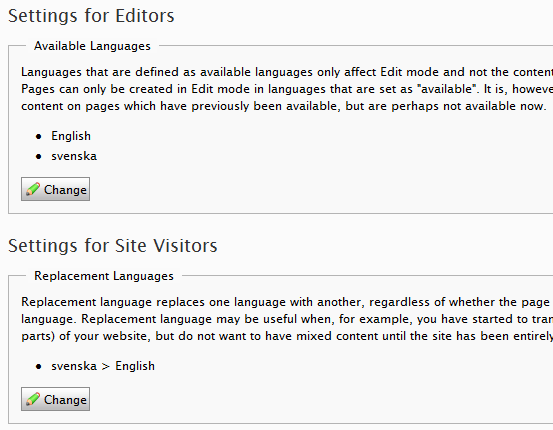
The page.PageLanguages only returns the languages the page have values on. Therefore one have to get all those language pages like this:
- PageDataCollection languageBranches = DataFactory.Instance.GetLanguageBranches(page.PageLink);
- foreach (LanguageBranch current2 in LanguageBranch.ListEnabled())
- {
- if (current2.LanguageID.ToUpper() != page.MasterLanguageBranch.ToUpper())
- {
- PageLanguageSetting pageLanguageSetting2 = PageLanguageSettingsTree.Instance.Get(page.PageLink, current2.LanguageID);
- bool flag = languageBranches.Exists(page.PageLink, current2.LanguageID);
- if (flag || (pageLanguageSetting2 != null && pageLanguageSetting2.IsActive))
- {
- var page3 = EPiServer.DataFactory.Instance.GetPage(page.PageLink, LanguageSelector.Fallback(current2.LanguageID, true));
- if (page3 != null)
- {
- if (page3.IsDeleted)
- DeletePage(page3.PageLink, current2.LanguageID);
- else
- UpdatePage(page3, current2.LanguageID);
- }
- }
- }
- }
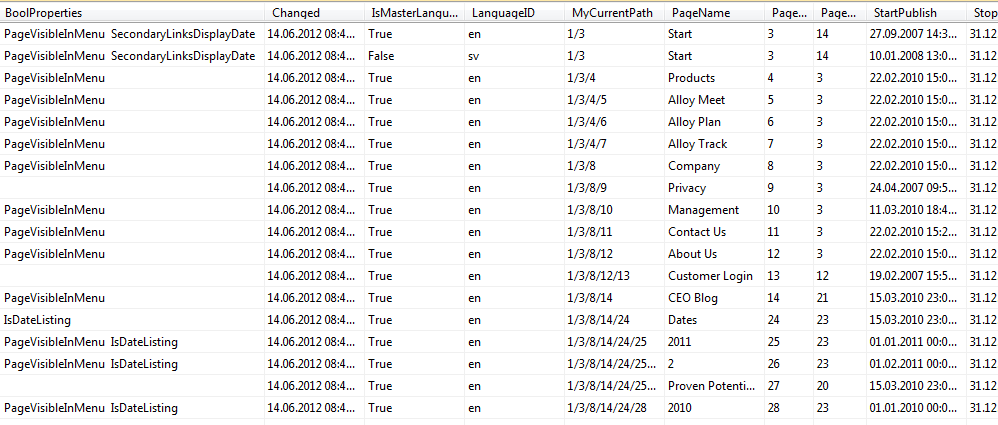
The actually DDS table have some known properties, and one can add other here as needed. I’m using a concept with bool properties, and for every property that is true I added to the text string BoolProperties. This includes the dynamic properties as well.
- [EPiServerDataStore(AutomaticallyRemapStore = true, AutomaticallyCreateStore = true)]
- public class EPiServerPageInfo : DDS_BaseData<EPiServerPageInfo>
- {
- public string PageName { get; set; }
- [EPiServerDataIndex]
- public string PageReferenceString { get; set; }
- [EPiServerDataIndex]
- public string LanguageID { get; set; }
- [EPiServerDataIndex]
- public bool IsMasterLanguageBranch { get; set; }
- public string MyCurrentPath { get; set; }
- [EPiServerDataIndex]
- public DateTime StartPublish { get; set; }
- [EPiServerDataIndex]
- public DateTime StopPublish { get; set; }
- [EPiServerDataIndex]
- public DateTime Changed { get; set; }
- [EPiServerDataIndex]
- public int PageTypeID { get; set; }
- public string BoolProperties { get; set; }
With have values like this:
When I publish/delete or move a page I hookup on the events like this
- public class AttachEvents : PlugInAttribute
- {
- public static void Start()
- {
- EPiServer.DataFactory.Instance.PublishedPage += new EPiServer.PageEventHandler(Instance_PublishedPage);
- EPiServer.DataFactory.Instance.MovedPage += new EPiServer.PageEventHandler(Instance_MovedPage);
- EPiServer.DataFactory.Instance.DeletedPage += new EPiServer.PageEventHandler(Instance_DeletedPage);
- }
- static void Instance_DeletedPage(object sender, EPiServer.PageEventArgs e)
- {
- EPiServerPageInfo.EnsurePage(e.Page);
- }
- static void Instance_PublishedPage(object sender, EPiServer.PageEventArgs e)
- {
- EPiServerPageInfo.EnsurePage(e.Page);
- }
- static void Instance_MovedPage(object sender, EPiServer.PageEventArgs e)
- {
- EPiServerPageInfo.EnsurePage(e.Page);
- if (e.TargetLink.CompareToIgnoreWorkID(PageReference.WasteBasket) || e.PageLink.CompareToIgnoreWorkID(PageReference.WasteBasket))
- {
- DoChildren(e.PageLink);
- }
- }
- static void DoChildren(PageReference start)
- {
- foreach (var child in EPiServer.DataFactory.Instance.GetChildren(start,LanguageSelector.MasterLanguage()))
- {
- EPiServerPageInfo.EnsurePage(child);
- DoChildren(child.PageLink);
- }
- }
- }
and update this store with the new values
- public static void UpdatePage(PageData page, EPiServerPageInfo row)
- {
- row.PageName = page.PageName;
- row.IsMasterLanguageBranch = page.IsMasterLanguageBranch;
- row.StartPublish = page.StartPublish;
- row.StopPublish = page.StopPublish;
- if (page.Changed > row.Changed)
- row.Changed = page.Changed;
- row.PageTypeID = page.PageTypeID;
- var boolItems=FindBoolProperties(page);
- var b = "";
- foreach (var key in boolItems.Keys)
- b += " " + key + " ";
- row.BoolProperties = b;
- row.MyCurrentPath = DigFather(page);
- }
If one has special elements one would like to query against its only to add that property to the DDS class and to update the UpdatePage method.

Comments