
Log how long a page takes to generate
After a project goes live there is often some debate if the site is fast enough. With today’s heavy use of JavaScript a lot is done after the page is loaded so it’s difficult for a user to actually know if it’s the rendering/JavaScript or the page generating that takes time.
In a project of mine we had terrible lag, and load time experienced for the users was very high. I wrote a small report that saved hourly the count of load time grouped by 1,2,3,4,5+ seconds.
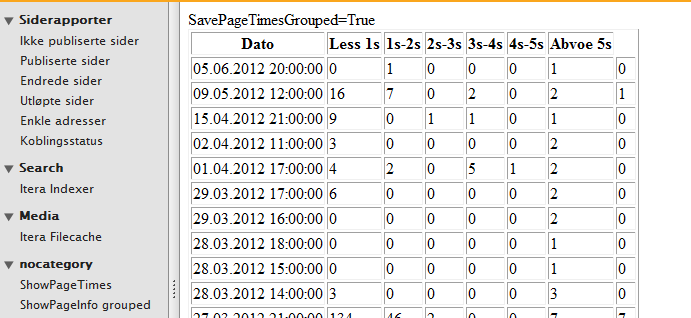
After I had let that code run for some hours I saw that the generating time from the server was not the problem. The actually problem was that the client didn’t cache the image resource files that were in use. I had overlooked the new (?) section in IIS7, so I changed my web.config to
    <caching>
      <profiles>
        <add extension=".gif" policy="CacheForTimePeriod" kernelCachePolicy="DontCache" duration="01:01:00" location="Any" />
        <add extension=".png" policy="CacheForTimePeriod" kernelCachePolicy="DontCache" duration="01:01:00" location="Any" />
        <add extension=".js" policy="CacheForTimePeriod" kernelCachePolicy="DontCache" duration="01:01:00" location="Any" />
        <add extension=".css" policy="CacheForTimePeriod" kernelCachePolicy="DontCache" duration="01:01:00" location="Any" />
        <add extension=".jpg" policy="CacheForTimePeriod" kernelCachePolicy="DontCache" duration="01:01:00" location="Any" />
        <add extension=".jpeg" policy="CacheForTimePeriod" kernelCachePolicy="DontCache" duration="01:01:00" location="Any" />
      </profiles>
    </caching>
And the clients got a huge boost in load time.
The little plugin works like this:
In my master page I added this code to Render
- public partial class UDMaster : System.Web.UI.MasterPage,IHaveProperties
- {
- DateTime start = DateTime.Now;
- protected override void Render(HtmlTextWriter writer)
- {
- if (PageTimesGrouped.SavePageTimesGrouped())
- {
- PageTimesGrouped.Add(((TimeSpan)(DateTime.Now - start)));
- }
The Dynamic DataStore class looks like this. I save only one row pr hour so this code will not generate a lot of rows. It will only save down to the DDS base if it gets a request for a new hour. - [EPiServerDataStore(AutomaticallyRemapStore = true, AutomaticallyCreateStore = true)]
- public class PageTimesGrouped : BaseData<PageTimesGrouped>
- {
- [EPiServerDataIndex]
- public DateTime Date { get; set; }
- public int Bellow1s { get; set; }
- public int Count_1s_2s { get; set; }
- public int Count_2s_3s { get; set; }
- public int Count_3s_4s { get; set; }
- public int Count_4s_5s { get; set; }
- public int Above5s { get; set; }
- static PageTimesGrouped _currentTime;
- public static PageTimesGrouped CurrentTime()
- {
- var now = DateTime.Now;
- if (_currentTime == null)
- {
- _currentTime = new PageTimesGrouped() { Date = new DateTime(now.Year, now.Month, now.Day, now.Hour, 0, 0), Bellow1s = 0, Count_1s_2s = 0, Count_2s_3s = 0, Count_3s_4s = 0, Count_4s_5s = 0, Above5s = 0 };
- }
- if (_currentTime.Date.Hour != now.Hour)
- {
- _currentTime.Save();
- _currentTime = new PageTimesGrouped() { Date = new DateTime(now.Year, now.Month, now.Day, now.Hour, 0, 0), Bellow1s = 0, Count_1s_2s = 0, Count_2s_3s = 0, Count_3s_4s = 0, Count_4s_5s = 0, Above5s = 0 };
- }
- return _currentTime;
- }
- public static void Add(TimeSpan span)
- {
- try
- {
- var a = CurrentTime();
- if (span.TotalMilliseconds < 1000)
- a.Bellow1s++;
- else if (span.TotalMilliseconds < 2000)
- a.Count_1s_2s++;
- else if (span.TotalMilliseconds < 3000)
- a.Count_2s_3s++;
- else if (span.TotalMilliseconds < 4000)
- a.Count_3s_4s++;
- else if (span.TotalMilliseconds < 5000)
- a.Count_4s_5s++;
- else
- a.Above5s++;
- }
- catch { }
- }
- public static bool SavePageTimesGrouped()
- {
- string tmp = System.Web.Configuration.WebConfigurationManager.AppSettings.Get("SavePageTimesGrouped");
- if (!string.IsNullOrEmpty(tmp))
- return true;
- return false;
- }
- public decimal RequestPrMin
- {
- get
- {
- var count = Bellow1s + Count_1s_2s + Count_2s_3s + Count_3s_4s + Count_4s_5s + Above5s;
- var now = DateTime.Now;
- var naa = new DateTime(now.Year, now.Month, now.Day, now.Hour, 0, 0);
- if (Date > now.AddHours(1))
- return count / (60);
- var a = now.Minute - Date.Minute;
- if (a > 0)
- return count / a;
- return -1;
- }
- }
- }
The Report plugin looks like this
- [GuiPlugIn(
- Area = PlugInArea.ReportMenu,
- DisplayName = "ShowPageInfo grouped",
- Url = "~/Custom/AdminPages/ShowPageTimesV2.aspx")]
- public partial class ShowPageTimesV2 : System.Web.UI.Page
- {
- protected void Page_Load(object sender, EventArgs e)
- {
- Bind();
- }
- void Bind()
- {
- CurrentList.DataSource = new object[] { PageTimesGrouped.CurrentTime() };
- CurrentList.DataBind();
- List2.DataSource = (from item in PageTimesGrouped.Items orderby item.Date descending select item).Take(100);
- List2.DataBind();
- }
- }
with front code like this
- <%@ Page Language="C#" AutoEventWireup="true" CodeBehind="ShowPageTimesV2.aspx.cs" Inherits="UDFase1.Custom.AdminPages.ShowPageTimesV2" %>
- <!DOCTYPE html PUBLIC "-//W3C//DTD XHTML 1.0 Transitional//EN" "http://www.w3.org/TR/xhtml1/DTD/xhtml1-transitional.dtd">
- <html xmlns="http://www.w3.org/1999/xhtml">
- <body>
- <form id="form1" runat="server">
- <div>
- SavePageTimesGrouped=<%=Itera.Data.PageTimesGrouped.SavePageTimesGrouped()%><br />
- <asp:Literal ID="DebugLit" runat="server" />
- <table border="1">
- <tr>
- <th>Dato</th>
- <th>Less 1s</th>
- <th>1s-2s</th>
- <th>2s-3s</th>
- <th>3s-4s</th>
- <th>4s-5s</th>
- <th>Abvoe 5s</th>
- </tr>
- <asp:Repeater ID="CurrentList" runat="server">
- <ItemTemplate>
- <tr>
- <td><%#Eval("Date") %></td>
- <td><%#Eval("Bellow1s")%></td>
- <td><%#Eval("Count_1s_2s")%></td>
- <td><%#Eval("Count_2s_3s")%></td>
- <td><%#Eval("Count_3s_4s")%></td>
- <td><%#Eval("Count_4s_5s")%></td>
- <td><%#Eval("Above5s")%></td>
- <td><%#Eval("RequestPrMin") %></td>
- </tr>
- </ItemTemplate>
- </asp:Repeater>
- <asp:Repeater ID="List2" runat="server">
- <ItemTemplate>
- <tr>
- <td><%#Eval("Date") %></td>
- <td><%#Eval("Bellow1s")%></td>
- <td><%#Eval("Count_1s_2s")%></td>
- <td><%#Eval("Count_2s_3s")%></td>
- <td><%#Eval("Count_3s_4s")%></td>
- <td><%#Eval("Count_4s_5s")%></td>
- <td><%#Eval("Above5s")%></td>
- <td><%#Eval("RequestPrMin") %></td>
- </tr>
- </ItemTemplate>
- </asp:Repeater>
- </table>
- </div>
- </form>
- </body>
- </html>

Comments