
File selector dojo property for EPiServer 7
Have made myself a dojo property for selection images. Noting fancy, but I though I should share some of my findings when creating a dojo property. There is some examples out there, but another one can’t hurt.
The basic concept here is that you can drag a file into an area. And I display a thumbnail of the file.
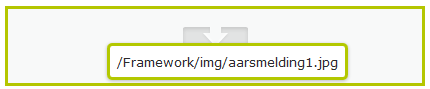 | Drag the file into the area |
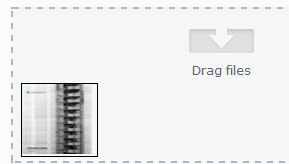 | Show a thumbnail |
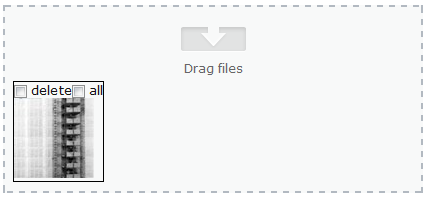 | After saving, show delete and all files from folder |
 | Select all files from folder |
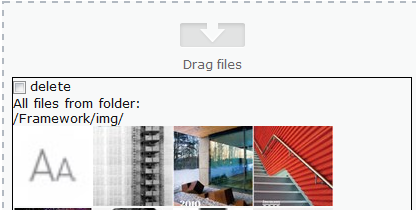 | after saving so a list of all the files. The property contains a href to all current files in that folder so IReference is set |
Since I wanted to select more than one file, I created a normal property and tagged my property with that and a UIHint
- [BackingType(typeof(PropertyFiles))]
- [CultureSpecific]
- [Display(Order = 1)]
- [UIHint("Files")]
- public virtual string FileList { get; set; }
Then I created a EditorDescriptor, where I points to my JavaScript file
- using System;
- using System.Collections.Generic;
- using EPiServer.Shell.ObjectEditing.EditorDescriptors;
- namespace EPiServer.Templates.Alloy.Business.EditorDescriptors
- {
- [EditorDescriptorRegistration(TargetType = typeof(string), UIHint = "Files")]
- public class FilesEditorDescriptor : EditorDescriptor
- {
- public override void ModifyMetadata(Shell.ObjectEditing.ExtendedMetadata metadata, IEnumerable<Attribute> attributes)
- {
- ClientEditingClass = "itera.editors.FilesList";
- base.ModifyMetadata(metadata, attributes);
- }
- }
- }
When I created the JavaScript file, I got some strange findings. Some examples out there do stuff in postCreate with the value, but as far as I can tell if there are more than one property being edited the value in postCreate is null.
So one should do stuff in the _setValue: function (value, updateTextarea) {…} it can seems. On an other property I use we update an iframe. If you do that you must do that last in the _setValue function, since we lose focus to the function, and never returns.
I added the Source and Target classes to handle drag and drop. But I got problem when having more than one target to drag items into. maybe a bug, or maybe some JavaScript code error on my part. (Guess my part  )
)
I also didn’t manage to drag folders into the area. Have you got that to work? please let me know.
The code displays the current value of the property inside the targetDisplay, and if I add a new item I create a new div that I adds to the display. the div contains a data-href attribute with the selected file. I also have a text area with the same html code. That is maybe redundant. One should probably only use the html value of the targetDisplay as the master for the value. This property is used for files, so I display a small image. I have a File system in place /FileCache/ that resize the images based on the added filename (here height_70.height_70.mode_crop.jpg) So you need to change that to your resizing method.
- define([
- "dojo/_base/array",
- "dojo/_base/connect",
- "dojo/_base/declare",
- "dojo/_base/lang",
- "dijit/_CssStateMixin",
- "dijit/_Widget",
- "dijit/_TemplatedMixin",
- "dijit/_WidgetsInTemplateMixin",
- "dijit/form/Textarea",
- "epi/epi",
- "epi/shell/widget/_ValueRequiredMixin",
- "epi/shell/dnd/Source",
- "epi/shell/dnd/Target"
- ],
- function (
- array,
- connect,
- declare,
- lang,
- _CssStateMixin,
- _Widget,
- _TemplatedMixin,
- _WidgetsInTemplateMixin,
- Textarea,
- epi,
- _ValueRequiredMixin,
- Source,
- Target
- ) {
- return declare("itera.editors.FileList", [_Widget, _TemplatedMixin, _WidgetsInTemplateMixin, _CssStateMixin, _ValueRequiredMixin], {
- templateString: "<div class=\"dijitInline ownerDiv\">\\par <div class=\"epi-content-area-editor\" >\\par <div dojoAttachPoint=\"target\" class=\"epi-content-area-actionscontainer files\">Drag files</div>\\par <div style=\"clear:both;\"></div>\\par <div dojoAttachPoint=\"targetDisplay\" ></div>\\par <div style=\"clear:both;\"></div>\\par </div>\\par <div style=\"clear:both;\"></div>\\par <input type=text value=\"\" class='actionField' style=\"display:none;\" data-dojo-attach-point=\"actions\" data-dojo-attach-event=\"click:_onAction\"/>\\par <div data-dojo-attach-point=\"stateNode, tooltipNode\">\\par <div data-dojo-attach-point=\"textArea\" data-dojo-type=\"dijit.form.Textarea\" style=\"width:200px;display:none;\"></div>\\par </div>\\par <br />\\par </div>",
- baseClass: "epiStringList",
- intermediateChanges: false,
- value: null,
- multiple: true,
- onChange: function (value) {
- // Event
- },
- postCreate: function () {
- // call base implementation
- this.inherited(arguments);
- // Init textarea and bind event
- this.textArea.set("intermediateChanges", this.intermediateChanges);
- this.connect(this.textArea, "onChange", this._onTextAreaChanged);
- this._setupTarget();
- },
- _onAction: function () {
- console.log("_onAction= " + this.targetDisplay.innerHTML);
- this.textArea.value = this.targetDisplay.innerHTML;
- this._setValue(this.targetDisplay.innerHTML, false);
- },
- _setupTarget: function () {
- var target = new Target(this.target, {
- accept: ["fileurl"],
- //Set createItemOnDrop if you're only interested to receive the data, and not create a new node.
- createItemOnDrop: true
- });
- this.connect(target, "onDropData", "_onDropDataFile");
- //var targetFolders = new Target(this.targetFolders, {
- // accept: ["link", "fileurl", "FM-FileLink"],
- // //Set createItemOnDrop if you're only interested to receive the data, and not create a new node.
- // createItemOnDrop: true
- //});
- //this.connect(targetFolders, "onDropData", "_onDropDataFolder");
- },
- _drawItems:function(list) {
- this.targetDisplay.innerHTML = list;
- },
- _onDropData: function (path, source) {
- var value = path;
- if (isFolder)
- value = path.substr(0, path.lastIndexOf("/")+1);
- var isFolder = false;
- if (source == this.targetFolders)
- isFolder = true;
- if (source.parent == this.targetFolders)
- isFolder = true;
- console.log(path + "=" + value + " " + source+" "+isFolder);
- var list = this.value;
- if (typeof this.value === "string") {
- // Split list
- list = this._stringToList(this.value);
- } else if (!this.value) {
- // use empty array for empty value
- list = [];
- }
- var txt = list.join("");
- var stringCheck = "/";
- if (txt.indexOf('data-href="' + value + '"') == -1) {
- var foundIt = (value.lastIndexOf(stringCheck) === value.length - stringCheck.length) > 0;
- if (foundIt)
- txt += '<div style="float:left;border:1px solid black;padding-right:5px;" data-href="' + value + '">All files from folder:<br />' + value + '</div>';
- else
- txt += '<div style="float:left;border:1px solid black;padding-right:5px;" data-href="' + value + '"><img src="/FileCache' + value + '/height_70.height_70.mode_crop.jpg" style="width:70px;height:70px;" title="' + value + '" /></div>';
- }
- this._setValue(txt, true);
- },
- _onDropDataFolder: function (dndData, source, nodes, copy) {
- //Drop item is an array with dragged items. This example just handles the first item.
- var dropItem = dndData ? (dndData.length ? dndData[0] : dndData) : null;
- console.log(dropItem + " " + dndData);
- if (dropItem) {
- //The data property might be a deffered so we need to call dojo.when just in case.
- dojo.when(dropItem.data, dojo.hitch(this, function (value) {
- //Do something with the data, here we just log it to the console.
- this._onDropData(value, source);
- }));
- }
- },
- _onDropDataFile: function (dndData, source, nodes, copy) {
- //Drop item is an array with dragged items. This example just handles the first item.
- var dropItem = dndData ? (dndData.length ? dndData[0] : dndData) : null;
- console.log(dropItem + " " + dndData);
- if (dropItem) {
- //The data property might be a deffered so we need to call dojo.when just in case.
- dojo.when(dropItem.data, dojo.hitch(this, function (value) {
- //Do something with the data, here we just log it to the console.
- this._onDropData(value, source);
- }));
- }
- },
- isValid: function () {
- return true;
- },
- // Setter for value property
- _setValueAttr: function (value) {
- this._setValue(value, true);
- },
- _setReadOnlyAttr: function (value) {
- this._set("readOnly", value);
- this.textArea.set("readOnly", value);
- },
- // Setter for intermediateChanges
- _setIntermediateChangesAttr: function (value) {
- this.textArea.set("intermediateChanges", value);
- this._set("intermediateChanges", value);
- },
- // Event handler for textarea
- _onTextAreaChanged: function (value) {
- this._setValue(value, false);
- },
- _setValue: function (value, updateTextarea) {
- // Assume value is an array
- var list = value;
- if (typeof value === "string") {
- // Split list
- list = this._stringToList(value);
- } else if (!value) {
- // use empty array for empty value
- list = [];
- }
- if (this._started && epi.areEqual(this.value, list)) {
- return;
- }
- var txt = list.join("");
- if (txt == "")
- this._set("value", null);
- else
- this._set("value", txt);
- updateTextarea && this.textArea.set("value", txt);
- this._drawItems(txt);
- if (this._started && this.validate()) {
- // Trigger change event
- this.onChange(list);
- }
- },
- // Convert a string to a list
- _stringToList: function (value) {
- // Return empty array for
- if (!value || typeof value !== "string") {
- return [];
- }
- // Trim whitespace at start and end
- var trimmed = value.replace(/^\s+|\s+$/g, "");
- // Trim whitespace around each linebreak
- var trimmedLines = trimmed.replace(/(\s*\n+\s*)/g, "\n");
- // Split into list
- var list = trimmedLines.split("\n");
- return list;
- }
- });
- });
After the property is saved have changed the Value in my PropertyFiles property. I find all the div.'s with the data-href attribute and creates a new html value with the div and some checkboxes to delete or select all files in that folder. I also add <a href to the files in the end of the html so the IReference will be set, and editors will get warning if they try to delete a file in use by this property.
To communicate to the dojo property I use this line of JavaScript
var obj=$(this).closest('.ownerDiv').find('.actionField')
this line will get a hold of the textbox in the dojo property
<input type=text value=\"\" class='actionField' data-dojo-attach-point=\"actions\" data-dojo-attach-event=\"click:_onAction\" style=\"display:none;\"/>\
If i then do obj.click() the _onAction will be triggered. I don't use the value of the textbox here, since i only hide the div, and remove the data-href attribute, but the pattern is nice for using that value for something
- using System;
- using System.Collections.Generic;
- using System.Linq;
- using System.Web;
- using EPiServer.Core;
- using EPiServer.Web.PropertyControls;
- using System.Web.UI.WebControls;
- using EPiServer.PlugIn;
- using EPiServer.Web.Hosting;
- using HtmlAgilityPack;
- using System.IO;
- using EPiServer;
- using System.Web.Hosting;
- namespace Itera.Models.Properties
- {
- [PropertyDefinitionTypePlugIn]
- [System.Serializable]
- public class PropertyFiles : PropertyLongString
- {
- public override object Value
- {
- get
- {
- return base.Value;
- }
- set
- {
- var str = value as string;
- if (str != null)
- {
- var doc = new HtmlDocument();
- doc.LoadHtml(str);
- var refLinks = "";
- foreach (var item in doc.DocumentNode.ChildNodes)
- {
- if (item.Name == "div" && item.Attributes.Contains("data-href") && item.Attributes["data-href"].Value!="")
- {
- var href = item.Attributes["data-href"].Value;
- var inner = "";
- refLinks += "<a href=\"" + href + "\" class=\"ignore\" style=\"display:none;\">" + href + "</a>";
- item.Attributes.Remove("style");
- if (href.EndsWith("/"))
- {
- item.Attributes.Add("style", "border:1px solid black;margin-bottom:5px;");
- inner = "<div>";
- inner += "<input type=checkbox onclick=\"$(this).parent().parent().removeAttr('data-href');$(this).parent().parent().css('display','none');var obj=$(this).closest('.ownerDiv').find('.actionField');obj.val('" + href + "');obj.click();\" />delete";
- inner += "</div>";
- var dir = System.Web.Hosting.HostingEnvironment.VirtualPathProvider.GetDirectory(href) as UnifiedDirectory;
- if (dir != null)
- {
- inner += "All files from folder:<br />" + dir.VirtualPath;
- foreach (UnifiedFile fil2 in dir.Files)
- {
- if (BaseMedia.IsMedia(fil2.VirtualPath))
- {
- refLinks += "<a href=\"" + fil2.VirtualPath + "\" class=\"ignore\" style=\"display:none;\">" + fil2.VirtualPath + "</a>";
- inner += "<div style=\"float:left;\">";
- inner += "<img style=\"width:80px;height:80px;\" src=\"/FileCache" + fil2.VirtualPath + "/width_80.height_80.mode_crop.jpg\" data-org=\"" + fil2.VirtualPath + "\" />";
- inner += "</div>";
- }
- }
- }
- }
- else
- {
- item.Attributes.Add("style", "border:1px solid black;float:left;margin-right:5px;margin-bottom:5px;");
- var filname = Path.GetFileName(href);
- var path = href.Substring(0, href.Length - filname.Length);
- inner = "<div>";
- inner += "<input type=checkbox onclick=\"$(this).parent().parent().removeAttr('data-href');$(this).parent().parent().css('display','none');var obj=$(this).closest('.ownerDiv').find('.actionField');obj.val('" + href + "');obj.click();\" />delete";
- inner += "<input type=checkbox onclick=\"$(this).parent().parent().attr('data-href','" + path + "');var obj=$(this).closest('.ownerDiv').find('.actionField');$(this).parent().html('All files from folder:<br />" + path + "');obj.val('" + href + "');obj.click();\" />all<br/>";
- item.Attributes.Remove("onclick");
- inner += "<img style=\"width:80px;height:80px;\" src=\"/FileCache" + href + "/width_80.height_80.mode_crop.jpg\" data-org=\"" + href + "\" />";
- inner += "</div>";
- }
- item.InnerHtml = inner+"<div style=\"clear:both;\"></div>";
- }
- }
- base.Value = doc.DocumentNode.OuterHtml;
- } else {
- base.Value = value;
- }
- }
- }
- public List<VirtualFile> GetFiles()
- {
- var result = new List<VirtualFile>();
- var str = this.LongString;
- if (str != null)
- {
- var doc = new HtmlDocument();
- doc.LoadHtml(str);
- foreach (var item in doc.DocumentNode.ChildNodes)
- {
- if (item.Name == "div" && item.Attributes.Contains("data-href") && item.Attributes["data-href"].Value != "")
- {
- var href = item.Attributes["data-href"].Value;
- if (href.EndsWith("/"))
- {
- var dir = System.Web.Hosting.HostingEnvironment.VirtualPathProvider.GetDirectory(href) as UnifiedDirectory;
- if (dir != null)
- {
- foreach (UnifiedFile fil2 in dir.Files)
- {
- result.Add(fil2);
- }
- }
- }
- else
- {
- var file = System.Web.Hosting.HostingEnvironment.VirtualPathProvider.GetFile(href) ;
- result.Add(file);
- }
- }
- }
- }
- return result;
- }
- }
- }
I guess I could have done this more dojo , but with my current knowledge this was the best I managed. If some of you have made a more advanced dojo property in EPiServer 7 please make a blog so we can learn from you.

Comments