
EasySearch Search Gadget
This gadget allows editors to view lists of pages based on queries. This enables them to track what has changed based on their interests and job role. This gadget uses EasySearch to perform a search on the site. Results are updated automatically based on a configurable time interval and the dashboard can contain many instances of the gadget, each one with a different query.
Install EasySearch
To setup the gadget, first download and install EasySearch. The latest release is v2.5 and is an excellent opportunity to test EasySearch if you haven’t done so before!
After downloading and unzipping EasySearch, contained within is an install zip that is installed using the EPiServer Deployment Center.
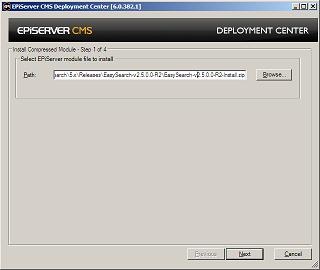
You may need to add assembly binding if you haven’t configured your site already. If not this is what I have been using until assemblies start being compiled for CMS 6
<runtime>
    <assemblyBinding>
      <dependentAssembly />
    </assemblyBinding>
    <assemblyBinding xmlns="urn:schemas-microsoft-com:asm.v1">
      <dependentAssembly>
        <assemblyIdentity name="EPiServer.Data"
                          publicKeyToken="8fe83dea738b45b7"
                          culture="neutral" />
        <bindingRedirect oldVersion="1.0.0.0-1.65535.65535.65535"
                         newVersion="1.0.238.39" />
      </dependentAssembly>
      <dependentAssembly>
        <assemblyIdentity name="EPiServer.Shell"
                          publicKeyToken="8fe83dea738b45b7"
                          culture="neutral" />
        <bindingRedirect oldVersion="1.0.0.0-1.65535.65535.65535"
                         newVersion="1.0.238.39" />
      </dependentAssembly>
      <dependentAssembly>
        <assemblyIdentity name="EPiServer.Shell.UI"
                          publicKeyToken="8fe83dea738b45b7"
                          culture="neutral" />
        <bindingRedirect oldVersion="1.0.0.0-1.65535.65535.65535"
                         newVersion="1.0.238.39" />
      </dependentAssembly>
      <dependentAssembly>
        <assemblyIdentity name="System.ComponentModel.Composition"
                          publicKeyToken="8fe83dea738b45b7"
                          culture="neutral" />
        <bindingRedirect oldVersion="2009.0.0.0-2009.65535.65535.65535"
                         newVersion="2009.26.8.0" />
      </dependentAssembly>
      <dependentAssembly>
        <assemblyIdentity name="System.Web.Mvc"
                          publicKeyToken="31bf3856ad364e35"
                          culture="neutral" />
        <bindingRedirect oldVersion="1.0.0.0-1.65535.65535.65535"
                         newVersion="1.0.0.0" />
      </dependentAssembly>
      <dependentAssembly>
        <assemblyIdentity name="ElektroPost.Licensing"
                          publicKeyToken="8fe83dea738b45b7"
                          culture="neutral" />
        <bindingRedirect oldVersion="5.0.0.0-6.65535.65535.65535"
                         newVersion="6.0.382.1" />
      </dependentAssembly>
      <dependentAssembly>
        <assemblyIdentity name="EPiServer.BaseLibrary"
                          publicKeyToken="8fe83dea738b45b7"
                          culture="neutral" />
        <bindingRedirect oldVersion="5.0.0.0-6.65535.65535.65535"
                         newVersion="6.0.382.1" />
      </dependentAssembly>
      <dependentAssembly>
        <assemblyIdentity name="EPiServer.Blog"
                          publicKeyToken="8fe83dea738b45b7"
                          culture="neutral" />
        <bindingRedirect oldVersion="5.0.0.0-6.65535.65535.65535"
                         newVersion="6.0.382.1" />
      </dependentAssembly>
      <dependentAssembly>
        <assemblyIdentity name="EPiServer.Cms.Shell"
                          publicKeyToken="8fe83dea738b45b7"
                          culture="neutral" />
        <bindingRedirect oldVersion="5.0.0.0-6.65535.65535.65535"
                         newVersion="6.0.382.1" />
      </dependentAssembly>
      <dependentAssembly>
        <assemblyIdentity name="EPiServer.Cms.Shell.UI"
                          publicKeyToken="8fe83dea738b45b7"
                          culture="neutral" />
        <bindingRedirect oldVersion="5.0.0.0-6.65535.65535.65535"
                         newVersion="6.0.382.1" />
      </dependentAssembly>
      <dependentAssembly>
        <assemblyIdentity name="EPiServer.Configuration"
                          publicKeyToken="8fe83dea738b45b7"
                          culture="neutral" />
        <bindingRedirect oldVersion="5.0.0.0-6.65535.65535.65535"
                         newVersion="6.0.382.1" />
      </dependentAssembly>
      <dependentAssembly>
        <assemblyIdentity name="EPiServer"
                          publicKeyToken="8fe83dea738b45b7"
                          culture="neutral" />
        <bindingRedirect oldVersion="5.0.0.0-6.65535.65535.65535"
                         newVersion="6.0.382.1" />
      </dependentAssembly>
      <dependentAssembly>
        <assemblyIdentity name="EPiServer.Enterprise"
                          publicKeyToken="8fe83dea738b45b7"
                          culture="neutral" />
        <bindingRedirect oldVersion="5.0.0.0-6.65535.65535.65535"
                         newVersion="6.0.382.1" />
      </dependentAssembly>
      <dependentAssembly>
        <assemblyIdentity name="EPiServer.Events"
                          publicKeyToken="8fe83dea738b45b7"
                          culture="neutral" />
        <bindingRedirect oldVersion="5.0.0.0-6.65535.65535.65535"
                         newVersion="6.0.382.1" />
      </dependentAssembly>
      <dependentAssembly>
        <assemblyIdentity name="EPiServer.ImageLibrary"
                          publicKeyToken="8fe83dea738b45b7"
                          culture="neutral" />
        <bindingRedirect oldVersion="5.0.0.0-6.65535.65535.65535"
                         newVersion="6.0.382.1" />
      </dependentAssembly>
      <dependentAssembly>
        <assemblyIdentity name="EPiServer.Implementation"
                          publicKeyToken="8fe83dea738b45b7"
                          culture="neutral" />
        <bindingRedirect oldVersion="5.0.0.0-6.65535.65535.65535"
                         newVersion="6.0.382.1" />
      </dependentAssembly>
      <dependentAssembly>
        <assemblyIdentity name="EPiServer.Legacy4"
                          publicKeyToken="8fe83dea738b45b7"
                          culture="neutral" />
        <bindingRedirect oldVersion="5.0.0.0-6.65535.65535.65535"
                         newVersion="6.0.382.1" />
      </dependentAssembly>
      <dependentAssembly>
        <assemblyIdentity name="EPiServer.LinkAnalyzer"
                          publicKeyToken="8fe83dea738b45b7"
                          culture="neutral" />
        <bindingRedirect oldVersion="5.0.0.0-6.65535.65535.65535"
                         newVersion="6.0.382.1" />
      </dependentAssembly>
      <dependentAssembly>
        <assemblyIdentity name="EPiServer.Log.Analyzers"
                          publicKeyToken="8fe83dea738b45b7"
                          culture="neutral" />
        <bindingRedirect oldVersion="5.0.0.0-6.65535.65535.65535"
                         newVersion="6.0.382.1" />
      </dependentAssembly>
      <dependentAssembly>
        <assemblyIdentity name="EPiServer.Log.Core"
                          publicKeyToken="8fe83dea738b45b7"
                          culture="neutral" />
        <bindingRedirect oldVersion="5.0.0.0-6.65535.65535.65535"
                         newVersion="6.0.382.1" />
      </dependentAssembly>
      <dependentAssembly>
        <assemblyIdentity name="EPiServer.Lucene"
                          publicKeyToken="8fe83dea738b45b7"
                          culture="neutral" />
        <bindingRedirect oldVersion="5.0.0.0-6.65535.65535.65535"
                         newVersion="6.0.382.1" />
      </dependentAssembly>
      <dependentAssembly>
        <assemblyIdentity name="EPiServer.Scheduler"
                          publicKeyToken="8fe83dea738b45b7"
                          culture="neutral" />
        <bindingRedirect oldVersion="5.0.0.0-6.65535.65535.65535"
                         newVersion="6.0.382.1" />
      </dependentAssembly>
      <dependentAssembly>
        <assemblyIdentity name="EPiServer.Scheduler.WKTL"
                          publicKeyToken="8fe83dea738b45b7"
                          culture="neutral" />
        <bindingRedirect oldVersion="5.0.0.0-5.65535.65535.65535"
                         newVersion="5.1.422.4" />
      </dependentAssembly>
      <dependentAssembly>
        <assemblyIdentity name="EPiServer.UI"
                          publicKeyToken="8fe83dea738b45b7"
                          culture="neutral" />
        <bindingRedirect oldVersion="5.0.0.0-6.65535.65535.65535"
                         newVersion="6.0.382.1" />
      </dependentAssembly>
      <dependentAssembly>
        <assemblyIdentity name="EPiServer.Web.WebControls"
                          publicKeyToken="8fe83dea738b45b7"
                          culture="neutral" />
        <bindingRedirect oldVersion="5.0.0.0-6.65535.65535.65535"
                         newVersion="6.0.382.1" />
      </dependentAssembly>
      <dependentAssembly>
        <assemblyIdentity name="EPiServer.WebDav"
                          publicKeyToken="8fe83dea738b45b7"
                          culture="neutral" />
        <bindingRedirect oldVersion="5.0.0.0-6.65535.65535.65535"
                         newVersion="6.0.382.1" />
      </dependentAssembly>
      <dependentAssembly>
        <assemblyIdentity name="EPiServer.WebParts"
                          publicKeyToken="8fe83dea738b45b7"
                          culture="neutral" />
        <bindingRedirect oldVersion="5.0.0.0-6.65535.65535.65535"
                         newVersion="6.0.382.1" />
      </dependentAssembly>
      <dependentAssembly>
        <assemblyIdentity name="EPiServer.WorkflowFoundation"
                          publicKeyToken="8fe83dea738b45b7"
                          culture="neutral" />
        <bindingRedirect oldVersion="5.0.0.0-6.65535.65535.65535"
                         newVersion="6.0.382.1" />
      </dependentAssembly>
      <dependentAssembly>
        <assemblyIdentity name="EPiServer.XForms"
                          publicKeyToken="8fe83dea738b45b7"
                          culture="neutral" />
        <bindingRedirect oldVersion="5.0.0.0-6.65535.65535.65535"
                         newVersion="6.0.382.1" />
      </dependentAssembly>
      <dependentAssembly>
        <assemblyIdentity name="EPiServer.XmlRpc"
                          publicKeyToken="8fe83dea738b45b7"
                          culture="neutral" />
        <bindingRedirect oldVersion="5.0.0.0-6.65535.65535.65535"
                         newVersion="6.0.382.1" />
      </dependentAssembly>
      <dependentAssembly>
        <assemblyIdentity name="log4net"
                          publicKeyToken="1b44e1d426115821"
                          culture="neutral" />
        <bindingRedirect oldVersion="1.0.0.0-1.65535.65535.65535"
                         newVersion="1.2.10.0" />
      </dependentAssembly>
      <dependentAssembly>
        <assemblyIdentity name="Microsoft.Web.Services3"
                          publicKeyToken="31bf3856ad364e35"
                          culture="neutral" />
        <bindingRedirect oldVersion="3.0.0.0-3.65535.65535.65535"
                         newVersion="3.0.0.0" />
      </dependentAssembly>
    </assemblyBinding>
  </runtime>
Index Site
After installing EasySearch, index your site from the EasySearch Index Management panel under Admin Tools.
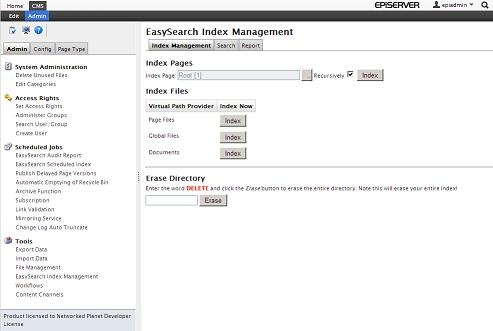
The gadget is now ready to be installed!
Install EasySearch Gadget
The gadget is installed using the EPiServer Deployment Centre from the EasySearchGadgetInstall.zip. After running the installer you should now have the gadget installed and ready for use. Add the ‘EasySearch’ gadget from the CMS Dashboard.
Configure EasySearch Gadget
The gadget is configured on first use to perform a search query at regular intervals.
Enter a search term and select the language to search in.
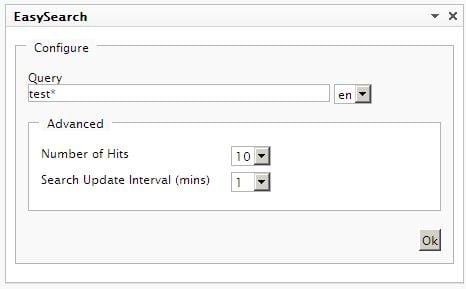
You can set the maximum number of hits to return and also the search refresh interval in minutes.
Click Ok and the results will be displayed.
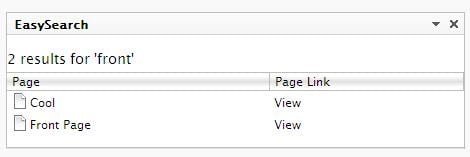
The results can be clicked on to Edit the page or click View to see the page in another window. You can add multiple instances of the gadget to perform more than one search at a time.

Comments