

A critical vulnerability was discovered in React Server Components (Next.js). Our systems remain protected but we advise to update packages to newest version. Learn More

Dan Matthews
May 31, 2016
  1442
(0 votes)

Vulcanised enhancements

These weekly updates are becoming a habit! In this edition, I’m going to share with you a couple of significant enhancements I’ve made to Vulcan, the lightweight Elasticsearch client for Episerver. The most obvious and most generally useful enhancement is the addition of an additional optional parameter to the SearchContent method that takes a ContentReference to search beneath. This was possible before but only by doing funky stuff like getting a list of the ancestors of a page and sending them all over to Elasticsearch as a search filter (ick!). Now it’s all neatly done by Vulcan for you. For example, if I wanted to search below the current content item my search might look like this (commerce example below but works just the same for CMS… note that I’m sending in null as the search query here because I don’t actually want to do a search, just pull back the contents):

model.Products = VulcanHandler.Service.GetClient().SearchContent<ProductBase>(null, false, currentContent.ContentLink).GetContents<ProductBase>();
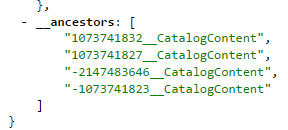
In order to support this, Vulcan adds an additional field to the content as it indexes it (more about that field later) so that this filter can run much faster and more efficiently. You don’t really need to think about the property much… although if you look in the index, you’ll see it there something like this (again, example is for a bit of commerce content):
 
image
 
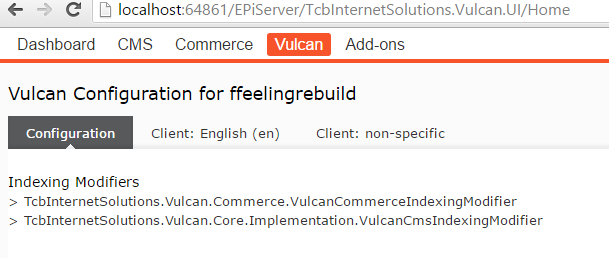
Rather than hardcode this extra bit of indexing logic, I made this mechanism generic so that it opens up some cool options for you. One thing you may well want to do is customise the object being indexed. Normally this is a bit of a black box, but I’ve added a hook into the JSON serialisation process so that you can add in custom fields as needed. Simply create a class that implements the IVulcanIndexingModifier interface. It just has one method, ProcessContent, that receives whatever bit of content is being indexed and the outgoing stream of JSON. Simply put whatever logic you need into there and, if needed, spit out JSON properties into the stream. This method will be automatically found and used when indexing content. For an example of how this works, see the two built-in indexing modifiers for CMS and Commerce that add ancestor and pricing properties. The joys of open source! You can check that your indexing modifier has been located and is being used by checking the Vulcan UI (here you’ll see the two built-in indexing modifiers have been detected and are available):
 
image
 
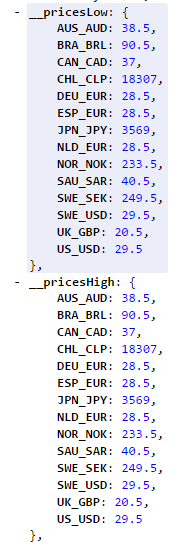
Using this new technique of modifying content as it’s indexed, I’ve also added some additional properties for pricing to commerce content. For variants, I’ve added the default price for the various markets and currencies. For products, the variants could be priced differently so there you’ll find two properties for price low and price high, so showing the bracket of prices of the variants of that product. Typically, you would aggregate these for facets and this gives you the ability to do that on products – low price or high price is up to you! Again, you shouldn’t need to worry too much about the exact implementation so I’ve added a few helper methods in a VulcanFieldHelper class (part of the Vulcan commerce package) which will give you the field name you need. For example, if I wanted to get all the variants below my current node and create a price facet, I could use the following:
 
model.SearchResponse = VulcanHandler.Service.GetClient().SearchContent<EPiServer.Reference.Commerce.Site.Features.Product.Models.FashionVariant>(
q => q.Aggregations(a => a
.Filter("this_node", cm => cm
.Filter(f => f
.Bool(b => b
.Must(m => m
.Term(TcbInternetSolutions.Vulcan.Core.VulcanFieldConstants.Ancestors, currentContent.ContentLink.ToReferenceWithoutVersion().ToString()))))
.Aggregations(agg => agg
.Terms("prices", t => t
.Field(VulcanFieldHelper.GetPriceField()))))));

Note that in this case I am having to manually specify the query to narrow down the aggregate results to this node. The reason for this is because you might not want the aggregation to do this, so it’s better that you can choose yourself whether or not you want it to. In effect, it’s doing pretty much the same kind of filter as the main search does to narrow down search results to a node. You will see that the prices aggregation is being done on a field retrieved from the VulcanFieldHelper. In this case, it’s going to use the current market and the current market’s default currency. You can override that though by passing in parameters to get the price field for another market or currency. If you really do want to see what this looks like in the index, here’s a sample of a product showing the price brackets for the variants (in this case, it seems like the variants are all the same price, so the low and high values are all the same):
image

One fairly major update in this version is the ability to play nicely with other shell modules such as Episerver Google Analytics and Episerver Forms. Previously, a bug in the code meant that it didn’t… somewhat hampering it’s usefulness! So how do you get all these Vulcan goodies? Simply update to the latest package in the Episerver Nuget feed and you should be good to go! As usual, all feedback and comments are appreciated and if you’d like to contribute, simply request developer access to the Vulcan project on GitLab.

DISCLAIMER: This project is in no way connected with or endorsed by Episerver. It is being created under the auspices of a South African company and is entirely separate to what I do as an Episerver employee.

May 31, 2016

Comments

Please login to comment.
Latest blogs
A day in the life of an Optimizely OMVP: Learning Optimizely Just Got Easier: Introducing the Optimizely Learning Centre

On the back of my last post about the Opti Graph Learning Centre, I am now happy to announce a revamped interactive learning platform that makes...

Graham Carr | Jan 31, 2026

Scheduled job for deleting content types and all related content

In my previous blog post which was about getting an overview of your sites content https://world.optimizely.com/blogs/Per-Nergard/Dates/2026/1/sche...

Per Nergård (MVP) | Jan 30, 2026

Working With Applications in Optimizely CMS 13

💡 Note:  The following content has been written based on Optimizely CMS 13 Preview 2 and may not accurately reflect the final release version. As...

Mark Stott | Jan 30, 2026

Experimentation at Speed Using Optimizely Opal and Web Experimentation

If you are working in experimentation, you will know that speed matters. The quicker you can go from idea to implementation, the faster you can...

Minesh Shah (Netcel) | Jan 30, 2026