

Problem with web.config after upgrade between MVC 4 and MVC 5, 5.2.0.0 and 3.0.0.0 and missing intellisense in Visual Studio.
This one will be a short blog post but I somehow a bit related to my last post about version of MVC and the 404 handlar from BVN Networks.
I recently created a new project and updated all nuget packages to the latest version of both EPiServer and Nugets from Microsoft.
After the upgrade I could not get the site to start and I got a strange error message. I also had problem with intellisense and none of the old ways of fixing the intellisense problem seemed to help.
The first error:
[A]System.Web.WebPages.Razor.Configuration.HostSection cannot be cast to
[B]System.Web.WebPages.Razor.Configuration.HostSection.
Type A originates from 'System.Web.WebPages.Razor, Version=2.0.0.0, Culture=neutral, PublicKeyToken=31bf3856ad364e35' in the context 'Default' at location 'C:\WINDOWS\Microsoft.Net\assembly\GAC_MSIL\System.Web.WebPages.Razor\v4.0_2.0.0.0__31bf3856ad364e35\System.Web.WebPages.Razor.dll'.
Type B originates from 'System.Web.WebPages.Razor, Version=3.0.0.0, Culture=neutral, PublicKeyToken=31bf3856ad364e35' in the context 'Default' at location 'C:\Users\MyName\AppData\Local\Temp\Temporary ASP.NET Files\root\63e7ff36\a1cb775d\assembly\dl3\8f568c18\9b7ddacf_d04dcf01\System.Web.WebPages.Razor.dll'.
This is casued by wrong versionnumbers in your config-files. This is easy to fix.
The fix:
      <dependentAssembly>
        <assemblyIdentity name="System.Web.Mvc"
                          publicKeyToken="31bf3856ad364e35" />
        <bindingRedirect oldVersion="0.0.0.0-5.2.2.0"
                         newVersion="5.2.2.0" />
</dependentAssembly><appSettings>
<add key="webpages:Version"
value="3.0.0.0" />
...
</appSettings>
The intellisense error for razorpages:
To fix the intellisense problem we need to update another web.config. This is located in the views-folder. If you look into this folder you will find out that you will need to fix other assembly versions as well:
In a view you will get the this problem with intellisens for helpers and types pages. Also the @model declaration is not working.
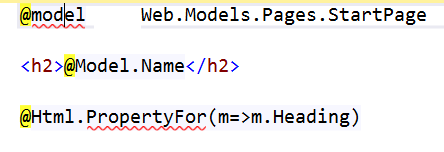
You need to change the following to target 3.0.0.0 as below
    <sectionGroup name="system.web.webPages.razor"
                  type="System.Web.WebPages.Razor.Configuration.RazorWebSectionGroup, System.Web.WebPages.Razor, Version=3.0.0.0, Culture=neutral, PublicKeyToken=31BF3856AD364E35">
      <section name="host"
               type="System.Web.WebPages.Razor.Configuration.HostSection, System.Web.WebPages.Razor, Version=3.0.0.0, Culture=neutral, PublicKeyToken=31BF3856AD364E35"
               requirePermission="false" />
      <section name="pages"
               type="System.Web.WebPages.Razor.Configuration.RazorPagesSection, System.Web.WebPages.Razor, Version=3.0.0.0, Culture=neutral, PublicKeyToken=31BF3856AD364E35"
               requirePermission="false" />
    </sectionGroup>
To get the intellisense to work properly you also need to change to the latest version as below:
<host factoryType="System.Web.Mvc.MvcWebRazorHostFactory, System.Web.Mvc, Version=5.0.0.0, Culture=neutral, PublicKeyToken=31BF3856AD364E35" />
If you need further assistance you can follow this post about upgrade an mvc project.
Update:
The old url did not work

Comments