
Take the community feedback survey now.

erik.engstrand@precio.se
Nov 7, 2009
  4717
(0 votes)

Users statistics gadget

After installing the EPiServer CMS 6 CTP I saw the Gadget contest on EPiSerer world. Here is my contribution to the contest. The users statistics gadget.

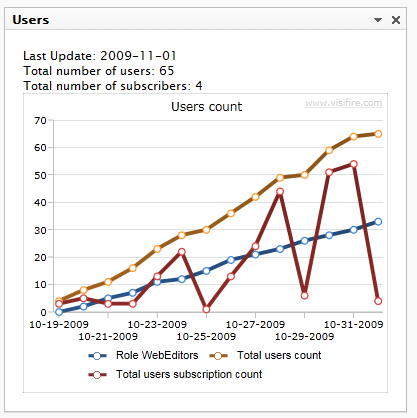
It simply displays a chart with the number of users and subscription users you have registered on the site. It’s also possible to show a chart of the users in a specific role. All settings is done in the Edit menu.

The chart is created in SIlverlight (Visifire). The Silverlight application accesses the users statistics from a WCF service. All wcf configurations is in the Gadget web.config. And therefore no need to update the web project’s web.config.
image 


Configuration

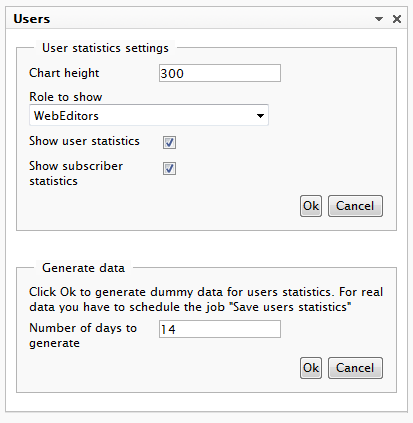
By clicking the Edit in the menu you will see some configuration options. You can choose to show statistics for one role of all roles in the RoleMembershipProvider.
image

Save history data

The history data is stored in the DynamicDataStore. I have created a scheduled job which should be executed once a day.

As seen in the image above I have made it possible to generate dummy data for the statistics. This is just for demo purposes.

Installation

If you have problems with the Silverlight chart. Add mime type to IIS: .xap     application/x-silverlight-app. Configuring IIS for Silverlight Applications.

The clientaccesspolicy.xml must be placed in the root of your project to get the Silverlight wcf reference running. This is done by the installer below.

Source code

Nov 07, 2009

Comments

Please login to comment.
Latest blogs
A day in the life of an Optimizely OMVP - Opticon London 2025

This installment of a day in the life of an Optimizely OMVP gives an in-depth coverage of my trip down to London to attend Opticon London 2025 held...

Graham Carr | Oct 2, 2025

Optimizely Web Experimentation Using Real-Time Segments: A Step-by-Step Guide

  Introduction Personalization has become de facto standard for any digital channel to improve the user's engagement KPI’s.  Personalization uses...

Ratish | Oct 1, 2025 |

Trigger DXP Warmup Locally to Catch Bugs & Performance Issues Early

Here’s our documentation on warmup in DXP : 🔗 https://docs.developers.optimizely.com/digital-experience-platform/docs/warming-up-sites What I didn...

dada | Sep 29, 2025

Creating Opal Tools for Stott Robots Handler

This summer, the Netcel Development team and I took part in Optimizely’s Opal Hackathon. The challenge from Optimizely was to extend Opal’s abiliti...

Mark Stott | Sep 28, 2025

Integrating Commerce Search v3 (Vertex AI) with Optimizely Configured Commerce

Introduction This blog provides a technical guide for integrating Commerce Search v3, which leverages Google Cloud's Vertex AI Search, into an...

Vaibhav | Sep 27, 2025

A day in the life of an Optimizely MVP - Opti Graph Extensions add-on v1.0.0 released

I am pleased to announce that the official v1.0.0 of the Opti Graph Extensions add-on has now been released and is generally available. Refer to my...

Graham Carr | Sep 25, 2025