
Batch Update EPiServer Page Properties after Creation
I’ll start this with a warning: this code can really mess up your site. I just created it to get something done quickly, and I’m only sharing it in case you’re in a similar situation. Be very careful with the values you enter, and as always, test, test, and retest before running this in a production environment!
Anyway… I ran into a situation today where I had to update a PropertyString value on 297 existing pages. Instead of setting this manually, I whipped up the following GuiPlugin. It takes three values : Page Type, Property Name, and New Value. This only works on String properties currently.
First – create a new GUI Plugin. In the code behind, add the following:
    [GuiPlugIn(DisplayName = "Batch Update", Area = PlugInArea.AdminMenu,
Url = "~/Templates/Advanced/Plugins/UpdateProperties.aspx", Description =
"This plugin batch updates a single page property to a specific value.")]
public partial class UpdateProperties : System.Web.UI.Page { protected override void OnLoad(EventArgs e) { base.OnLoad(e); if (!PrincipalInfo.HasAdminAccess) { pnlStart.Visible = false; pnlComplete.Visible = true; lblComplete.Text = "Access denied."; } } public String UpdateStringProperties(String PageType, String PropertyName,
String NewValue) { int count = 0; try { PageData WriteableClone = null; IEnumerable<PageData> AllPagesOfType =
PageHelpers.GetPagesByTypeRecursive(PageType,
DataFactory.Instance.GetPage(PageReference.StartPage)); foreach (PageData ThisPage in AllPagesOfType) { WriteableClone = ThisPage.CreateWritableClone(); WriteableClone[PropertyName] = NewValue; DataFactory.Instance.Save(WriteableClone,
EPiServer.DataAccess.SaveAction.Publish |
EPiServer.DataAccess.SaveAction.ForceCurrentVersion,
EPiServer.Security.AccessLevel.FullAccess); count++; } } catch (System.Exception ex) { return ex.ToString(); } return "Process successfully completed for " +
count.ToString() + " pages."; } protected void btnSubmit_Click(object sender, EventArgs e) { String PageType = this.txtPageType.Text; String PropertyName = this.txtPropertyName.Text; String NewValue = this.txtNewValue.Text; if (String.IsNullOrEmpty(PageType)
|| String.IsNullOrEmpty(PropertyName) ||
String.IsNullOrEmpty(NewValue)) { lblValidation.Text = "All fields must be entered"; } else { pnlStart.Visible = false; pnlComplete.Visible = true; lblComplete.Text = UpdateStringProperties(PageType,
PropertyName, NewValue); } } }
Note: The above references a function called GetPagesByTypeRecursive, which looks like the following:
        public static IEnumerable<PageData> GetPagesByTypeRecursive(String
PageTypeName, PageData StartPage)
        {
            List<PageData> AllPages = new List<PageData>();
            PageDataCollection ThisCollection =
DataFactory.Instance.GetChildren(StartPage.PageLink);
            foreach (PageData ThisPage in ThisCollection)
            {
                if (HasChildren(ThisPage))
                {
                    IEnumerable<PageData> ThisList =
GetPagesByTypeRecursive(PageTypeName, ThisPage);
                 foreach (PageData SubPage in ThisList)
                 {
                 if (SubPage.PageTypeName == PageTypeName) AllPages.Add(SubPage);
                 }
                }
                if (ThisPage.PageTypeName == PageTypeName) AllPages.Add(ThisPage);
            }

            return AllPages;
        }
Your aspx page can look like the following:
<%@ Page Language="C#" AutoEventWireup="true"
CodeBehind="UpdateProperties.aspx.cs"
Inherits="MyProject.Templates.Advanced.Plugins.UpdateProperties" %>

<!DOCTYPE html PUBLIC "-//W3C//DTD XHTML 1.0 Transitional//EN"
"http://www.w3.org/TR/xhtml1/DTD/xhtml1-transitional.dtd">

<html xmlns="http://www.w3.org/1999/xhtml" >
<head id="Head1" runat="server">
    <title>Update Properties Plugin</title>

</head>
<body>
    <form id="form1" runat="server">
    <asp:Panel ID="pnlStart" runat="server">
    <h1>Update Properties Plugin</h1>
    <fieldset>
         <p>Page Type: <asp:TextBox runat="server" ID="txtPageType" /></p>
         <p>Property Name: <asp:TextBox runat="server" ID="txtPropertyName" /></p>
         <p>New Value: <asp:TextBox runat="server" ID="txtNewValue" /></p>
         <p><asp:Button runat="server" ID="btnSubmit" CssClass="submit"
Text="Submit" OnClick="btnSubmit_Click" /></p>
            <asp:Label ID="lblValidation" runat="server" Text=""></asp:Label>
    </fieldset>
    </asp:Panel>
    <asp:Panel ID="pnlComplete" Visible="false" runat="server">
        <asp:Label ID="lblComplete" runat="server" Text=""></asp:Label>

    </asp:Panel>
    </form>
</body>
</html>
This will give you a nice little Plugin under Tools in Admin:
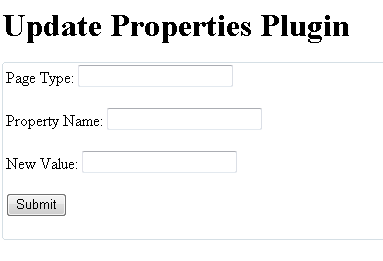
Which allows you to set a Page Type, Property Name and New Property Value – all as String – and, once submitted, will iterate through all pages in your site (from StartPage down) and set that property value. In my test instance, 297 pages took about 25 seconds to run.
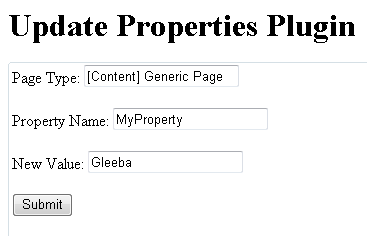
This could easily be refined and extended, but for about 15 minutes worth of work I now have an (admittedly dangerous) easy, repeatable process that allows me to update page values after creation.

Comments