
XForm spam prevention with reCAPTCHA or jQuery slider
reCAPTCHA
I’ve decided to do two different methods. The first is integration of reCAPTCHA in XForm. Here’s an example how it can look like with reCAPTCHAS “clean” theme.
t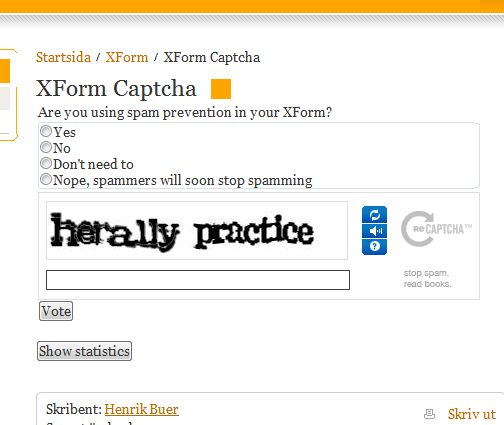
This is the XForm from the Public templates. To do this I’ve hooked in to the ControlsCreated event of the XFormControl on the page. There I create a new control of type RecaptchaControl and add this to the XFormControl above the submit button. Download the reCAPTCHA ASP.NET library (it’s just a dll). Drop it in your bin folder and add a reference to the dll. Heres the ControlsCreated event handler.
1: protected void FormControl_ControlsCreated(object sender, EventArgs e)
2: {
3: Recaptcha.RecaptchaControl objReCaptcha = new Recaptcha.RecaptchaControl();
4:
5: objReCaptcha.ID = "MyReCaptcha";
6: objReCaptcha.Theme = "clean";
7: objReCaptcha.PrivateKey = "your_private_key_here";
8: objReCaptcha.PublicKey = "your_public_key_here";
9:
10: // Find submit button and insert captcha before
11: foreach(Control objControl in FormControl.Controls)
12: {
13: if (objControl.GetType() == typeof(EPiServer.XForms.WebControls.Submit))
14: {
15: FormControl.Controls.AddAt(FormControl.Controls.IndexOf(objControl), objReCaptcha);
16: break;
17: }
18: }
19: }
After this you need to validate the reCAPTCHA when the form submits. This is done in BeforeSubmitPostedData event handler.
1: protected void FormControl_BeforeSubmitPostedData(object sender, EPiServer.XForms.WebControls.SaveFormDataEventArgs e)
2: {
3: Recaptcha.RecaptchaControl objControl = FormControl.FindControl("MyReCaptcha") as Recaptcha.RecaptchaControl;
4:
5: if (objControl != null)
6: {
7: Page.Validate();
8:
9: if (!objControl.IsValid)
10: {
11: // TODO: Notify user that validation failed
12: e.CancelSubmit = true;
13: }
14: }
15: }
That’s it. Add a custom validator or some other kind of user feedback if validation fails…
jQuery slider
With that said I must admit… I hate captchas. I think it’s an intrusive way that hinders user interaction. I’ve also seen a lot of bad captchas that’s barely readable which I find annoying. Your users deserves better.
My humble approach to spam prevention without pissing off my users are to use a jQuery slider instead of a button. Here’s how it can look.
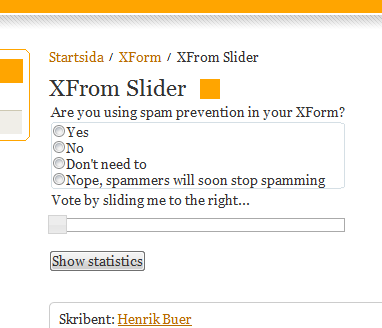
The idea here is that spam bots can’t interact with the slider. Help me out here readers… is this true? This demands just slightly more effort from the users compared to clicking a button.
I add the slider like I did the reCAPTCHA with the difference that I also hide the submit button. If you want to use the options that the editor can set for the forms submit button (ChannelOptions, mail addresses and subject) when the slider does postback, this is the place to do it. See the code below.
1: protected void FormControl_ControlsCreated(object sender, EventArgs e)
2: {
3: Slider.Slider objSlider = new Slider.Slider(Page.ClientScript.GetPostBackEventReference(this, Slider.Slider.PostBackArgument));
4:
5: objSlider.SliderHeading = "Vote by sliding me to the right...";
6: objSlider.SliderStyle = "style=\"margin-left:5px;margin-top:5px\"";
7:
8: // Find submit button, hide it and add slider
9: foreach(Control objControl in FormControl.Controls)
10: {
11: if (objControl.GetType() == typeof(EPiServer.XForms.WebControls.Submit))
12: {
13: // Save ChannelOption for later use when slider does postback
14: EPiServer.XForms.WebControls.Submit xSubmit = (EPiServer.XForms.WebControls.Submit)objControl;
15:
16: SubmitOptions = ActionToChanelOptions(xSubmit.Action);
17: FormControl.Data.MailFrom = xSubmit.ActionSettings["from"];
18: FormControl.Data.MailTo = xSubmit.ActionSettings["to"];
19: FormControl.Data.MailSubject = xSubmit.ActionSettings["subject"];
20:
21: if (SubmitOptions == ChannelOptions.CustomUrl)
22: {
23: FormControl.Data.CustomUrl = xSubmit.Action;
24: }
25:
26: if ((FormControl.Data.MailSubject == null) || (FormControl.Data.MailSubject.Length == 0))
27: {
28: FormControl.Data.MailSubject = FormControl.FormDefinition.MailSubject;
29: }
30:
31: Int32 iIndex = FormControl.Controls.IndexOf(objControl);
32:
33: FormControl.Controls[iIndex].Visible = false;
34: FormControl.Controls.AddAt(iIndex, objSlider);
35:
36: break;
37: }
38: }
39: }
1: if (IsPostBack && Request["__EVENTARGUMENT"] != null && Request["__EVENTARGUMENT"] == Slider.Slider.PostBackArgument)
2: {
3: Page.Validate();
4:
5: if (!Page.IsValid)
6: {
7: // TODO: Notify user that validation failed
8: }
9: else
10: {
11: FormControl.SubmitForm(SubmitOptions);
12: }
13: }
I’d really like your opinion on using a jQuery slider as spam prevention. Does it stop spam bots? Is there any other way for a bot to interact with a slider besides simulating mouse movements and clicks? I’ve been running the slider variant on my public site “protecting” blog comments and a guestbook for a few months now. So far no spam… Feel free to post your thoughts on the effectiveness of having a slider as opposed to having a captcha.
Code ‘n links
reCAPTCHA – get your keys here
reCAPTCHA ASP.NET library – get your dll here
The code is the XFom template from the Public templates modified to reside in an .aspx file
XForm reCAPTCHA here
XForm Slider here
Slider.cs here

Comments