
XML Sitemap for EPiServer CMS as a scheduled job, supported by search engines such as Google, Yahoo, Bing etc.
This sitemap generator adheres to the 0.9 version of the sitemap protocol as specified by sitemaps.org
Many of the public sites that I’ve been working with has used sitemaps both as XML sitemaps (sitemaps.org) and as simple text files (one URL/line). In my effort to reduce the repetitive work when developing sites, I decided to write a plug-in that I can just drop in the bin folder and be done with it so I can focus on the fun stuff.
I’ve seen sitemap generators for EPiServer that generates the sitemap on-the-fly when requested. If your site has a lot of pages this is a bad idea since it can be a lengthy process. There is also generally no need for the sitemap to reflect the absolute latest site structure the moment it’s requested because it’s only indicative i.e. the search engines does not guarantee to index every URL in the sitemap but it uses the sitemap to learn about the site structure. The final decision what URLs are indexed is up to the search engines algorithms. As stated in the blog post title this is a scheduled job so you can set the generation intervals to suite your needs.
The code isn't really that exiting. I use FindPagesWithCriteria to get the sites pages. After that I FilterForVisitor and remove the pages that are shortcuts to external pages from the collection to get a final set of pages to generate the sitemap for. Every language that the page exists for generates an URL.
The sitemap protocol specifies optional tags, change frequency and priority. My plug-in has two properties to facilitate this. After installation you may create properties on your page types or dynamic properties if you want to use these tags. Remember that setting all pages to the highest priority (1.0) won’t improve your ranking nor does setting all pages to the lowest priority (0.0) decrease your ranking The priority is relative to other pages on your site.
Limitations
A sitemap can contain a maximum of 50 000 URLs and be no larger than 10Mb. This plug-in doesn’t check for or consider those boundaries.
Installation
Drop the Sitemap.dll in your bin folder and the language file (xCreateSitemap.xml) in your lang folder. Configure the path to where the sitemap should be written (se below).
Configuration
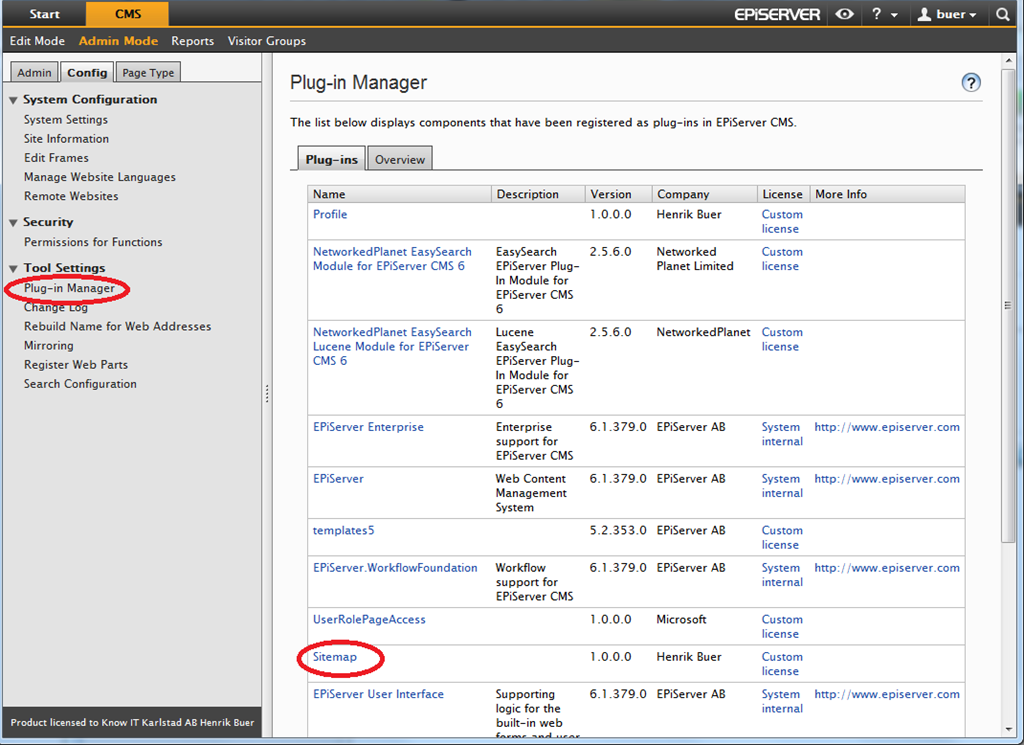
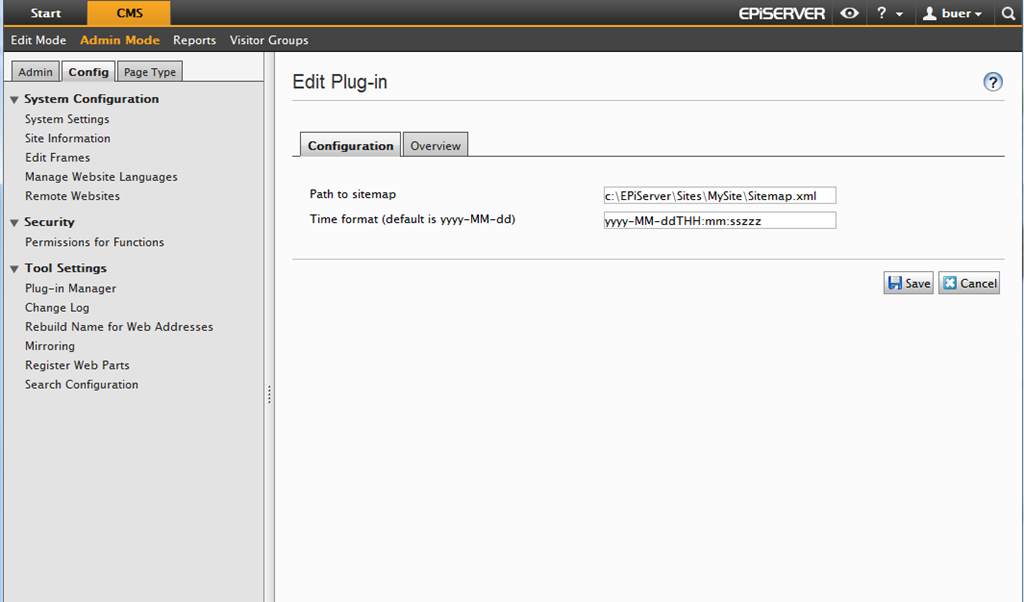
Use the Plug-in Manager to set a path to where the sitemap should be written. This should be in your sites structure and preferably in your root so that you can provide a link for search engines i.e http://www.mysite.se/sitemap.xml. You might have to configure access rights to the sitemap.
You can also specify what time format to use for the “lastmod” timestamp. Default is “yyyy-MM-dd”. If your pages change frequently you are encouraged to include the time portion so crawlers have more complete information about your site i.e. “yyyy-MM-ddTHH:mm:sszzz”. The timestamp should be in W3C Datetime encoding
If you want to use priority or change frequency create properties named “Priority” and “ChangeFrequency” on your page types or as dynamic properties. These properties should be of the included types “Priority” and “Change frequency”

Comments