

Handle the error in Composer function
It’s time to blog and my first post is about how we handle error when working with Composer function.
I agree with Fredrik Karlsson (Dropit) about what he wrote in his blog that Composer doesn’t have a easy way to handle the error for the function.
Most of you who’s working with Composer have seen this message some time

and try to find something in log for what has going wrong, but didn’t find anything. What’s wrong?
How can we solve this issue?
1. Configure log4net for logging Composer
We begin with configure the log4net for logging Composer. I recommend that we separate the log for Composer from EPiServer. It would be much easier to debug and find information. The best way to do this is creating a new log4net config with name “dropit.extension.config” and put it under “bin” folder due to Composer try to find this config in first hand, and add two loggers for Composer assemblies Dropit.Extension & Dropit.Extension.UI,
1: <?xml version="1.0" encoding="utf-8" ?>
2: <configuration>
3: <configSections>
4: <section name="log4net"
5: type="log4net.Config.Log4NetConfigurationSectionHandler, log4net" />
6: </configSections>
7: <!-- This section contains the log4net configuration settings -->
8: <log4net>
9: <!-- Try the logview4net utility to listen to UDP-logs, download from sourceforge.net -->
10: <appender name="udpLogAppender" type="log4net.Appender.UdpAppender" >
11: <!-- Typical encoding values are Unicode/utf-16 or utf-8 or ascii. See System.Text.Encoding for more info. Omit this tag to get the system default Ansi -->
12: <!-- Use utf-16 since it's default for logvivew4net -->
13: <encoding value="utf-16" />
14: <!-- Be careful where you send the logs, they may contain sensitive data. You can use 224.0.0.1 for the local net -->
15: <remoteAddress value="127.0.0.2" />
16: <remotePort value="8090" />
17: <layout type="log4net.Layout.PatternLayout">
18: <!-- You should be aware that generating type and method information is very SLOW -->
19: <conversionPattern value="%date %level - %message%n%exception" />
20: </layout>
21: </appender>
22: <!-- Setup the root category, add the appenders and set the default level -->
23: <root>
24: <level value="Error" />
25: <appender-ref ref="udpLogAppender" />
26: <!--appender-ref ref="RollingFileAppender" />-->
27: </root>
28: <logger name="Dropit.Extension">
29: <level value="Error" />
30: </logger>
31: <logger name="Dropit.Extension.UI">
32: <level value="Error" />
33: </logger>
34: </log4net>
35: </configuration>
2. Create a Composer function
Just make a very simple Composer function with an error, the ErrorFunction, and try to cause an DivideByZeroException.
1: public partial class ErrorFunction : BaseContentFunction
2: {
3: protected override void OnLoad(EventArgs e)
4: {
5: int x = 5;
6: int y = 0;
7: int z = x / y;
8: }
9: }
OK, Now try to register this function and use this (drag and drop) on a Composer page and see what happens.
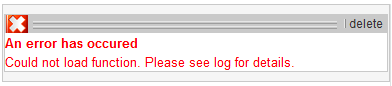
And take a look at the log
1: UDP8080 - 127.0.0.1 2009-11-13 16:27:47,005 ERROR - 1.2.5 Unhandled exception in ASP.NET
2: System.Web.HttpUnhandledException: Exception of type 'System.Web.HttpUnhandledException' was thrown. ---> System.DivideByZeroException: Attempted to divide by zero
3. Common Function Error Handler
Now, let catching the error by adding a try{} catch{} and using the CommonFunctionErrorHandler.
1: public partial class ErrorFunction : BaseContentFunction
2: {
3: protected override void OnLoad(EventArgs e)
4: {
5: if (!IsPostBack)
6: {
7: try
8: {
9: int x = 5;
10: int y = 0;
11: int z = x / y;
12: }
13: catch (DivideByZeroException ex)
14: {
15: if (!Utils.CommonFunctionErrorHandler(this,
16: "Invalid y value. The value cannot be zero.",
17: ex))
18: throw;
19: }
20: }
21: }
22: }
Compile, and try to drag and drop the function again. Now insteand of the standard message, we’ll get a more friendly message.

and the log records the same exception message again,
1: UDP8080 - 127.0.0.1 2009-11-13 16:35:27,427 ERROR - ASP.composer_functions_errorfunction_ascx: Invalid y value. The value cannot be zero.
2: System.DivideByZeroException: Attempted to divide by zero.
4. Composer Error handle level
Ok, But what the CommonFunctionErrorHandler does? you may wonder. The CommonFunctionErrorHandler handles an exception in three way: Development, Test or Production.
Take a look at the Composers settings in Admin-mode.
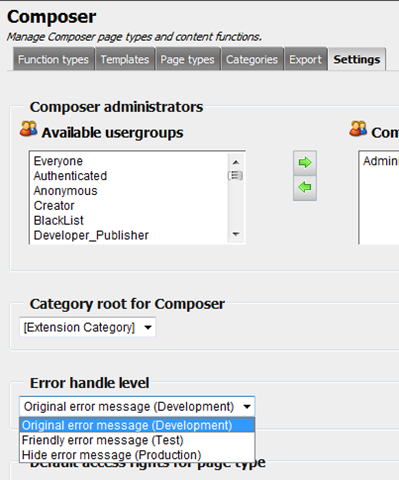
Try to switching between these modes. Go to the view mode of the Composer page that contains the ErrorFunction we created in previous section and see what happens with our “ErrorFunction”.
a. Original error message (Development): The page crashes and display the the original message of the exception.
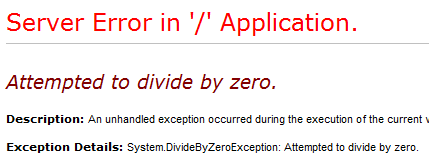
b. The Friendly error message (Test): Display a more friendly message so the tester can report the error and continue testing other functions on the page.
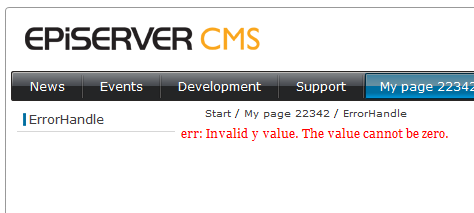
c. Hide error message (Production): This is kind of “On error resume next”. You may hide the function from end-user and let other composer function and controls on the page display as normal.
Conclusion
That’s all and I hope that I can give you a clue how you can handle the error in Composer function. Please let me know if you have any comments or suggestions for improving this handle in Composer.

Comments