
Google Analytics Gadget
Here is another little contribution to the Gadget Contest 2009. I was not sure what i was going to make util today when i discovered the Google Analytics Export API. The API let you export statistics recorded from Google Analytics javascript and use them in you own application. Be ware of that the Export API is still its early beta phase and may change with time. But still, fun to play with :-)
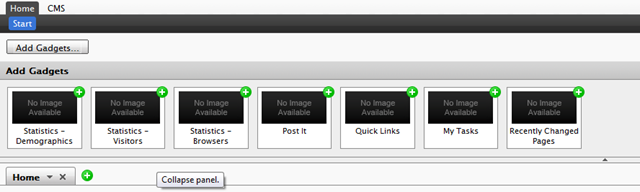
One thing that i know web editors like is to track their users. How many users, where they are, what they visit, what browser etc they use. Gadgets are a prefect whay of displaying this kind of information. I could make one big godly where they could choose between different reports. But i thought, the less the users need to configure the better. So i desided to splitt the reports into different gadgets. The editor could then just add the wanted reports into the dashboard.
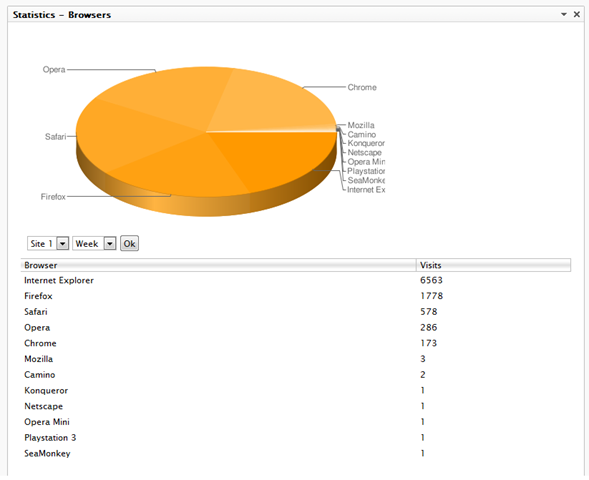
Beneath you can see a demontration of the Browser report displaying how many users use the different kind of web browsers. As you can see on the screenshot you can select data from different sites using the dropdown. The site dropdown is automagicaly populated based on the logon account for the gadget on Google Analytics. This means its not limited to the episerver site itself. The current relase of this gadget only support a basic time drill down: Today, this week, this month and this Year. Maybe a post a updated version of this gadget in the near future…
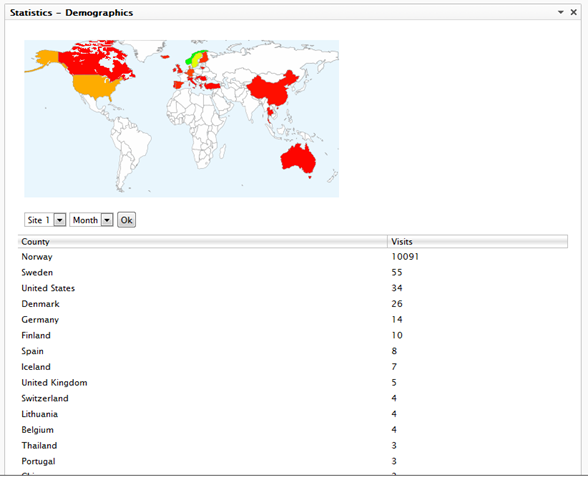
Another cool report is the demographic report showing the visitors in a map overlay.
 .
.
By the way, all of these graphs used by this gadget is made using the Google Chart API
For the installation:
This gadget installes as module (this seems to be a popular way of doing things lately)
Download the installer here
The only thing you have to do after you have installed the gadget through the EPiServer Deployment Center is to update web.config with the username and password for the Google Analytics Account
<appSettings>
<add key="AnalyticsGadget.Username" value="username" />
<add key="AnalyticsGadget.Password" value="password" />
</appSettings>
Download the source here
Feedback
If you have any feedback on this gadget, please don’t hesitate leaving a comment :-)

Comments