


Changes to the EPiServer CMS Globalization
When I got back from parental leave about a year and ago back I took on some bugs that had to do with the globalization functionality in EPiServer CMS. While trying to reproduce the bugs and testing around some I found out that there were quite a few glitches, mostly in the UI, when getting into more advanced language settings. There was also some uncertainty how the language settings should be treated for different use cases. To remedy this we worked on clarifying the specifications for the multi language functionality. This resulted in some changes that are now ready to be released in the EPiServer CMS 6 R2 release.
The changes affects
The
- The page language settings/language settings UI.
- Made a clear distinction between settings that affects editors (available) and settings that affects the site (Replacement/Fallback language).
- Edit panel
- Fixed some glitches where the language selector would sometimes now sync with the actual content language.
- Added information messages for some language cases.
- Replacement language now also sets System and User interface language to the replacement language (but not content language).
Page language settings
The page language settings UI has gotten a layout and textual update to clarify the different settings. First of all, there are new headings to separate the “available language”-setting that only affects editors from the “replacement/fallback”-language settings that affects the site visitors. Here is a screen shot of the UI in EPiServer CMS 6 R2:
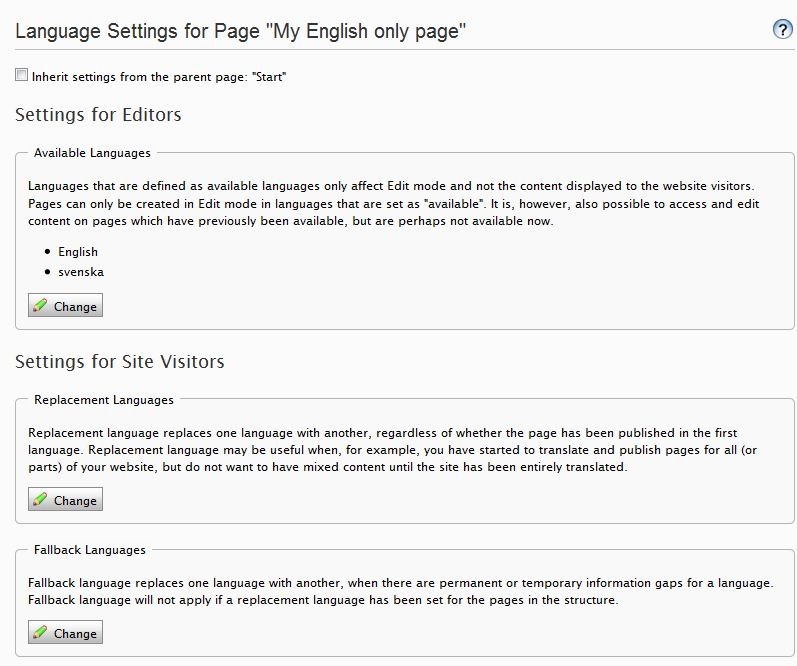
The connection between available languages and replacement languages has also been removed which makes is possible to set up replacement languages for all languages.
Edit panel updates
Edit panel has gotten some fixes and new functionality. First of all, there is informational messages when a page has language settings which affects the appearance of the page on the web site. This includes:
- The language does not exist for the page and is not visible on the web page.
- The language does not exist but is visible due to language settings.
- The language exists but is overridden due to replacement language settings.
Another change is that it’s now possible to preview a page that has no information for the selected language but is visible due to language settings. The following screen shot shows a page that does not exist for Swedish but is visible in English due to replacement language settings.
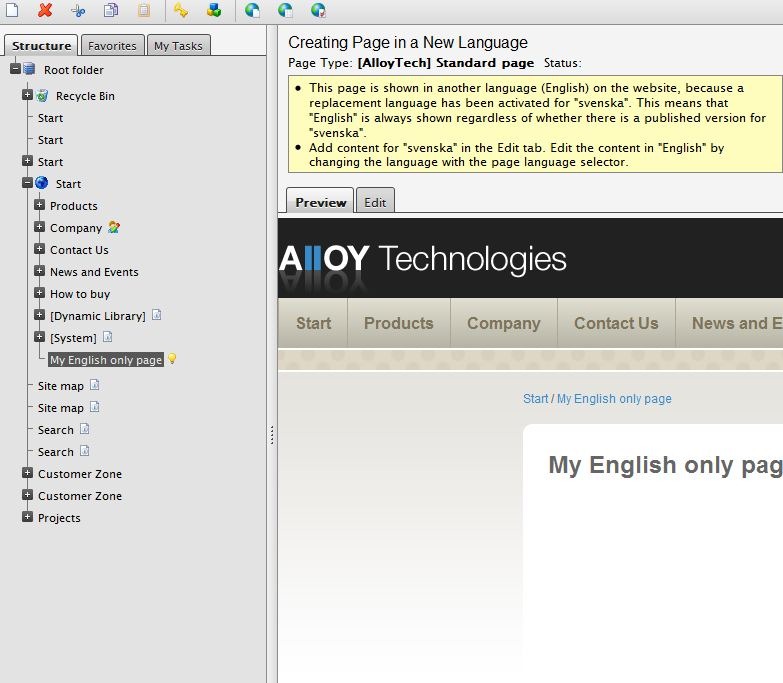
Replacement language updates
Replacement language now sets the System and User interface language to the replacement language. This means that translations and culture settings (like date/time formats) will appear with the replacement language’s culture settings. For a part of the site where replacement language has been set for all pages this means that this part of the site will appear the same way as if the user had visited the site in the replacement language. The only difference is that content language remains which means that pages that does not have a replacement language setting will appear in the original language (for instance a link outside the replacement language structure).
Changing this behavior
This behavior is implemented in the InitializeCulture method in EPiServer.PageBase. To turn this off you can either turn of the CultureSupport.OptionFlag in your page constructor or override the method for your page.

Comments