


EPiServer 7: Configuring editors for your properties
There is an updated version of this blog post for EPiServer 7.5 here.
In EPiServer 7, one of the goals for the new editing system has been to reduce the need to create custom properties. David Knipe has written an excellent blog post about using standard validation attributes. I wrote another blog post that explains how you create a custom editor in the EPiServer 7 preview release.
Since the preview release we have done some improvements that you might want to be aware of. First of all, editors are assigned to your value types and not your property types. For instance, the editor to select pages is connected to the PageReference type and not PropertyPageReference. One problem that comes with this change is that you might have several properties that have the same value type, for instance string, but that should behave differently. This has been solved by a new attribute, “EditorHint”, that you can assign to your model properties or PropertyData-derived classes. The following example shows how one of the built in properties that uses string as the value type is defined:
1: [EditorHint("ImageUrl")]
2: public class PropertyImageUrl : PropertyFileUrl
We have also made some additions to be able to easily create select lists or check box selections without having to create a custom editor. This can be done doing two things. First you have to assign a type that implements ISelectionFactory to the editing meta data. Then you have to assign one of the two built in editing widgets. The following example shows a page type model with two properties that enables single or multiple selection of languages:
1: using System;
2: using System.Collections.Generic;
3: using System.ComponentModel.DataAnnotations;
4: using EPiServer.Core;
5: using EPiServer.DataAbstraction;
6: using EPiServer.Framework.DataAnnotations;
7: using EPiServer.Shell.ObjectEditing;
8: using EPiServer.Shell.ObjectEditing.EditorDescriptors;
9:
10: namespace EPiServer.Templates.Alloy.Models.Pages
11: {
12: [SiteContentType(
13: GUID = "AAC25733-1D21-4F82-B031-11E626C91E3B",
14: GroupName = Global.GroupNames.Specialized)]
15: public class TestEditorsPage : PageData
16: {
17: [Display(GroupName = SystemTabNames.Content)]
18: [UIHint("CustomLanguage")]
19: public virtual string SingleLanguage { get; set; }
20:
21: [Display(GroupName = SystemTabNames.Content)]
22: [UIHint("CustomLanguageMultiple")]
23: public virtual string MultipleLanguage { get; set; }
24: }
25:
26: [EditorDescriptorRegistration(TargetType = typeof(string), UIHint = "CustomLanguageMultiple")]
27: public class LanguageEditorDescriptor : EditorDescriptor
28: {
29: public override void ModifyMetadata(ExtendedMetadata metadata, IEnumerable<Attribute> attributes)
30: {
31: SelectionFactoryType = typeof(LanguageSelectionFactory);
32: ClientEditingClass = "epi-cms/contentediting/editors/CheckBoxListEditor";
33:
34: base.ModifyMetadata(metadata, attributes);
35: }
36: }
37:
38: public class LanguageSelectionFactory : ISelectionFactory
39: {
40: public IEnumerable<ISelectItem> GetSelections(ExtendedMetadata metadata)
41: {
42: var languages = new List<SelectItem>();
43: languages.Add(new SelectItem(){ Value = "EN", Text = "English"});
44: languages.Add(new SelectItem(){ Value = "SW", Text = "Swahili"});
45: languages.Add(new SelectItem(){ Value = "PF", Text = "French Polynesia"});
46:
47: return languages;
48: }
49: }
50:
51: [EditorDescriptorRegistration(TargetType = typeof(string), UIHint = "CustomLanguage")]
52: public class LanguageMultipleEditorDescriptor : EditorDescriptor
53: {
54: public override void ModifyMetadata(ExtendedMetadata metadata, IEnumerable<Attribute> attributes)
55: {
56: SelectionFactoryType = typeof(LanguageSelectionFactory);
57: ClientEditingClass = "epi-cms/contentediting/editors/SelectionEditor";
58:
59: base.ModifyMetadata(metadata, attributes);
60: }
61: }
62: }
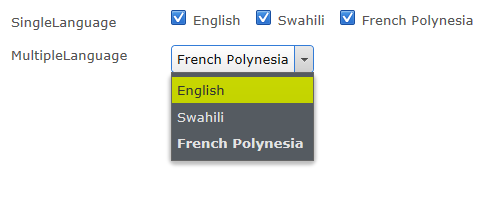
And this is how it looks while editing pages:

Comments