


Single/Multiple selection in EPiServer 7.5
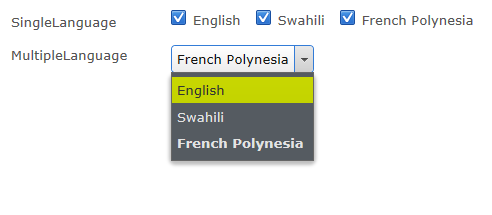
This is an updated blog post on how to set up single/multiple selection from a list of predefined values (The original blog post can be found here). In this blog post we are going to use two new attributes in EPiServer 7.5 that are located in the EPiServer.Shell.ObjectEditing namespace in the EPiServer.UI assembly: SelectOne and SelectMany. These can be defined on a property and requires a reference to a class implementing the ISelectionFactory interface:
[ContentType]
public class SamplePage : PageData
{
[SelectOne(SelectionFactoryType=typeof(LanguageSelectionFactory))]
public virtual string SingleLanguage { get; set; }
[SelectMany(SelectionFactoryType = typeof(LanguageSelectionFactory))]
public virtual string MultipleLanguage { get; set; }
}
public class LanguageSelectionFactory : ISelectionFactory
{
public IEnumerable<ISelectItem> GetSelections(ExtendedMetadata metadata)
{
return new ISelectItem[] { new SelectItem() { Text = "English", Value = "EN" }, new SelectItem() { Text = "Guinean", Value = "GN" } };
}
}
Creating your own attributes
Since you wan’t to follow the DRY principle and avoid adding the reference to the selection factory in a lot of attributes it might be good creating your own attribute if you will use them in several places. This can be done by inherriting from the EPiServer attributes and just overriding the SelectionFactoryType property:
[AttributeUsage(AttributeTargets.Property, AllowMultiple = false)]
public class LanguageSelectionAttribute : SelectOneAttribute
{
public override Type SelectionFactoryType
{
get
{
return typeof(LanguageSelectionFactory);
}
set
{
base.SelectionFactoryType = value;
}
}
}

Comments