


Hidden Gems of EPiServer Find
EPiServer Find is not just for EPiServer CMS pages– in fact the client API supports indexing of any .NET object.
When working with indexing of data in EPiServer Find there are some hidden gems that are nice to know about.
The Id attribute: Avoid duplicates when updating
According to the documentation, If a document of the same type with the same ID already exists it will be overwritten (or updated if you like). In other words, controlling the ID is the key.
Let me illustrate this with a code sample. For demonstration purposes I have created a class Product:
public class Product
{
public Guid Id { get; set; }
public string DisplayName { get; set; }
public string Description { get; set; }
public string Brand { get; set; }
public string Model { get; set; }
public string Type { get; set; }
}
Using the Product model I can now add some simple test data to the EPiServer Find index.
Product p1 = new Product()
{
Id = guidproduct1,
DisplayName = "Cannondale CAAD 10",
Model = "CAAD 10 Shimano 105",
Description = "With its lightest-in-class frame and unmistakable Cannondale ride-feel,"
+ "the CAAD10 is designed to turn people into cyclists.",
Brand = "Cannondale",
Type = "Elite Racing Bikes"
};
Product p2 = new Product()
{
Id = guidproduct2,
DisplayName = "Cannondale Synapse Carbon 3",
Model = "Carbon 3 Ultegra",
Description = "Elite-race performance meets all-day comfort.",
Brand = "Cannondale",
Type = "Elite Racing Bikes"
};
var client = Client.CreateFromConfig();
client.Index(p1);
client.Index(p2);
If I navigate to the Find Explorer (from the main menu in EPiServer CMS) I can now see the following:
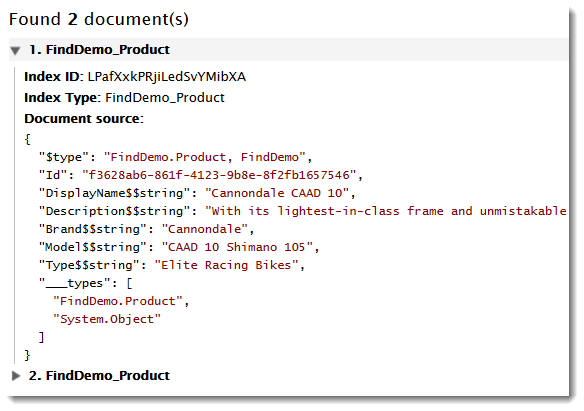
Notice the “Index ID” – this is the id that Find is using for identifying each document in the index. Lets see what happens if I now try to update product number two:
private static void UpdateItem()
{
var client = Client.CreateFromConfig();
// get product 2
var searchResult = client.Search<Product>().
Filter(p => p.Id.Match(guidproduct2))
.GetResult()
.FirstOrDefault();
if (searchResult != null)
{
searchResult.Type = "Performance Road";
client.Index(searchResult);
}
}
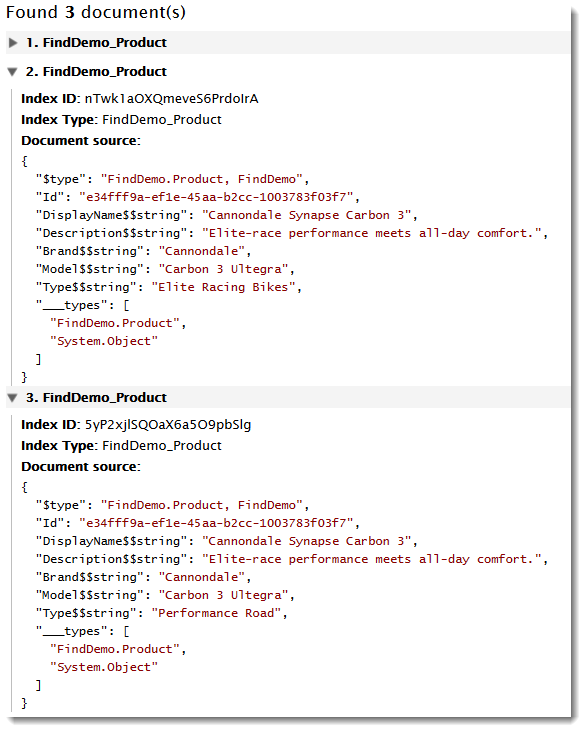
As you can see from the screenshot above, the update resulted in duplicate documents in the index. Off course, I could solve this by deleting the document before re-indexing, but that far from an ideal solution. The trick is to use the Id attribute on the property that uniquely identifies your model:
[Id]
public Guid Id { get; set; }
Re-indexing, we can see that the Find is now using my Id property as Index ID:
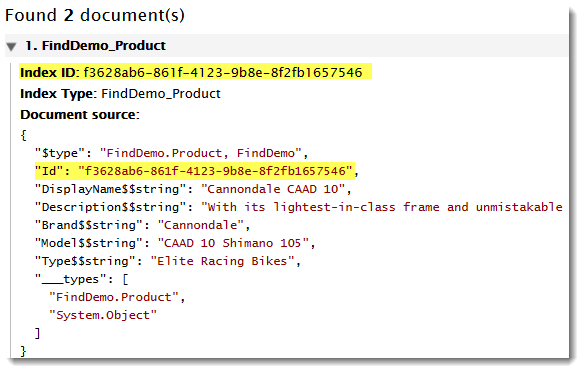
This way updating existing documents no longer result in duplicates.
“Making it look pretty” - using IDocumentInterpreter
By default, Find will use Namespace_Class as title in the index explorer. To easier distinguish between the different documents, we can tell the explorer to use a property on our model instead. In order to do this, we create a new class where we implement interface IDocumentInterpreter and override the ExtendDocumentInformation method.
public class MyIndexInterpreter : IDocumentInterpreter
{
public void ExtendDocumentInformation(IndexDocument indexDocument)
{
Expression<Func<Product, string>> headerExpression =
x => x.DisplayName;
var headerField = SearchClient.Instance.Conventions.
FieldNameConvention.GetFieldName(headerExpression);
JToken headerToken;
if (indexDocument.Hit.Document.TryGetValue(headerField, out headerToken))
{
indexDocument.Headline = headerToken.ToString();
}
}
}
Notice that you pass in your model type and specify the property you want to use as title – here I’m using DisplayName.
Navigating to the explorer view, it is a lot easier to distinguish between the documents in the index.

The IDocumentInterpreter interface is part of the EPiServer.Find.Framework.UI namespace.

Comments