


Did you know of the UnifiedFileSummarySaved?
Recently I had a customer that wanted to list file attachments on their site. The idea was to use Find and use custom file summary properties as base for the list filter values.
One of the key points was that if “Brand” was not set, the file should not be listed at all on the site. Basically, if file summary was updated I needed to re-index the file.
Those of you who have been working with EPiServer for some time know that the EPiServer Datafactory exposes several events for pages and files. In EPiServer 7 we have got a new event which fires when the file summary is changed. Here is how I made use of it:
Creating a separate VPP with a custom file summary is easy enough - add a new VPP to EPiServerFramework file:
<add showInFileManager="true" virtualName="Manuals" virtualPath="~/Manuals/"
      bypassAccessCheck="false" maxVersions="5" useRouting="true"
      customFileSummary="~/CustomSummary.config" name="SiteManuals"
      type="EPiServer.Web.Hosting.VirtualPathVersioningProvider, EPiServer" />
I then added the CustomSummary.config file, which resulted in the following file summary edit view:
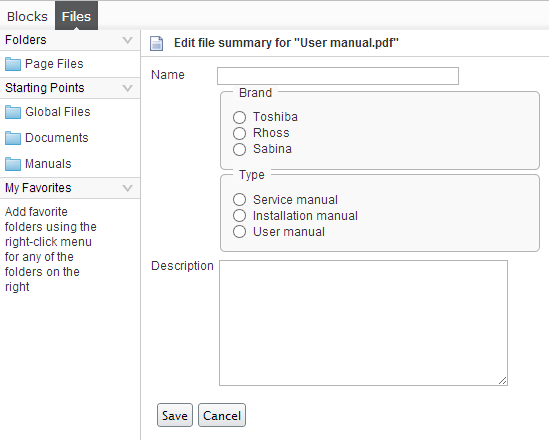
Next step was hooking up to the event, and the preferred way is to use a InitializableModule.
[InitializableModule]
    [ModuleDependency(typeof(EPiServer.Web.InitializationModule))]
    public class FileEventHookUp : IInitializableModule
    {
        private bool _eventsAttached = false;

        public void Initialize(InitializationEngine context)
        {
            if (!_eventsAttached)
            {
                // Attach event handler to event that fires when file summary changes
                UnifiedFile.UnifiedFileSummarySaved += FileSummarySaved;
                _eventsAttached = true;
            }
        }

        void FileSummarySaved(UnifiedFile sender, UnifiedVirtualPathEventArgs e)
        {
            var fields = sender.Summary.Dictionary;

            if (fields.Contains("Brand"))
            {
                string brandName = fields["Brand"] as string;
                if (!string.IsNullOrEmpty(brandName))
                {
                    var document = new Document()
                        {
                            Name = fields["Name"] as string,
                            Brand = brandName,
                            Description = fields["Description"] as string,
                            Type = fields["Type"] as string,
                            PermanentLink = sender.PermanentLinkVirtualPath,
                            Changed = sender.Changed
                        };

                    SearchClient.Instance.Index(document);
                }
            }
        }

        public void Uninitialize(InitializationEngine context)
        {
            // Detach event handlers
            UnifiedFile.UnifiedFileSummarySaved -= FileSummarySaved;
        }

        public void Preload(string[] parameters)
        {
            throw new NotImplementedException();
        }
    }
The Document class is a simple DTO class used for storing the data in Find.
As a side note: Those of you who have seen a preview of what is coming in the next release of EPiServer know that handling files will become much easier. 

Comments