
Troubleshooting database tool – SqlClientLogger
This tool logs every call to the database done by the application layer with a stack trace and a time it took to execute the query. The benefits of using this tool is that it prints out a stack trace so it’s easy to locate what code that generates the database call. The logs are written to log4net and should appear in the sites log file.
Download
Requirements:
.Net 2.0
Log4Net
Installation
Drop the assembly “SqlClientLogger.dll” to your sites bin/folder
Replace the SqlClient database provider with the logging SqlClient database provider in web.config
<configuration>
...
<system.data>
<DbProviderFactories>
<remove invariant="System.Data.SqlClient" />
<add name="System.Data.SqlClient"
invariant="System.Data.SqlClient"
description=".Net Framework Data Provider for SqlServer with logging of executed commands"
type="SqlClientLogger.DatabaseFactory, SqlClientLogger"/>
</DbProviderFactories>
</system.data>
</configuration>
Usage
When the SqlClientLogger is installed on the site it is going to send log4net messages using the logger “SqlClientLogger”.
Log4Net logger levels
DEBUG – prints out database command, stack trace and execution time
INFO – prints out database command and execution time.
WARN – prints out database command, stack trace and execution time the execution time is over 500 ms
Sample of how to configure it in the file
EPiServerLog.config (or where your log4net configuration is)
<log4net>
...
<logger name="SqlClientLogger">
<level value="DEBUG" />
</logger>
Duration Filter
Duration threshold can be set in the appSettings in the web.config file for the keys
SqlClientLoggerDurationFilterMs – a threshold for all logged database calls
SqlClientLoggerDurationWarnFilterMs - a threshold for trigger a warning message, the default is set to 500 ms
Example of setting duration threshold to 10 ms and warning threshold to 100 ms
<configuration>
...
<appSettings>
<add key="SqlClientLoggerDurationFilterMs" value="10"/>
<add key="SqlClientLoggerDurationWarnFilterMs" value="100"/>
</appSettings>
Remarks
SqlClientLogger are not going to work with LinqToSql sense it using the SqlClient database providers directly without looking at the configuration. To trace LinqToSql calls please use LinqToSqlLogger.zip
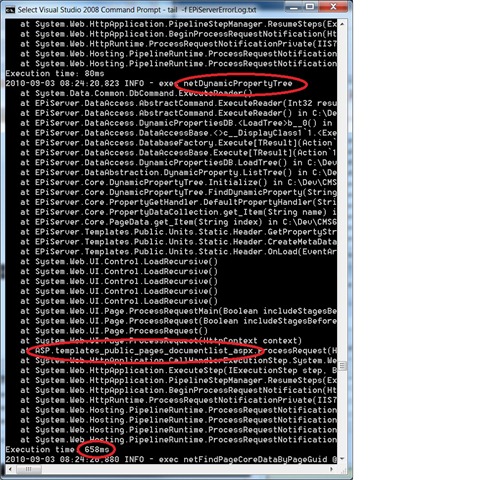
Example of output:
In this example we can see the stored procedure “netPropertyTree” is executed without any arguments are executed by the user control in Templates/Public/Pages/DodumentList.aspx and its takes 685 milliseconds.

Comments