
Versions state graph of a page data object in the EPiServers editorial interface
This is a follow up of my first blog post Version state graph of a PageData object and describes what save actions are taken when clicking in the EPiServers editorial interface (for EPiServer CMS 6 R2).
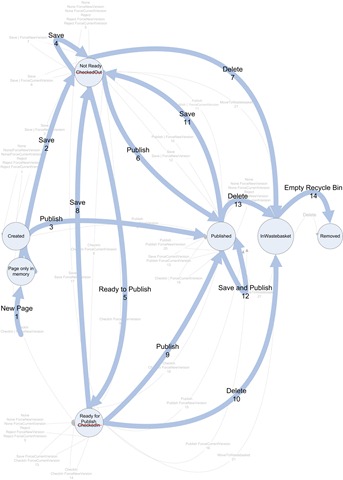
Comments to state graph
the descriptions only describes the most important actions taken when an action occurs, for a more detailed description please visit ny first blog post Version state graph of a PageData.
| Id | From state | Editorial action | Description |
| 1 | New Page is invoked from the editorial interface. | A page is created in the memory. the page property Pending Publish is set to true. | |
| 2 | Page only in memory | The editor clicks save. | The page is saved as a checked out version. The Properties PageLink,PageFolderID is set.when the page is created. |
| 3 | Page only in memory | The editor clicks publish. | The page is saved as a published version. The Properties PageLink,PageFolderID is set.when the page is created and the page property PendingPublish is set to false. |
| 4 | Checked out | The editor clicks save. | The saved version is overwritten with a new checked out version. |
| 5 | Checked out | The editor click Ready to Publish. | The page is saved as the same version as the checked in page, but with the status checked out |
| 6 | Checked out | The editor click publish. | The page is saved as the same version as the checked in page, but with the status checked in |
| 7 | Checked out | The editor deletes the page. | The page is moved to the Recycle bin, the pages property IsDeleted is set to true. |
| 8 | Checked In | The editor click save. | The page is saved as a new version with the status checked out. |
| 9 | Checked In | The editor clicks publish. | The page is saved with the same version and the property PendingPublish is set to false. |
| 10 | Checked In | The editor delete the page. | The page is moved to the Recycle bin, the pages property IsDeleted is set to true |
| 11 | Published | The editor clicks save. | A new version is created with the page property PendingPublish set to false. |
| 12 | Published | The editor clicks Save and publish. | A new published version is created. |
| 13 | Published | The editor deletes the page. | The page is moved to the Recycle bin, the pages property IsDeleted is set to true |
| 14 | In Wastebasket | The editor empty Recycle Bin. | The page and all its versions are deleted from the database. |
Wastebasket
When moving a page away from the wastebasket the page property IsDeleted will be set to false. If you manually move a page to the wastebasket IsDeleted will be set to true.
Published delayed pages
The scheduled job “Publish Delayed Page Versions“ list delayed pages in all the page providers. For the local page provider it looks at the properties DelayedPublished, ReadyToPublish and the start publish date is set for the page to be published, and then publish the page if the correct criteria is set.
Hiding pages that has an old StopPublish date
When pages are displayed to the end user all pages has to be filtered out that the current user should not see. The filter FilterForVisitors works in most of the cases.

Comments