
A social plugin for EPiServer
The background
Since the release of EPiServer 6 i haven´t been engaged in any pure EPiServer projects and therefor haven´t got to use the new and shiny features that comes with version 6. Because of that (and the fact that my EPiServer developer certificate soon will expire again) I started playing around with the Dynamic Data Store recently to get a better grip on it.
The goal
The goal of this, other than me getting to know DDS, was to create a plugin for EPiServer that provided some basic “social” features like comments and ratings. There has been numerous blogposts and demos on how to implement this kind of functionality using DDS, but I thought I would take it a step further and create a ready-to-use plugin.
Besides that, I wanted the use of it to be as simple as possible. No configuration, no setup, no extra files. Just drop an assembly in the bin-folder and get busy coding.
The result
The result of all this became a plugin that provides a simple API for creating comments and ratings for EPiServer pages. It also contains a simple editmode plugin for managing these for each page.
This is to be considered in an alpha stage. There still remains some work before it is ready and additional features will be added along the way. Feel free to try it out.
This post focuses on how to use the EPiSocial plugin rather than how DDS works.
Single assembly deployment
Well, almost. The plugin itself is just a single assembly, but it depends on both AutoMapper and StructureMap.
So the deployment consists of adding the following three assemblies to your bin-folder:
- EPiSocial.dll
- AutoMapper.dll
- StructureMap.dll
Then add a reference to EPiSocial and you´re done.
POCO objects
The comments and ratings are simple POCO objects and looks like this:
PageComment class:
1: public class PageComment
2: {
3: public string Id { get; set; }
4: public string Text { get; set; }
5: public int PageId { get; set; }
6: public string PageLanguage { get; set; }
7: public Author Author { get; set; }
8: public DateTime Created { get; set; }
9: }
PageRating class:
1: public class PageRating
2: {
3: public string Id { get; set; }
4: public int Rating { get; set; }
5: public int PageId { get; set; }
6: public string PageLanguage { get; set; }
7: public Author Author { get; set; }
8: public DateTime Created { get; set; }
9: }
Author class:
1: public class Author
2: {
3: public string Email { get; set; }
4: public string Name { get; set; }
5: }
Usage - The easy way
The EPiSocial plugin provides a EPiSocialService class that is the entrypoint for using the API. It has a singleton instance, EPiSocialService.Instance, to use.
The EPiSocialService itself has two properties, a CommentRepository and a RatingRepository, that provides methods for adding, retrieving and removing comments/ratings.
Add a comment:
1: var pageComment = new PageComment
2: {
3: Text = "Some text",
4: PageId = 3,
5: PageLanguage = "sv",
6: Created = DateTime.Now,
7: Author = new Author { Name = "Some name" }
8: };
9:
10: EPiSocialService.Instance.CommentRepository.AddComment(pageComment);
Get comments for a page:
1: var commentsForPage = EPiSocialService.Instance.CommentRepository.GetCommentsForPage(3);
Languagespecific overload:
1: var commentsForPage = EPiSocialService.Instance.CommentRepository.GetCommentsForPage(3, "sv");
Usage - The recommended way
Even though the above example is really quick and easy to use, you really should not depend directly on the EPiSocialService class. As the good developer you are you should instead have dependencies on the interface IEPiSocialService or any of the repository interfaces ICommentRepository or IRatingRepository.
Editmode plugin
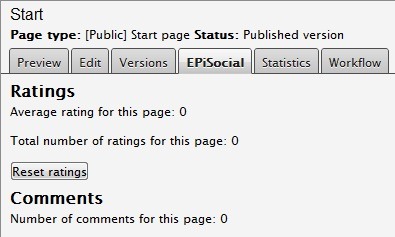
When adding the EPiSocial assembly you also get an editmode plugin added to EPiServer. It is a tab in the editpanel of each page named “EPiSocial”. The plugin contains some statistics for the current page and the ability to reset ratings and remove unwanted comments.
This has been an introduction to EPiSocial. The project is just in it´s first stumbling steps and any feedback is appreciated.
The plugin can be downloaded here for now. Feel free to try it out.

Comments