
A critical vulnerability was discovered in React Server Components (Next.js). Our systems remain protected but we advise to update packages to newest version. Learn More

Sebastian Lundh
Nov 30, 2009
  6062
(0 votes)

Request Monitor Gadget

The idea behind this gadget is to be able to pinpoint slow pages and see activity on the site. Then analyze why these pages takes long time to load. You can also on specific pages see all requests to compare performance of the site to earlier. The gadget will show activity for the day with updates every 20min.
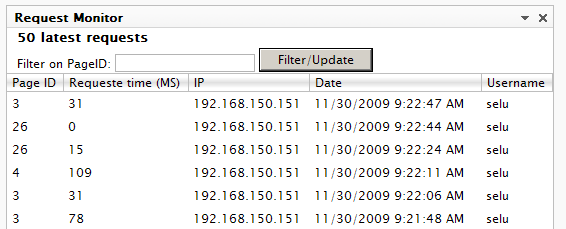
 

latest
Shows 50 latest requests to the site with page id, request time, ip, date and username if logged in. You can filter on Pageid, if thextbox is empty it will just refresh table.
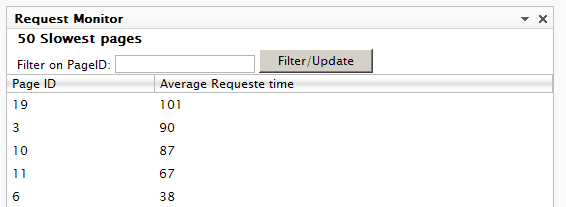
 

 slowest

Shows the 50 slowest pages with page id and average request time for it. Here you can also search by page id to get data for specific pages.
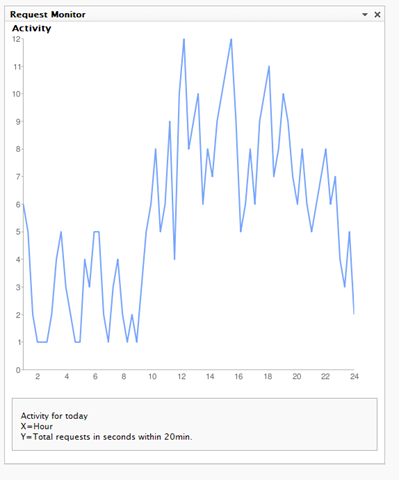
 

 Activity

Shows activity for today over 24h. With all requests grouped within 20min. Google chart is used.


Configuration will let you empty all data.


Installation

Download the install package and install it with EPiServer Deployment Center.

You will also have to update web.config also with the http module that listens to PreRequestHandlerExecute and PostRequestHandlerExecute to capture request times.

Add to <httpModules> (IIS6) and <Modules> (IIS7):
<add name="RequestModule" type="RequestMonitorGadget.Modules.RequestModule, RequestMonitorGadget"/>


Download


Nov 30, 2009

Comments

Please login to comment.
Latest blogs
A day in the life of an Optimizely OMVP: Learning Optimizely Just Got Easier: Introducing the Optimizely Learning Centre

On the back of my last post about the Opti Graph Learning Centre, I am now happy to announce a revamped interactive learning platform that makes...

Graham Carr | Jan 31, 2026

Scheduled job for deleting content types and all related content

In my previous blog post which was about getting an overview of your sites content https://world.optimizely.com/blogs/Per-Nergard/Dates/2026/1/sche...

Per Nergård (MVP) | Jan 30, 2026

Working With Applications in Optimizely CMS 13

💡 Note:  The following content has been written based on Optimizely CMS 13 Preview 2 and may not accurately reflect the final release version. As...

Mark Stott | Jan 30, 2026

Experimentation at Speed Using Optimizely Opal and Web Experimentation

If you are working in experimentation, you will know that speed matters. The quicker you can go from idea to implementation, the faster you can...

Minesh Shah (Netcel) | Jan 30, 2026