
Take the community feedback survey now.

Thomas Krantz
Aug 12, 2010
  2946
(0 votes)

Insert EPiServer page properties into CSS-files with EPiCssModifier

Have you ever wanted to replace hard wired image urls in your css files with images selected from EPiServer? That is, without using inline css in your templates.

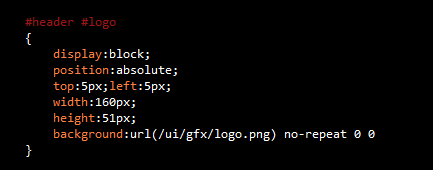
Usually, your css may look something like:
image

You want to let the editors pick the image for the logo, right?

If you’re using PageTypeBuilder – which you should – then it’s only a matter of adding a property attribute to your page type class. Like so:

image

The CssFragment attribute in the property declaration means that you want to replace /ui/gfx/logo.png in all css-files with whatever value LogoImage contains.

What happens when you render the page is that the css links are modified slightly. This is your original css link:

image

Instead, it will render:

image

Note the appended query string to the css link.

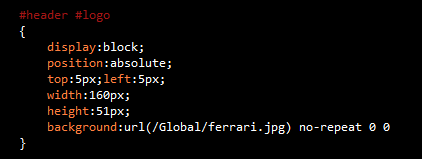
Then a http handler will catch the request to the css-file and do a simple search and replace based on the query string parameters. The result will be a css that looks like this:
image

Prerequisites:

1. EPiServer CMS 6

2. PageTypeBuilder

To use:

1. Unzip, compile and drop the EPiCssModifier.dll in your /bin

2. Add this to the Web.config:

image

3. Voila! You’ve got yourself an inline-css free road to happiness.

Download source and binaries for EPiCssModifier

Aug 12, 2010

Comments

Please login to comment.
Latest blogs
A day in the life of an Optimizely OMVP - Opticon London 2025

This installment of a day in the life of an Optimizely OMVP gives an in-depth coverage of my trip down to London to attend Opticon London 2025 held...

Graham Carr | Oct 2, 2025

Optimizely Web Experimentation Using Real-Time Segments: A Step-by-Step Guide

  Introduction Personalization has become de facto standard for any digital channel to improve the user's engagement KPI’s.  Personalization uses...

Ratish | Oct 1, 2025 |

Trigger DXP Warmup Locally to Catch Bugs & Performance Issues Early

Here’s our documentation on warmup in DXP : 🔗 https://docs.developers.optimizely.com/digital-experience-platform/docs/warming-up-sites What I didn...

dada | Sep 29, 2025

Creating Opal Tools for Stott Robots Handler

This summer, the Netcel Development team and I took part in Optimizely’s Opal Hackathon. The challenge from Optimizely was to extend Opal’s abiliti...

Mark Stott | Sep 28, 2025

Integrating Commerce Search v3 (Vertex AI) with Optimizely Configured Commerce

Introduction This blog provides a technical guide for integrating Commerce Search v3, which leverages Google Cloud's Vertex AI Search, into an...

Vaibhav | Sep 27, 2025

A day in the life of an Optimizely MVP - Opti Graph Extensions add-on v1.0.0 released

I am pleased to announce that the official v1.0.0 of the Opti Graph Extensions add-on has now been released and is generally available. Refer to my...

Graham Carr | Sep 25, 2025
