

The beauty of Decorator pattern in Optimizely
Decorator pattern is one of my favorite design pattern for backend code development.
From wikipedia:
A decorator pattern is a design pattern that allows a behavior to be added to an individual object dynamically, without affecting the behavior of other objects from the same classes.
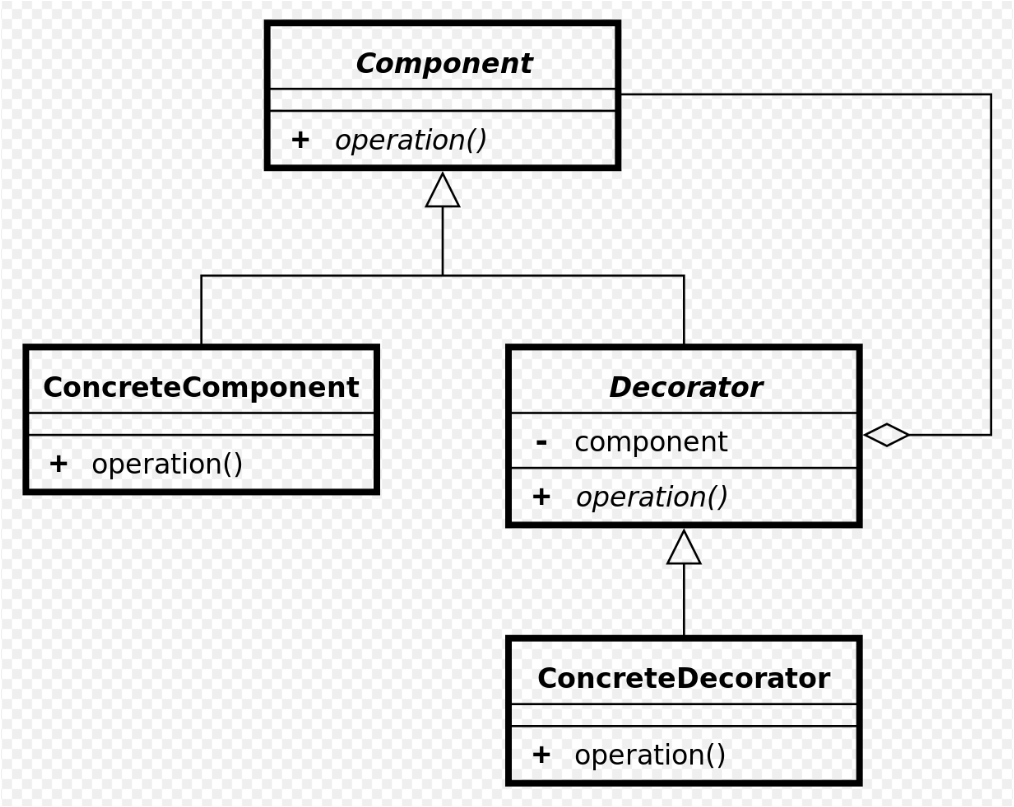
Advantages:
- Helps you extend the behaviour of the classes/services without modifying the behavior.
- Helps enforcing single responsibility principle (one class one responsibility) and Open/Closed principle (classes can be extended but not modified).
- More efficient than subclassing because the objects behavior can be augmented without definining an entierly new object.
- Mainly used for caching keep the layer separate (including the keys can be made unique per functionality)
- Additional scenarios - logging, alerting, processing etc.
Implementation:
A simple example is an alert needs to be sent every time an order is submitted or there's an unhandled exception in the order service after a user submits the order. It might be tempting to add an 'Alert Sender Email' dependency directly to the main order service class. However, if we need to stick to SRP and O/C SOLID principles, order service should only perform 1 job (submit the order).
In that case, one way to extend the behavior of the order service class is to create a new class that inherits from the same interface (IOrderSubmitService) that sends the email. This means you don't need to add a new interface (unlike sub-classing) which makes the interfaces slim and helps the interface segregation principle indirectly.
Sample code:
namespace RF.Website.CMS.Features.CartCheckout.OrderSubmit.Alerting
{
    using System;
    using System.Threading.Tasks;
    using RF.Website.CMS.Features.CartCheckout.OrderSubmit.Services;
    using RF.Website.CMS.Features.CartCheckout.OrderSubmit.ViewModels;
    using RF.Website.Common.Features.Foundation.Alerts.Services;

    public class AlertingOrderSubmitService : IOrderSubmitService
    {
        private readonly IOrderSubmitService _implementation;
        private readonly IAlertSender _alertSender;

        public AlertingOrderSubmitService(
            IOrderSubmitService orderSubmitService,
            IAlertSender alertSender)
        {
            _implementation = orderSubmitService ?? throw new ArgumentNullException(nameof(orderSubmitService));
            _alertSender = alertSender ?? throw new ArgumentNullException(nameof(alertSender));
        }

        public async Task<OrderSubmitViewModel> SubmitOrderAsync(string associateName, int cartVersion, string kountSessionId)
        {
            try
            {
                return await _implementation.SubmitOrderAsync(associateName, cartVersion, kountSessionId);
                // Potential to add code to send email after every successful submission.
            }
            catch (Exception exception)
            {
                string subject = "SubmitOrderAsync Error";
                string body = "An error occurred while calling SubmitOrderAsync.";
                await _alertSender.SendAlertAsync(subject, body, exception);
                throw;
            }
        }
    }
}
The statement in the try block is the one that calls the implementation of the submit order
The IOrderSubmitService:
namespace ClientName.CartCheckout.OrderSubmit.Services
{
    using System.Threading.Tasks;
    using ClientName.CartCheckout.OrderSubmit.ViewModels;

    public interface IOrderSubmitService
    {
        Task<OrderSubmitViewModel> SubmitOrderAsync();
    }
}
Next you will need to ensure the above code wraps the main code by using a decorator pattern. Luckily, it comes as a part of the Structure map and can be easily incorporate this in your code.
public void ConfigureContainer(ServiceConfigurationContext context)
{
 context.StructureMap().Configure(container =>
{
   container.For<IOrderSubmitService>().Use<DefaultOrderSubmitService>();
  // Can be used for logging or extending other behaviors of the Submit Order service
  // container.For<IOrderSubmitService>().DecorateAllWith<LoggingOrderSubmitService>();
   container.For<IOrderSubmitService>().DecorateAllWith<AlertingOrderSubmitService>();
}

}
That's it. Add a breakpoint in the AlertingOrderSubmitService to see it in action. Every time it will hit the wrapper/decorator class and then into your concrete implementation of the functionality.
Happy coding!

Comments