

Localize Forms post-submission actors
The "Send email after submission" actor for Episerver Forms are not marked as LanguageSpecific. That's a real struggle for editors when they want to customize the email response for each language version.
I'm not sure about the background why this is not translateable by default.
However, there are a few workarounds for this trouble.
Use the "Edit propery" function in CMS Admin
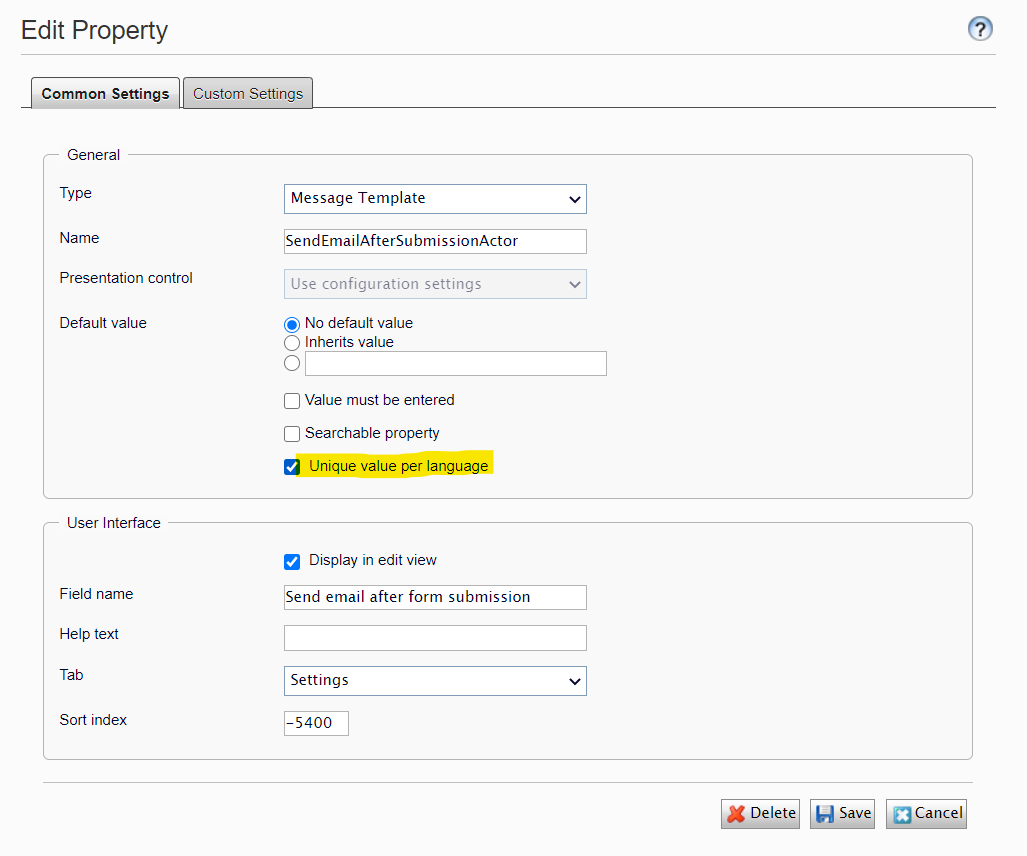
Pros:
- Easy ans effortless
Cons:
- Not safe
- The setting might revert back to default after IIS recycle, nuget update or code deployment
- The translated data will be lost (permanently!) if the property reverts back to default
Programmatically update the property attribute
We can create an initialization module that executes after Forms finishes its init tasks.
    [InitializableModule]
    [ModuleDependency(typeof(EPiServer.Forms.EditView.InitializationModule))] // Should initialize AFTER Epi Forms
    public class FormsLanguageSpecific : IInitializableModule
    {
        Injected<IContentTypeRepository> _contentTypeRepository;
        Injected<IPropertyDefinitionRepository> _propertyDefinitionRepository;

        public void Initialize(InitializationEngine context)
        {
            var containerTypeList = typeof(IFormContainerBlock).GetDerivedTypes();
            foreach (var containerType in containerTypeList)
            {
                var formContainerContentType = _contentTypeRepository.Service.Load(containerType);
                if (formContainerContentType == null)
                {
                    continue;
                }

                var actors = formContainerContentType.PropertyDefinitions
                    .Where(p => p.Type!=null && p.Type.TypeName != null
                        && p.Type.TypeName.Equals("EPiServer.Forms.EditView.SpecializedProperties.PropertyEmailTemplateActorList"));
                foreach (var actor in actors) // Iterates through all actors (incl. custom actors)
                {
                    var clone = actor.CreateWritableClone();
                    clone.LanguageSpecific = true;
                    _propertyDefinitionRepository.Service.Save(clone);
                }
            }
        }
    }
Pros:
- Don't need to worry about many msitake when using the Admin UI
- It permanently changes the property (almost)
- Personally, I haven't seen any issue after updating/deploying
Cons:
- The site will fail to start in case of internal Forms code refactors
Feb 23, 2021

Comments