


Visual Studio 2019 Features, Enterprise, Extensions and Remote Debugging Woes
Introduction
Visual Studio 2019 has been out about 6 weeks now and in this article I'm going to present both the best features to upgrade for, as well as my pick of my favourite extensions and I'm also going to cover woes around debugging in 2019.
Features
Most of these features can be seen in more detail here https://docs.microsoft.com/en-us/visualstudio/ide/whats-new-visual-studio-2019?view=vs-2019 but I'm going to give a quick bulleted list of the main feature enhancements
- New Improved Search - The main search has been made a lot more like what you'd expect in tools like Resharper with Ctrl + Q availible to quicksearch from the keyboard. All classes and code are in this search so you can quickly navigate to files. Sadly it's does support camel case searching like Resharper does.
- Refactorings - There's a load of new reactorings added in this version availible from Ctrl + including support for new C# features.
- Intellicode - Not truely part of 2019 but mentioned in all the blogs. Essentally this is an AI trained replacement for Intellsense that learns based upon scanning GitHub projects and is supposed to be more intelligent on what it recommends. Availible on 2017 and 2019 https://marketplace.visualstudio.com/items?itemName=VisualStudioExptTeam.VSIntelliCode
- Code Cleanup - New profile based options have been added for cleaning up code and standardizing your code across projects/the solution. A good step but it's nowhere near as comprehensive as Resharper.
- Dashboard - A new dashboard that's more focused on getting started or resuming a project and some general UI tweaks have been added.
- Live Sharing - Another plugin but now integrated in 2019 allows for Live collaboration of code with others over the internet. This is great for remote works as you can esentially pair program to fix issues without being physically together.
- Code Reviews - Allows for Code Reviews to be handled directly in Visual Studio 2019. Again not directly part of 2019 and require a plugin https://marketplace.visualstudio.com/items?itemName=vsideversioncontrolmsft.pr4vs but does add PR features in to VS. This is great for being able to see the code directly in VS with context and the entire code file instead of the limited fragments in Azure DevOps. The one downer is there's no way currently of finisihing a PR with a merge so you still have to do this in Azure DevOps.
- Debugger Improvements - Long overdue, the ability to search inside an object that your watching in the debugger so you can find data within an object/collection.
- Snapshot Debugger - This is built in to VS 2019 and allows to snapshot the application execution in the cloud and then debug it. Great for debugging Integration on the DXC or Azure without affecting the user who's using it (I.E a QA in a test cycle) https://www.youtube.com/watch?v=5ODiPOiNzMk
Enterprise
Here is a little summary of the benefits of using Enterprise 2019 over professional
- Dependency Validation - Allows seniors to create a dependency validation diagram that enforces coding standards to not access layers against the architectural guidelines. I.E WebApplication cannot directly access the Data project and if a developer does the solution will not build.
- Code Clone - Allows for the detection of code clones where the same code has been repeated.
- Intellitrace - While debugging all the events of your application will be captured and you can jump back and analyize the application state and call stack at that point (like travelling back in time) https://docs.microsoft.com/en-us/visualstudio/debugger/intellitrace?view=vs-2019 https://www.youtube.com/watch?v=ivkiU5ZAKfY https://colinsalmcorner.com/post/intellitrace-tips-and-tricks-the-basics
- Intellitest - Allows for automatic unit test generation
- Live Unit Testing - Allows unit tests to run on the fly while coding live, great for making sure everything is not regressing as working
- Fakes - Used for faking objects similar to make other popular frameworks.
Plugins
Here are some plugins that I really enjoy in Visual Studio 2019 that are all now supported
- Resharper - Paid enhancment to productivity including better Intellisense, refactoring, code cleanup, file templating, searching and many many others.
- Ghostdoc - For automatically generating XML comments, great if you hate working with code without /// comments.
- VS Live Share - As described above in 2019 features
- Episerver CMS Visual Studio Extension - An essential for Episerver Developers. Adds file templates but mainly just used for creating an Alloy demo.
- Moksnes Attach to IIS - Quick attacking to IIS automatically.
- GItFlow for Visual Studio 2017/2019 - Allows for managing GitFlow nativly in VS
- Markdown Editor - Markdown previewing in VS
- Open in Visual Studio Code - Opens a file in VS Code, great for files such as web.config which can sometimes be laggy in Visual Studio.
- Pull Request extension for VS 2019 - As described above in 2019 features
Remote Debugging in 2019
When switching over to 2019 and trying to attach to my Integration DXC instance I was faced with
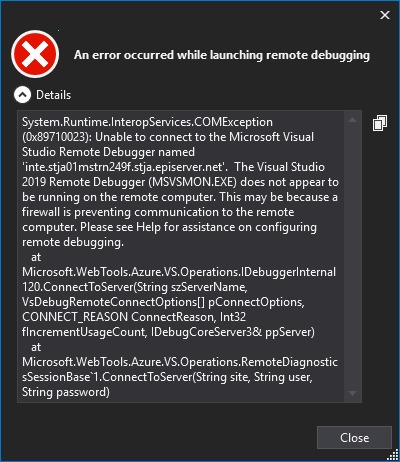
After much playing around I figured out this was down to the fact every new VS increments the debugger ports as explained here https://docs.microsoft.com/en-us/visualstudio/debugger/remote-debugger-port-assignments?view=vs-2019 and the new 4024 ports were blocked in my companies firewall therefore they were required to be added. If you see this you know where to look.
Conclusion
Hopefully this has summarized features in 2019 across professional and Enterprise and also some great plugins to use, if you have any feedback let me know

Comments