

Branch Templates in Optimizely CMS
Optimizely CMS natively doesn't support branch templates, a concept known from different content management systems. Branch templates are useful if we want to help content authors to automate repetetive tasks with multiple content items, for example creation of a new product pages with subpages, all with predefined layout containing various blocks. This issue can be solved by copying and pasting exisitng page and adjusting the content on the copy, but it's more like a workaround which solves the problem only partially. For the blocks initial values in Optimizely CMS we can use SetDefaultValues method but managing it from code for larger structures can be painful, also it doesn't solve the problem of automated subpages creation. We can solve both issues by adding branch template functionality to the CMS.
We can achieve it by adding simple code, first let's add a new item template, we will only use it as a folder, so we don't need any fields:
[ContentType(DisplayName = "White Label Template Folder",
        GUID = "2acce58b-41cc-4edc-a361-a1baa86b51bc",
        Description = "A folder which allows to structure new branch templates.",
        GroupName = TabNames.BranchTemplate, Order = 40)]
public class TemplateFolderPage : PageData
{
}
We can also configure the folder icon:
[UIDescriptorRegistration]
public class TemplateFolderPageUIDescriptor : UIDescriptor<TemplateFolderPage>
{
    public TemplateFolderPageUIDescriptor()
            : base(ContentTypeCssClassNames.Folder)
    {
    }
}
To implement the core functionality we can use the code below. In a nutshell, inside the CreatedContent event, we first do some pre-checks:
- Is it a "new item" event? (we don't want to execute the code for example on copy/paste opetation).
- Do we have a folder with our branch templates under the root?
- Do we have a page item with the currently created type inside the root branch templates folder?
If all checks passed, we create a deep copy of the item from the branch folder and use it to replace the original page. We make sure that page name and URLSegment are unique:
[InitializableModule]
[ModuleDependency(typeof(InitializationModule))]
public class BranchTemplateInitialization : IInitializableModule
{
    private IContentRepository _contentRepository;
    private IContentLoader _contentLoader;
    private UrlSegmentOptions _urlSegmentOptions;
    private IUniqueIdentityCreator _uniqueIdentityCreator;

    public void Initialize(InitializationEngine context)
    {
        var contentEvents = ServiceLocator.Current.GetInstance<IContentEvents>();
        _contentRepository ??= ServiceLocator.Current.GetInstance<IContentRepository>();
        _contentLoader ??= ServiceLocator.Current.GetInstance<IContentLoader>();
        _urlSegmentOptions ??= ServiceLocator.Current.GetInstance<UrlSegmentOptions>();
        _uniqueIdentityCreator ??= ServiceLocator.Current.GetInstance<IUniqueIdentityCreator>();

        contentEvents.CreatedContent += ContentEvents_CreatedContent;
    }

    public void Uninitialize(InitializationEngine context)
    {
        var contentEvents = ServiceLocator.Current.GetInstance<IContentEvents>();
        contentEvents.CreatedContent -= ContentEvents_CreatedContent;
    }

    private void ContentEvents_CreatedContent(object sender, ContentEventArgs e)
    {
        var saveArgs = e as SaveContentEventArgs;
        if (e.Content == null || (saveArgs != null && saveArgs.MaskedAction == SaveAction.CheckOut))
        {
            // skip other actions like copying
            return;
        }

        var templateFolder = _contentLoader.GetChildren<TemplateFolderPage>(ContentReference.RootPage).FirstOrDefault();
        if (templateFolder == null)
        {
            return;
        }

        // this is simplified code which only take 1st branch template item with the given type.
        var myTemplateItem = _contentLoader.GetChildren<IContent>(templateFolder.ContentLink)?.FirstOrDefault(x => x.ContentTypeID == e.Content.ContentTypeID);
        if (myTemplateItem == null)
        {
            return;
        }

        var name = e.Content.Name;
        var oldItemLink = e.ContentLink;
        var parentLink = e.Content.ParentLink;
        var newItemLink = _contentRepository.Copy(myTemplateItem.ContentLink, parentLink, AccessLevel.NoAccess, AccessLevel.NoAccess, false);
        var newItem = _contentRepository.Get<PageData>(newItemLink);
        _contentRepository.Delete(oldItemLink, true);

        // rename page name and url segment to the one entered by author
        var newPage = newItem.CreateWritableClone();
        // we need to rename to new name and before forcing uniqueness
        newPage.Name = name;
        newPage.URLSegment = name;
        newPage.Name = _uniqueIdentityCreator.CreateName(newPage, name);
        newPage.URLSegment = _uniqueIdentityCreator.CreateURLSegment(newPage, _urlSegmentOptions);
        _contentRepository.Save(newPage, SaveAction.Default, AccessLevel.NoAccess);

        // update content link to point to new item
        e.ContentLink = newItemLink;
        e.Content = newItem;
    }
}
To make it work, we need to create the folder of type TemplateFolderPage under the root (I called it "Products Wizard"), then inside that folder we create a new page of selected type and predefined layout (I called it "Simple Product Template" and used "Product Page" type, but this is just an example). I also added a sub page called "Gallery" with it's own layout. This structure will serve as a template for all new product pages:
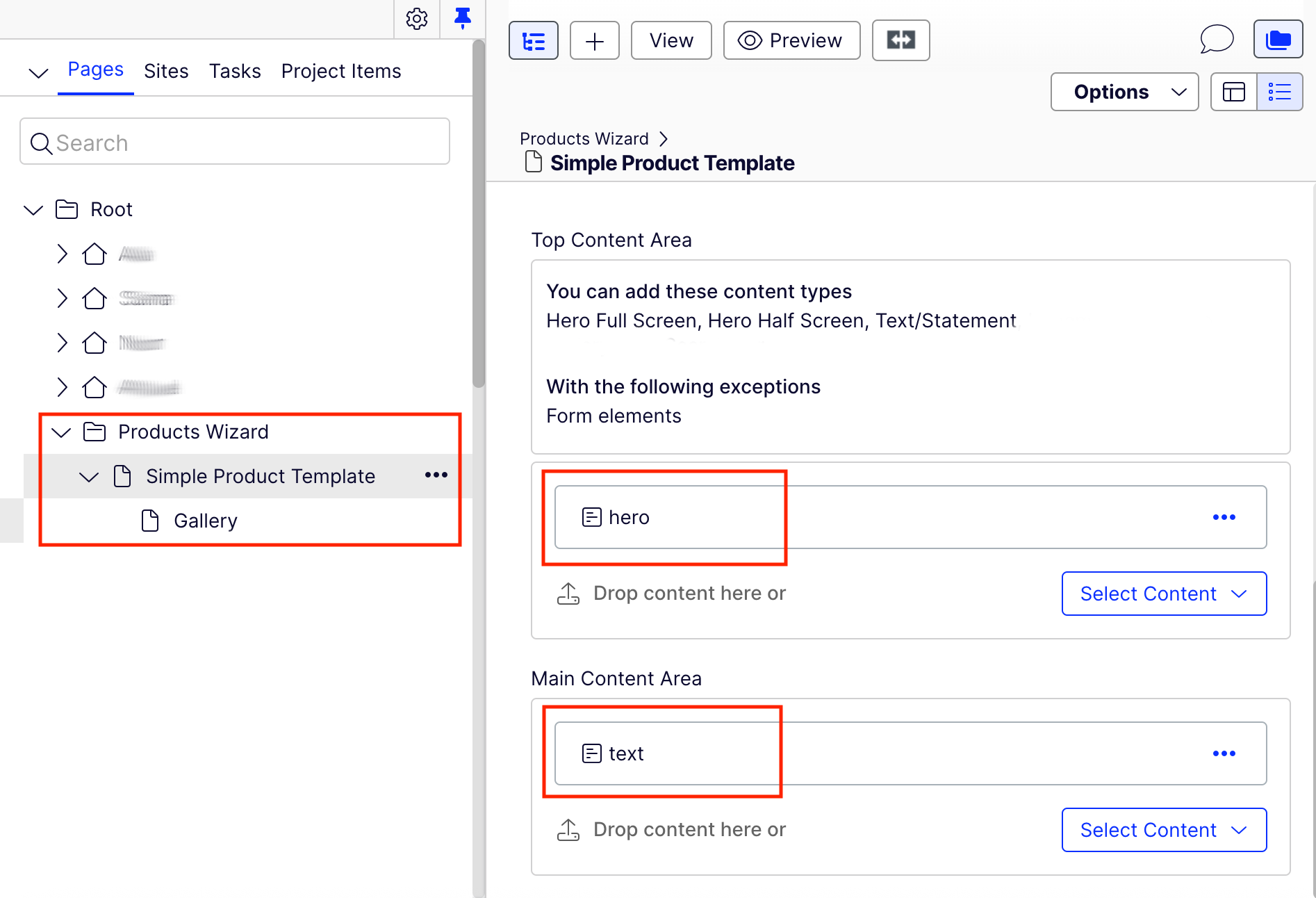
With the code in place, we can now create w new "Product Page" item using the standard "New Page" dialog. It should create a new product page under the given name and url segment, but with the predefined layout and the gallery subpage inside.

Comments