
Implement a custom geolocation provider with Forms
I got a support ticket a few days ago in terms of Forms' hidden vistor profiling element. The customer basically wanted to capture user's zip code by using the element with a external geolocation api. He could get ip, location name however zip code always return empty in submission. So, i digged in the form's visitor profiling element and its geolocation provider. It turns out Form is using an api named FreeGeo and fetch geolocation info base on user's ip address and you can replace it by your own api for sure. The thing is, to make it work, we'll need some extra steps to config custom provider and justify the api result to meet our needs. The following implementaion is built with Episerver 11 Alloy site together with Forms 4.20. This is step by step guide to acomplish it.
1. Change configuration using new provider
Open Web.config file, add following block of config under <virtualPathProviders> section.
    <geolocation defaultProvider="customGeoProvider">
      <providers>
        <add name="customGeoProvider" type="AlloySample.Internal.GeoData.CustomGeolocationProvider, AlloySample" geoApiUrl="http://{YOUR_API_URI}/{0}?access_key={YOUR_API_KEY}"/>
      </providers>
    </geolocation>
This config will switch geolocation to your custom one. You can modify type and geoApiUrl to fit your needs and notice that {0} will be filled with user IP when making a request to api.
2. Create custom provider to fetch api result
Firstly, we add a new provider class that inherit GeolocationProviderBase class and ICustomGeolocationProvider interface (this is required because Forms will scan all implementation of ICustomGeolocationProvider to process). In this sample, i created a provider class named CustomGeolocaitonProvider
 public class CustomGeolocationProvider : GeolocationProviderBase, ICustomGeolocationProvider
    {
        private string _geoApiUrl { get; set; }
        private static readonly ILogger _logger = LogManager.GetLogger(typeof(FreeGeolocationProvider));
        public override IGeolocationResult Lookup(System.Net.IPAddress address)
        {

            return GetGeoData(address.ToString()).Result;
        }
        private async Task<EPiServer.Forms.Internal.GeoData.GeolocationResult> GetGeoData(string clientIp)
        {
            if (string.IsNullOrEmpty(clientIp))
            {
                return null;
            }

            //create request and get reponse in Json from API
            var request = (HttpWebRequest)WebRequest.Create(string.Format(_geoApiUrl, clientIp));
            request.Method = WebRequestMethods.Http.Get;
            request.Accept = "application/json";

            var response = await request.GetResponseAsync().ConfigureAwait(false);
            string jsonResponse = "";
            using (var reader = new StreamReader(response.GetResponseStream()))
            {
                jsonResponse = reader.ReadToEnd();
            }

            if (string.IsNullOrEmpty(jsonResponse))
            {
                return null;
            }

            EPiServer.Forms.Internal.GeoData.GeolocationResult result;
            try
            {
                //convert json response to GeolocationResult
                dynamic geoJsonData = jsonResponse.ToObject();

                result = new EPiServer.Forms.Internal.GeoData.GeolocationResult
                {
                    ip = geoJsonData["ip"],
                    country_code = geoJsonData["country_code"],
                    country_name = geoJsonData["country_name"],
                    region_code = geoJsonData["region_code"],
                    region_name = geoJsonData["region_name"],
                    city = geoJsonData["city"],
                    zip_code = geoJsonData["zip"],
                    time_zone = geoJsonData["time_zone"]?.id,
                    latitude = geoJsonData["latitude"],
                    longitude = geoJsonData["longitude"],
                    CountryCode = geoJsonData["country_code"],
                    Region = geoJsonData["region_name"],
                };

            }
            //if jsonResponse is not a valid json string:
            catch
            {
                _logger.Error("Free Geo Api does not return a valid json string");
                return null;
            }

            return result;
        }
        public override IEnumerable<string> GetCountryCodes(string continentCode)
        {
            throw new NotImplementedException();
        }
        public override IEnumerable<string> GetRegions(string countryCode)
        {
            throw new NotImplementedException();
        }
        public override void Initialize(string name, System.Collections.Specialized.NameValueCollection config)
        {
            base.Initialize(name, config);

            //get geoApiUrl in Provider Config
            if (string.IsNullOrEmpty(config["geoApiUrl"]))
            {
                throw new ConfigurationErrorsException("Invalid configuration. Geo API url is missing");
            }
            _geoApiUrl = config["geoApiUrl"];
        }
        public override Capabilities Capabilities => throw new NotImplementedException();
        public IGeoDataProcessService GeoDataProcessService
        {
            get
            {
                return new CustomGeoDataProcessService();
            }

        }


    }
In this provider class, we care about two methods: GetGeoData - method will handle geolocation data receiving and GeoDataProcessService - method return data processor. In GetGeoData method, just go ahead and write your code to pull api geo location data. I'm assuming your api is returning json data, the code is nothing but a simple api call using WebRequest.
            var request = (HttpWebRequest)WebRequest.Create(string.Format(_geoApiUrl, clientIp));
            request.Method = WebRequestMethods.Http.Get;
            request.Accept = "application/json";

            var response = await request.GetResponseAsync().ConfigureAwait(false);
            string jsonResponse = "";
            using (var reader = new StreamReader(response.GetResponseStream()))
            {
                jsonResponse = reader.ReadToEnd();
            }

            if (string.IsNullOrEmpty(jsonResponse))
            {
                return null;
            }
After receving json response from api, the remaining task is so simple, you just need to create a new GeoLocationResult instance to store all json data by mapping field by field of json to result model or you can custome result here. The tricky point is that you need to map result property value to the right json object property. For example, my api return json result with "zip": "XXX" but the other api return "zip_code": "XXX".
          try
            {
                //convert json response to GeolocationResult
                dynamic geoJsonData = jsonResponse.ToObject();

                result = new EPiServer.Forms.Internal.GeoData.GeolocationResult
                {
                    ip = geoJsonData["ip"],
                    country_code = geoJsonData["country_code"],
                    country_name = geoJsonData["country_name"],
                    region_code = geoJsonData["region_code"],
                    region_name = geoJsonData["region_name"],
                    city = geoJsonData["city"],
                    zip_code = geoJsonData["zip"],
                    time_zone = geoJsonData["time_zone"]?.id,
                    latitude = geoJsonData["latitude"],
                    longitude = geoJsonData["longitude"],
                    CountryCode = geoJsonData["country_code"],
                    Region = geoJsonData["region_name"],
                };

            }
            //if jsonResponse is not a valid json string:
            catch
            {
                _logger.Error("Free Geo Api does not return a valid json string");
                return null;
            }
After get geo data, we'll need one more step to process the data. Method GeoDataProcessService return a service named GeoDataProcessService that will be created on the next step.
3. Add a custom geolocation data process service
Add a new class, name it whatever you want, inherit IGeoDataProcessService with code as below:
 public class CustomGeoDataProcessService : IGeoDataProcessService
    {

        EPiServer.Forms.Internal.GeoData.GeolocationResult IGeoDataProcessService.ProcessGeoData(IGeolocationResult geoLocationResult)
        {
            var result = geoLocationResult as EPiServer.Forms.Internal.GeoData.GeolocationResult;
            return result;
        }
    }
This class has only one method and it gets IGeolocationResult from provider's Lookup method and return strong typed result. This step is mandatory because Forms requires a data processor.
Compile, run and subit forms, im now able to capture geolocation info as exact as api result.
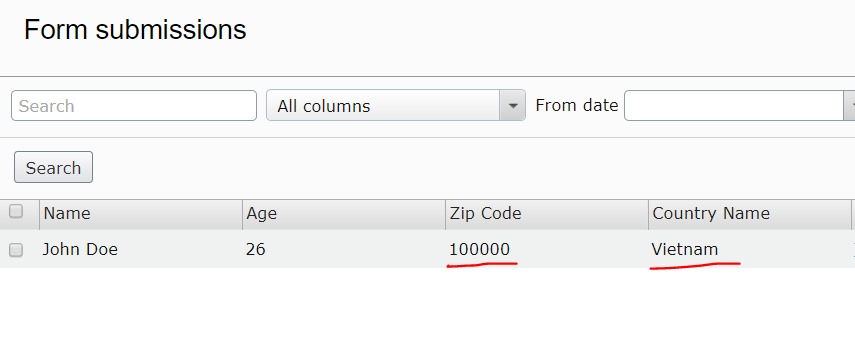
*Note: The form's element will work only if site is online, the local sites won't be able to capture gelocation data.
If you have any questions in relation to this post, please comment below. Thanks!

Comments