search
AI OnAI Off
A critical vulnerability was discovered in React Server Components (Next.js). Our systems remain protected but we advise to update packages to newest version. Learn More.

This could be caused by case-sensitive URL processing in Linux environment.
Add RouteOptions to Startup.cs:
services.Configure(o => { o.LowercaseUrls = true; });
Any other option why it doesn't exist in the build package (maybe it is the reason of 404 error)? Because locally I have correct structure of ClientResources and the script exists
@Aneta, in our solution we hold these resources within the wwwroot i.e.
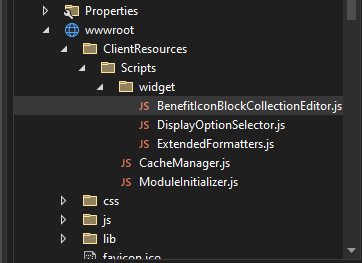
Our module.config looks like this
<?xml version="1.0" encoding="utf-8"?>
<module clientResourceRelativePath="2.0" loadFromBin="false">
  <assemblies>
    <!-- The assembly containing the rest store needs to be added. -->
    <add assembly="Redacted.Cms" />
  </assemblies>
  <routes>
    <route url="{moduleArea}/{controller}/{action}/">
      <defaults>
        <add key="moduleArea" value="Redacted.Cms" />
        <add key="controller" value="" />
        <add key="action" value="Index" />
      </defaults>
    </route>
  </routes>
  <dojo>
    <paths>
      <add name="Redacted" path="~/ClientResources/Scripts" />
    </paths>
  </dojo>
  <clientModule initializer="Redacted/ModuleInitializer">
    <moduleDependencies>
      <add dependency="Shell" />
      <add dependency="CMS" type="RunAfter" />
    </moduleDependencies>
  </clientModule>
  <clientResources>
    <!-- Inject our custom Display Option selector -->
    <add name="epi-cms.widgets.base" path="~/ClientResources/Scripts/widget/DisplayOptionSelector.js" resourceType="Script"/>
  </clientResources>
</module>
And in Project file have the following
  <ItemGroup>
    <Content Update="module.config">
      <CopyToOutputDirectory>Always</CopyToOutputDirectory>
    </Content>
  </ItemGroup>
Would be worth checking the 3 things over in your solution


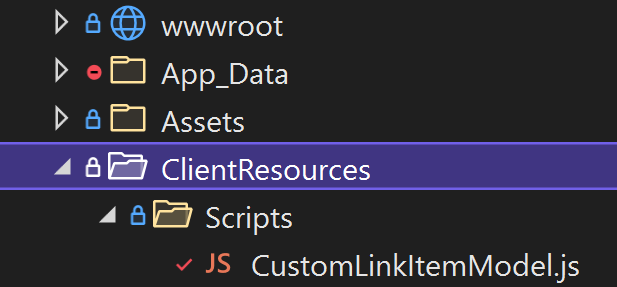
I've implemented an editor descriptor and created dojo class: CustomLinkItemModel.js. Locally everything works, but after deployment to Integration, an edit mode is blank for this block and I've noticed this error in the console: GET https://....com/ClientResources/Scripts/CustomLinkItemModel.js 404. I've also noticed that this js file wasn't be added to relaese package before hosting on DXP.
1) The module.config is located in the root directory (projectName.web) and looks like this:
2) Files structure:
3) The editor descriptor includes a following line:
ItemModelType = "projectName/CustomLinkItemModel"
4) The CustomLinkItemModel.js looks like this:
Anybody knows what might be wrong or maybe what is missing?